
Run Signal on an Android Go phone
Published: October 7, 2026
Signal Foundationfrom Signal's official site. The file is hosted by Signal, not by us. signal.org/android/apk
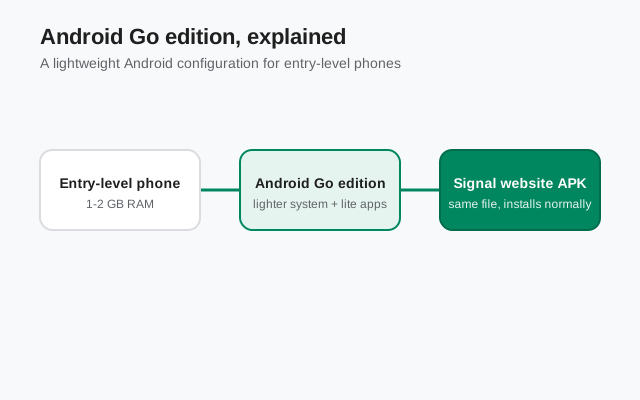
Android Go edition powers the world's cheapest smartphones: 1 or 2 GB of RAM, slower chips, small storage. If that is your phone, you are probably wondering whether a full-featured messenger like Signal can even run on it. The short answer: yes, it runs, but you need to set expectations and configure a few things, because Go phones kill background apps aggressively.
This guide is written for the Go reality: little RAM, little storage, and an OS tuned to conserve both. It covers installing Signal's website build (version 8.29.3, package org.thoughtcrime.securesms) from signal.org/android/apk, keeping notifications alive when the system wants to sleep everything, and managing storage so the app does not choke.
A note on honesty: Signal does not publish an official minimum-RAM figure, and we will not invent one. What follows is practical guidance for 1–2 GB phones based on how Android Go manages memory. Not lab benchmarks we did not run.
What Android Go edition actually is
Android Go edition is a stripped-down configuration of Android for entry-level phones. It is not a different operating system. It is regular Android with lighter default apps (Google Go, Gallery Go, Maps Go), stricter background limits, and a Play Store that highlights lightweight apps. The phones typically ship with 1–2 GB of RAM and 16–32 GB of storage.
The key difference for messaging apps is memory management. On a Go phone, the system is far more aggressive about closing background apps to keep the foreground app smooth. That is great when you are browsing, and terrible for a messenger that needs a persistent background connection to deliver messages instantly.
Go edition also means the phone probably lacks Google Play Services in full form on some ultra-budget models, or has a cut-down version. Signal's website build does not require Play Services (it has its own update mechanism and a fallback for notifications), which is exactly why the direct APK is the right choice here rather than fighting with a half-working Play Store.
Will Signal run on a 1 GB RAM phone?
Yes, with caveats you should know going in. On a 2 GB RAM Go phone, Signal runs acceptably: chats open fine, messages send and receive, voice calls work, video calls work but may stutter on the weakest chips. On a 1 GB RAM phone, Signal runs, but the experience is rougher: the app will be closed in the background frequently, so notifications depend entirely on the configuration in the "Keeping notifications alive" section below, and switching away from Signal mid-call on 1 GB can drop the call.
The honest framing: Signal is not a "Go-optimized" lightweight app. It is a full messenger with end-to-end encryption, and encryption plus media handling costs memory. It will never feel as snappy on a Go phone as it does on a mid-range device. But "runs fine for daily messaging" is a fair description on 2 GB, and "usable with patience" on 1 GB.
What actually determines the experience, in order:
- RAM. 2 GB is the practical comfort line; 1 GB means constant background kills.
- Background exemption. Whether you set Signal to unrestricted battery usage (below) matters more than the chip.
- Storage headroom. A Go phone with 500 MB free behaves worse than one with 3 GB free: Android itself slows down when storage is nearly full.
- OS version. Newer Go editions (Android 12 Go and up) manage memory better than the early ones.
The numbers we actually verified
Since we promised no invented numbers, here is what we can say plainly and what we cannot.
| The APK download | About 109 MB, small enough for most mobile data plans. Exact size varies by release; see our APK size guide. |
|---|---|
| Installed footprint | A few hundred megabytes including the app and its initial data, before your chats and media. |
| RAM while running | Signal holds a background connection plus whatever chat is open. On Go phones this is enough that the system will close it under pressure unless exempted. |
| What we did not do | We did not run lab benchmarks on specific Go models, so we will not quote timings or memory figures as measured results. Treat any site that does with suspicion unless it names the device and method. |
The numbers that matter for you are the ones on your phone: Settings → Storage shows free space, and the running-services view (Developer options → Running services, if enabled) shows memory pressure. If free storage is under 1 GB, clear space before installing anything: Android itself misbehaves when storage is critically low, and every app gets blamed for it.
Install steps for Go phones
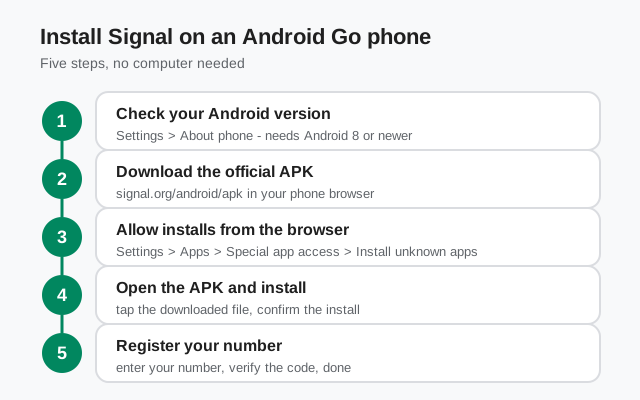
Download the APK
On the Go phone's browser, open signal.org/android/apk and download. The file is small enough for mobile data; if your connection drops, our mobile-data tips help.
Free up space first
Check Settings → Storage. If you are under 1 GB free, clear cached data, delete unused apps, or move photos to an SD card before installing. The installer needs working room, and Android needs headroom.
Allow the install
Open the downloaded file and allow your browser under Settings → Apps → Special app access → Install unknown apps (path varies slightly by Go skin; some put it under Security). Allow only the browser.
Install and register
Tap Install, open Signal, register your number, and restore a backup if you have one. Then, critically, do the next section before you put the phone down.
Keeping notifications alive on Go
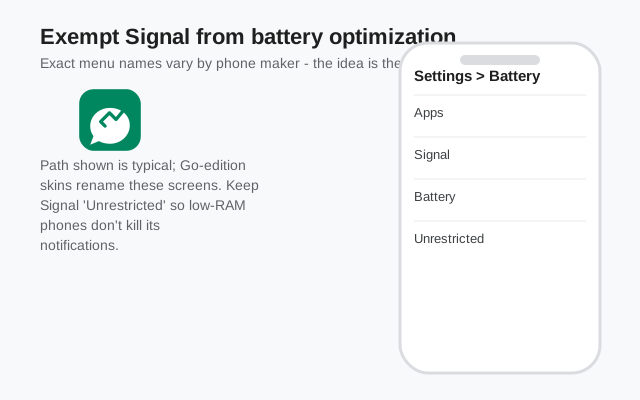
This is the section that decides whether Signal is usable on your Go phone. Android Go's whole design philosophy is killing background apps, and Signal needs its background connection alive to deliver messages. You must exempt it.
Go to Settings → Apps → Signal → Battery and set it to Unrestricted (wording varies: "Don't optimize," "Allow background activity"). Then check for any additional app-killing layers your skin adds:
- Autostart / auto-launch: if your settings have an autostart manager, enable it for Signal.
- Background restrictions: some Go skins have a separate "restrict background" toggle per app: make sure it is off for Signal.
- Data Saver: if Data Saver is on, either exempt Signal (Settings → Network → Data Saver → Unrestricted data → Signal) or accept that messages may pause on mobile data.
Then test honestly: lock the phone for five minutes, send yourself a message from another device, and see when it arrives. On a 1 GB phone, even with everything exempted, the system may still close Signal under extreme memory pressure. If that happens, the practical answer is to open Signal a couple of times a day rather than expecting perfect push. It is a hardware limit, not a configuration failure.
One more Go-specific tip: do not use task-killer or "RAM booster" apps. They fight the OS memory manager and usually make notification reliability worse, not better. The built-in exemption above is the correct tool.
Storage: what actually fills up
On a 16 GB Go phone, storage is the other constraint. Here is what actually fills up with Signal, in order:
- Media in chats. Photos, videos, and voice notes accumulate fast. In Signal: Settings → Data and storage → Manage storage shows per-conversation usage: clear the heavy ones. Disappearing messages (per-chat timer) prevent the pile-up in the first place.
- The app's cache. Settings → Apps → Signal → Storage → Clear cache is safe: it removes temporary files, not your chats.
- Backups. Signal's local backup file grows with your history. If you keep backups, move old ones to a computer or SD card rather than letting them sit in internal storage.
- Never "Clear data." Clear cache is safe; clear data wipes the app including un-backed-up chats. The buttons sit next to each other. Read before tapping.
If your phone has an SD card slot, use it for photos and downloads generally, but keep Signal itself on internal storage. Android does not reliably run apps from SD cards, and moving Signal there causes exactly the kind of flakiness this guide is trying to prevent.
Frequently asked questions
Will Signal work on a 1GB RAM Android Go phone?
It runs, but expect the system to close it in the background often. Exempt Signal from battery optimization and open it a few times a day. For the smoothest experience, 2GB RAM is the practical comfort line.
How do I keep Signal notifications working on Android Go?
Set battery usage to Unrestricted for Signal, enable autostart if your skin has it, and exempt Signal from Data Saver. Then test with the phone locked for five minutes.
Can I install Signal on a Go phone without the Play Store?
Yes, that is what this guide covers. Download the APK from signal.org/android/apk and sideload it. The website build updates itself, so you never need the Play Store.
Is it safe to clear Signal's cache on a low-storage phone?
Yes. Clear cache removes temporary files only. Do not tap "Clear data": that wipes the app and any chats not backed up.