
Download Signal APK (official)
Published: October 7, 2026 · Updated: October 8, 2026
Signal Foundationfrom Signal's official site — file hosted by Signal, not by us. signal.org/android/apk
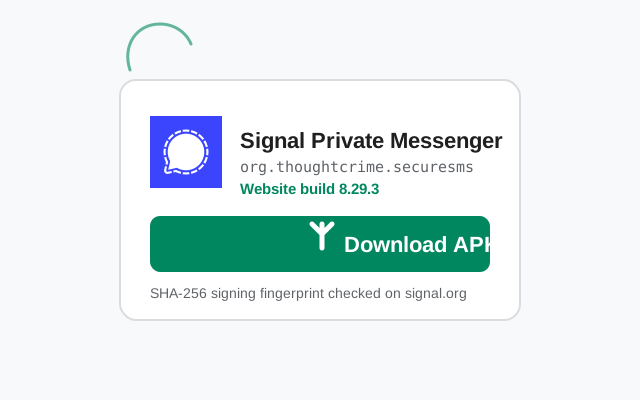
Yes, this is really the official file. Signal publishes its Android app as a direct APK on signal.org/android/apk. The current website build is version 8.29.3 (package org.thoughtcrime.securesms). This page explains exactly what you are downloading, how to check it is genuine, and how to install it. We do not host APK files; the button above takes you to Signal's own page. After a shareable file URL? Read why the “direct link” keeps breaking: the right way to share the download first.
What you are downloading
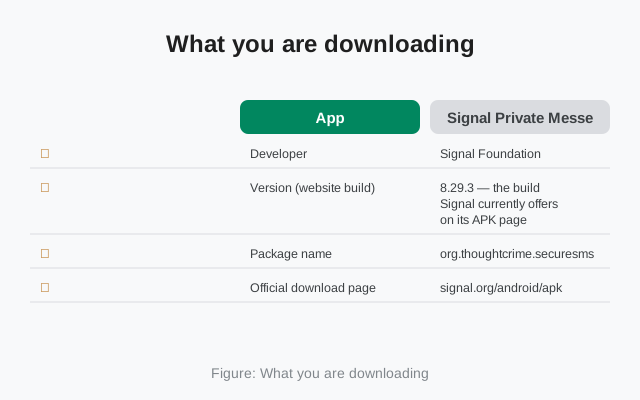
| App | Signal Private Messenger |
|---|---|
| Developer | Signal Foundation |
| Version (website build) | 8.29.3: the build Signal currently offers on its APK page |
| Package name | org.thoughtcrime.securesms |
| Official download page | signal.org/android/apk |
| Client license | AGPLv3 (open source) |
| Updates | The website build checks for and installs its own updates. No Play Store needed |
| Signing | Uses a different signing key than the Play Store build, so it cannot be installed over the Play version |
Will it run on your phone?
The website build runs on standard Android phones. Before you download, check these three things:
- A phone number that can receive SMS. Signal registers with a phone number and sends a verification code. A Wi-Fi-only tablet cannot register on its own, but you can link it as a secondary device after registering on a phone.
- Enough free storage. Keep a few hundred megabytes free so the download and install both fit comfortably.
- Which build you already have. If Signal is currently installed from the Play Store, you cannot install this APK over it. The signing keys differ. Back up your chats, uninstall the Play version, then install the APK. Our no-Play-Store install guide walks through the switch step by step.
Verify the file before you install (SHA-256)
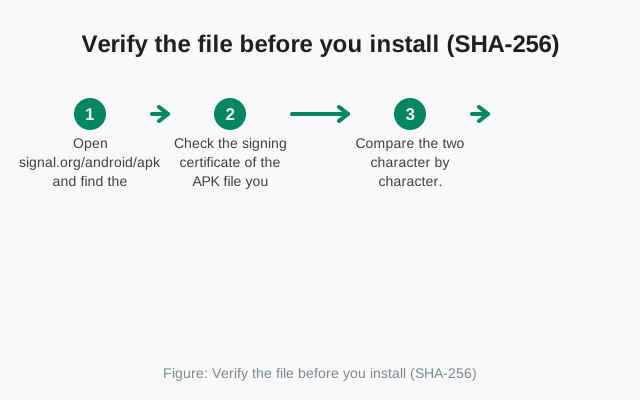
This is the step that separates a safe install from a gamble. Signal publishes the SHA-256 fingerprint of its signing certificate on the download page itself. After downloading the APK:
- Open signal.org/android/apk and find the fingerprint printed on the page.
- Check the signing certificate of the APK file you downloaded (Android's
apksignertool can do this on a computer; our full verification guide covers every platform). - Compare the two character by character. If every character matches, the file genuinely came from Signal. If anything differs, even one character, delete the file and re-download from the official page.
A fingerprint copied onto a third-party site is only as trustworthy as that site. The fingerprint that matters is the one on Signal's own page, because Signal controls that page. Always read it there, never from a mirror or a blog post. That includes this one.
Version history
The version Signal currently offers on its official APK page. The file name follows Signal's website-build pattern: Signal-Android-website-prod-universal-release-8.29.3.apk. When Signal ships a new release, this page's button keeps pointing at signal.org, so you always get whatever is current.
Signal's APK page only offers the current build. It does not keep an archive of old versions. That is deliberate: old builds miss security fixes. If you are hunting for an older APK because a new version broke something, check our update troubleshooting guide first; running an outdated build is a genuine security risk.
You can verify the current build yourself at any time: Signal's own update endpoint (updates.signal.org/android/latest.json) publishes the website build's current version name and direct file URL. It showed 8.29.3 when we checked on October 7, 2026. If that endpoint ever shows a newer version than the one listed here, Signal has shipped since our last re-check; the download button above still points at signal.org, so you always get the current file.
Install steps
-
Download from the official page
Tap the green Download button above. Your browser will ask to keep the file. Confirm it. The file name ends in
.apk. Make sure the download happens over HTTPS. See why an encrypted connection matters every time you download the Signal APK. Reading this on a computer? Scan the QR code on Signal's download page instead. How to use the QR code safely. -
Allow installs from your browser
When you open the file, Android will ask permission to install apps from your browser (this is the "Install unknown apps" setting). Allow it just for your browser. Our install guide shows the exact path for Samsung, Xiaomi, Huawei, and Pixel phones.
-
Install and open Signal
Tap Install on the Android installer screen, then Open. If you see an "App not installed" error, you probably have the Play version already. Here is why that happens and how to fix it.
-
Register your number
Enter your phone number, wait for the SMS code, and type it in. Then restore from a backup if you have one.
Permissions Signal asks for
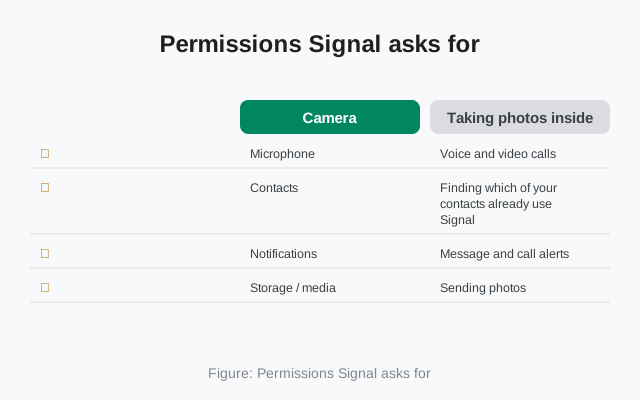
Signal asks for the standard permissions a messenger needs. Nothing here is unusual, and you can review or revoke each one later in Android's Settings → Apps → Signal → Permissions:
| Camera | Taking photos inside chats and scanning QR codes (for linking devices) |
|---|---|
| Microphone | Voice and video calls, voice messages |
| Contacts | Finding which of your contacts already use Signal |
| Notifications | Message and call alerts. Allow this or you will miss messages. |
| Storage / media | Sending photos, videos, and files; saving received media |
Our permissions guide explains each one in more depth, including which are truly required and which you can safely deny.
Download questions
Is this APK safe to download?
Yes, if it comes from signal.org/android/apk and the SHA-256 fingerprint matches. That combination means the file came from Signal itself and was not modified in transit. Our full safety assessment covers the supply chain in detail.
Why is the website build a different version than the Play Store?
Both builds contain the same Signal code; they are just shipped through different channels and signed with different keys. Version numbers can briefly differ because the two channels do not always release on the same day.
Can I update this build without the Play Store?
Yes. The website build checks for updates itself and prompts you to install them. You never need the Play Store again once it is installed. If an update stalls, see our update guide.
The download keeps failing. What should I do?
Try a different browser, check your free storage, and make sure your connection is not blocking the download domain. Our download fix guide covers every common failure.
from Signal's official site — file hosted by Signal, not by us.