
Every Permission the Signal APK Asks For, Explained
Published: October 7, 2026 Updated: October 8, 2026
Signal asks for a short list of Android permissions, and every one of them is tied to a feature you can see. None are required for basic messaging. You can deny everything and still send and receive texts. Grant a permission when you want the feature behind it; deny it when you do not. This guide goes through each permission, what it actually does, what breaks if you deny it, and which ones Signal never asks for at all.
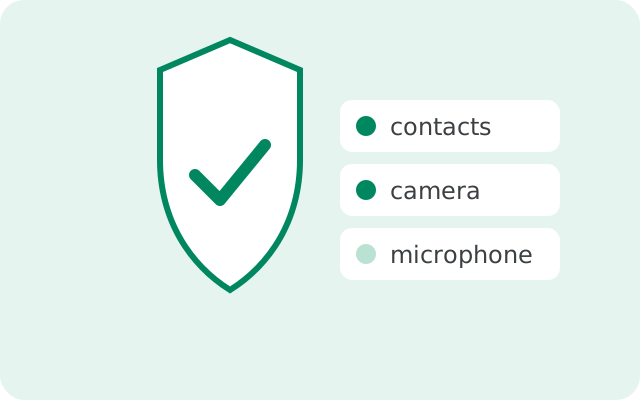
The one rule for Signal permissions
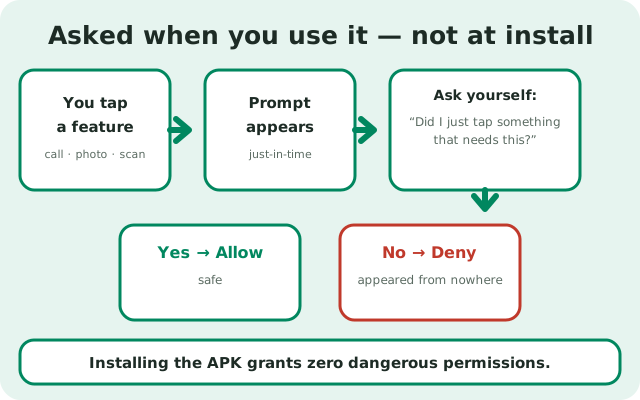
Signal follows a simple pattern: a permission is requested the first time you use the feature that needs it, not all at once during install. Open the app and you can start messaging immediately. Try to make a call, and then it asks for the microphone. Try to send a photo, and then it asks for media access.
This matters because it makes each request easy to judge. When a permission prompt appears, ask yourself one question: did I just tap something that needs this? If yes, allowing is safe. If a prompt appears out of nowhere while you were doing something unrelated, deny it. You can always grant it later. The step-by-step granting guide shows exactly how to fix a permission you denied by mistake.
Each permission, explained
The quick overview first, details below:
| Permission | Why Signal asks |
|---|---|
| Contacts | Shows which of your contacts already use Signal, with their names. Optional: deny it and type numbers manually. |
| Camera | Scanning the QR code to link the desktop app, and taking photos to send. Optional: deny it and pick from your gallery instead. |
| Microphone | Voice messages and voice/video calls. Optional for texting: deny it and calls and voice notes will not work. |
| Notifications (Android 13+) | Alerting you to new messages. Optional technically: deny it and you must open the app to see new messages. |
| Photos and videos / music and audio (Android 13+) | Sending media from your phone and saving media you receive. Optional: deny it and you cannot attach files. |
| Phone state | Handling interruptions: e.g. pausing a Signal call when a regular phone call comes in. Background detail you will never notice. |
Contacts
The contacts permission lets Signal check your address book and show you which contacts already have Signal, displayed with the names you saved. That is the entire purpose: contact discovery and name display.
What happens if you deny it: Signal still works. You add people by typing their phone numbers manually, and chats show numbers instead of names until you name them yourself. Nothing else changes.
Privacy note: this is the permission privacy-minded users think about most, because it involves your address book. Signal's design uploads only hashed, truncated phone numbers for discovery: not names, not your whole contact list as readable data. Whether that tradeoff is worth the convenience of automatic contact discovery is your call. Denying it is a completely supported way to use Signal, and many privacy-focused users do exactly that.
Camera
Signal uses the camera for two visible features: scanning QR codes (linking the desktop app, adding contacts) and taking photos or videos to send in a chat.
What happens if you deny it: you cannot scan QR codes in-app and cannot take photos directly from a chat. You can still send any photo or video already saved on your phone by picking it from the gallery. That uses the media permission, not the camera.
Judging the prompt: if you tapped the camera icon in a chat or the QR scanner in linked devices, the request is legitimate. Signal never turns the camera on without you tapping something camera-related first.
Microphone
The microphone powers voice messages and voice/video calls. That is all it is for.
What happens if you deny it: text messaging works perfectly. Voice messages cannot record, and calls cannot connect audio. If calls suddenly have no sound one day, a denied or auto-reset microphone permission is the first thing to check. The call-mic troubleshooting page walks through it.
Judging the prompt: legitimate when you start a call or hold the mic button for a voice note. The mic is only active during those moments; Signal does not listen in the background, and Android shows a mic indicator whenever any app records.
Notifications
On Android 13 and newer, apps must ask before they can show notifications. So Signal asks. Without it, you get no message alerts, no call ringing screen, nothing in the notification shade.
What happens if you deny it: Signal still receives your messages; you just will not be told. You have to open the app to see anything new. Missed calls will not ring. For most people this defeats the purpose of a messenger, so this is the one permission most users should grant.
If alerts stop working later: the permission may have been denied accidentally or reset by the system. Notification troubleshooting covers the full fix chain, and the granting guide shows the re-enable steps.
Photos, videos, and files
On Android 13 and newer, media access is split into photos and videos and music and audio. Signal asks for these when you attach a file to a message or save media you received.
What happens if you deny it: you cannot attach photos, videos, or files to messages, and you cannot save media from chats to your phone. Text works fine.
Partial access: newer Android versions let you grant limited access: "select photos and videos" instead of your whole library. This is a good middle ground: Signal can attach the photos you pick and nothing else. You can change the selection later from the app's permission screen.
Phone state
This is the quiet one. Phone-state access lets Signal react to what the phone part of your phone is doing: the classic example is pausing or handling a Signal call gracefully when a regular cellular call comes in.
What happens if you deny it: on most phones, nothing you will notice. It is background plumbing for call interruptions, not a feature you tap.
Judging the prompt: this one is usually granted at the system level without a dramatic prompt. You do not need to think about it unless call handoffs misbehave.
Permissions Signal never asks for
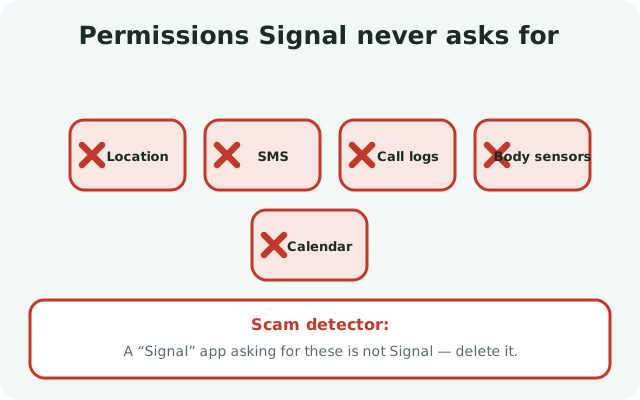
Just as telling as the list above is what is missing from it. The real Signal app does not ask for:
- Location: Signal has no feature that needs to know where you are.
- SMS: Signal dropped SMS support; it has no reason to read your texts.
- Call logs: your phone-call history is none of its business.
- Body sensors, calendar, and similar: nothing in Signal uses them.
This is also a scam detector. If an app calling itself "Signal," especially one downloaded from anywhere except Signal's own page or the Play Store, asks for your location or SMS access, it is not Signal. Delete it. Our safety guide covers how to tell real from fake.
Why this list is short
Compare this with a typical free messenger or social app, whose permission lists run long because the business model is data. Signal is a nonprofit; there is no advertising profile to feed. The permissions it requests map one-to-one onto features you asked for: a call needs the mic, a photo needs the camera, an alert needs notifications.
The practical takeaway: grant permissions lazily. Deny everything at the start, use Signal for a week, and allow each permission the moment a feature you want asks for it. You will end up with exactly the access your usage justifies; if you ever want to trim it back, Android's app-info screen lets you revoke anything in seconds.
from Signal's official site file hosted by Signal, not by us
Frequently asked questions
What permissions does the Signal APK need?
For basic messaging: none. Contacts, camera, microphone, notifications, and media access are each requested when you first use the feature that needs them, and all are optional. Denying a permission only disables its feature.
Is it safe to give Signal access to my contacts?
The permission is only used for contact discovery, showing which contacts use Signal, using hashed phone numbers, not readable contact data. It is optional; denying it just means typing numbers manually. Many privacy-focused users deny it.
Why does Signal want my location?
It does not. The real Signal app never asks for location, SMS, or call-log access. If an app claiming to be Signal requests those, it is fake. Delete it and get Signal only from signal.org or the Play Store.
Can I use Signal without granting any permissions?
Yes, for text messaging. You will type numbers manually, get no notification alerts, and be unable to make calls or send media, but sending and receiving text messages works with zero permissions granted.
How do I change Signal's permissions later?
Long-press the Signal icon, tap App info, then Permissions, and toggle each one. You can grant or revoke any permission at any time; changes take effect immediately.
Keep reading
- the install hub: every install route for the Signal APK in one place
- grant permissions step by step: fix a permission you denied by mistake
- fix notification problems: when alerts stop arriving
- contacts not showing: when discovery is not working