
Using Signal Without a SIM Card: What Is Really Possible
Published: October 7, 2026
Signal Foundationfrom Signal's official site — file hosted by Signal, not by us. signal.org/android/apk
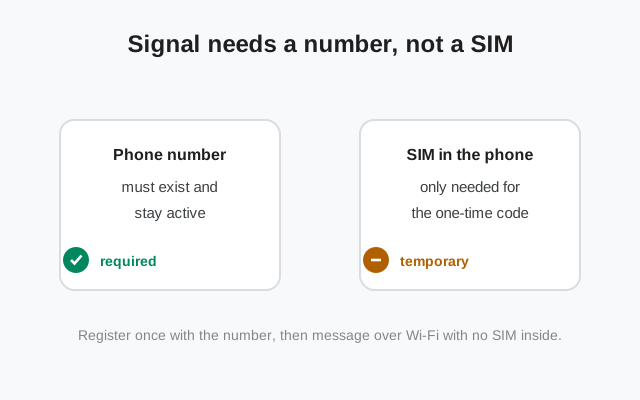
"Can I use Signal without a SIM card?" is one of the most asked questions about Signal, and the short answer surprises people: yes, mostly. The confusion comes from mixing up two different things. Signal requires a phone number to register. It does not require a physical SIM card to keep working. Once you separate those ideas, every option below makes sense.
This guide covers what "no SIM" can actually mean, the four real paths (register-then-remove, eSIM, landline, virtual numbers), tablets as linked devices, and what flat-out never works. Install the app itself from the official APK at signal.org/android/apk (website build 8.29.3) or the Play Store. The SIM situation doesn't change the install.
Why Signal insists on a phone number
Signal's identity system is built on phone numbers. Your number is your account identifier: it's how contacts find you, how groups know you, and what the verification code proves you control. This is a deliberate design choice (numbers are hard to fake at scale, which keeps spam and abuse down), and it's not something you can opt out of.
But note what the requirement actually is: a number that can receive a verification code, once, at registration. Not a SIM card in your phone forever. Not a cellular plan. Not even a mobile number, as we'll see. The SIM is just the most common way to hold a number. It's the container, not the requirement.
This design also explains a behavior that confuses people: Signal keeps working when you travel abroad with the SIM removed, when your prepaid plan lapses, and when the phone sits in airplane mode with Wi-Fi on. None of those affect the number's ownership or the app's keys. The flip side is that Signal can't help you if you lose the number: let a prepaid SIM expire and get recycled to a stranger, and that stranger can receive your verification codes. Registration lock (your Signal PIN) is the defense: with it enabled, knowing the code isn't enough to take the account. If you're going SIM-free, treat the PIN as the actual key to your account, because it is.
This is also why "Signal without a phone number" is a different, harder question. Without any number at all, there's no account. Everything below assumes you have some number; the question is whether a physical SIM must stay in the phone.
What "no SIM" can actually mean
People mean four different things by "no SIM," and the answer differs for each:
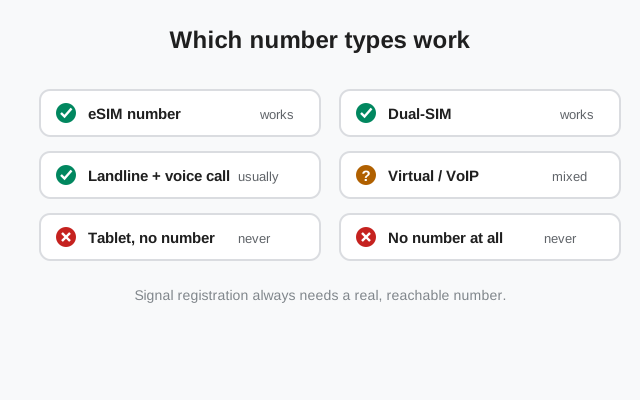
- Phone has no SIM slot in use right now (second phone, old phone, Wi-Fi-only use): fully workable, via register-then-remove.
- Phone is eSIM-only (many newer phones): not actually SIM-less in any meaningful sense; the eSIM is the SIM. Register normally.
- Only a landline available: workable via voice-call verification.
- No phone number at all: doesn't work. Signal needs a number; there's no email or username-only registration.
Figure out which one you are before reading further. Most people are case 1, and case 1 is easy.
Option 1: register, then remove the SIM
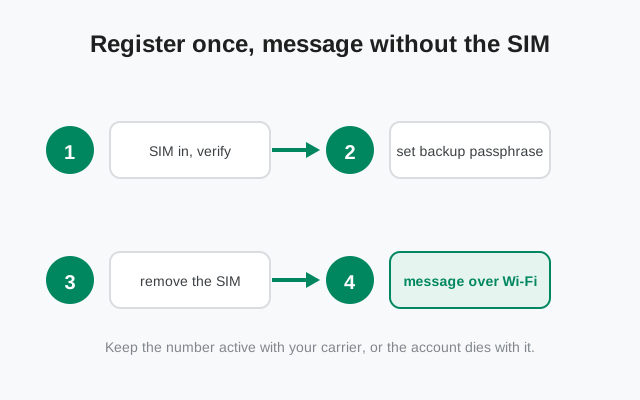
The simplest path, and the one most people should use:
Put the SIM in (temporarily)
Borrow the SIM slot for ten minutes: your own SIM, a family member's spare, any active SIM whose number you want as your Signal identity.
Register normally
Install Signal, enter the number, receive the SMS code, enter it. Set your PIN and enable registration lock.
Remove the SIM
Take it out. Signal keeps working over Wi-Fi: messaging, calls, groups, everything.
Why this works: after registration, Signal authenticates with cryptographic keys stored on the device, not with the SIM. The SIM proved you control the number once; the keys prove it's still you ever after.
Two cautions. First, registration lock (tied to your PIN) is essential here: if the number gets reassigned to someone else later, they can't hijack your Signal account. Second, if you ever need to re-register (new phone, reinstall), you'll need access to that number again. Keep that in mind before the SIM disappears into a drawer for two years.
Option 2: eSIM, no physical SIM at all
eSIM-only phones (recent iPhones in the US, some Pixels and Galaxies) have no physical SIM slot. It changes nothing about Signal. An eSIM is a SIM in every way that matters: it holds a number, receives SMS, and registers exactly like a physical SIM.
If your "no SIM" situation is just "my phone only does eSIM," stop worrying: install Signal, enter the number on your eSIM, get the code, done. There is no special eSIM procedure and no limitation. Our dual-SIM guide covers the eSIM-plus-physical-SIM combo if you run both.
Option 3: landline with a voice call
Signal's verification doesn't have to be SMS. When registering, you can request a voice call instead: Signal calls the number and an automated voice reads the code. A landline can receive that call.
The procedure: enter the landline number with country code, wait for the SMS timer to expire (SMS to a landline fails, as expected), then choose the voice-call option. Answer the call, write down the code, enter it in Signal. Done. The landline number is now your Signal identity, usable from the app on your phone over Wi-Fi.
This is genuinely useful for shop counters, offices, and households that want a shared Signal identity on a fixed number. The limitation is re-registration: you'll need access to that landline again if you ever reinstall. And obviously a landline number can't receive SMS-based account recovery from other services. But for Signal itself, the voice call is all it needs.
Option 4: virtual numbers, the honest truth
Virtual numbers, Google Voice, burner apps, online SMS-receiving services, are where honest guidance gets uncomfortable. Technically, some virtual numbers can receive Signal's SMS and complete registration. Practically:
- Signal actively blocks many VoIP/virtual ranges because they're the top source of spam accounts. What's blocked changes constantly.
- Free online "receive SMS" numbers are shared between strangers: whoever used the number before you may still have its Signal account, and whoever uses it after you can hijack yours.
- Paid virtual numbers fare better but still get blocked unpredictably, and losing the subscription means losing the number and eventually the account.
Our honest verdict: virtual numbers are a gamble, not a strategy. If you must use one, use a paid, private virtual number from a reputable provider, enable registration lock immediately, and understand you're one policy change away from losing access. For anything that matters, your main Signal identity, use a real mobile number or a landline.
Tablets without a SIM: linked devices
Wi-Fi-only tablets can't register their own Signal account (no number to verify), but they don't need to: link the tablet as a secondary device to the Signal on your phone. Install Signal on the tablet, the APK from signal.org/android/apk works fine, choose the link option instead of registering, and scan the QR code with your phone's Signal.
The tablet then mirrors your account: same chats, same contacts, messages sync. It needs no SIM, no number of its own, ever. Our tablet guide walks through both the linked and standalone setups. This is also the right answer for a second phone you want SIM-free: link it rather than registering it.
What never works
- No number at all. Email-only, username-only, or anonymous registration doesn't exist on Signal. The number is the account.
- The same number on two primary devices. Registering your number on a second phone moves the account there and logs out the first. One number, one primary device. Other devices must be linked.
- Re-registering without access to the number. New phone + lost number + no registration-lock PIN = starting over with a new number. There's no support ticket that recovers this; it's cryptographic, not bureaucratic.
- Shared free SMS-receiving numbers. Technically sometimes possible, practically asking to lose the account to a stranger.
The through-line: Signal's security model treats the phone number as identity proof. Every "no SIM" trick that works does so within that model. You still prove control of a number once. Anything promising to skip that proof is either wrong or a scam.
from Signal's official site — file hosted by Signal, not by us. signal.org/android/apk