
How to Change Your Phone Number on Signal
Published: October 7, 2026 · Updated: October 8, 2026
from Signal's official site — file hosted by Signal, not by us
Got a new SIM and worried about losing years of Signal chats? You do not need to start over. Signal’s Change Number feature exists for exactly this situation: one account, new number, everything else intact. This guide walks through the safe order (backup, change, verify), what carries over, what resets, and the one mistake that costs people their message history.
The safe order: backup, change, verify
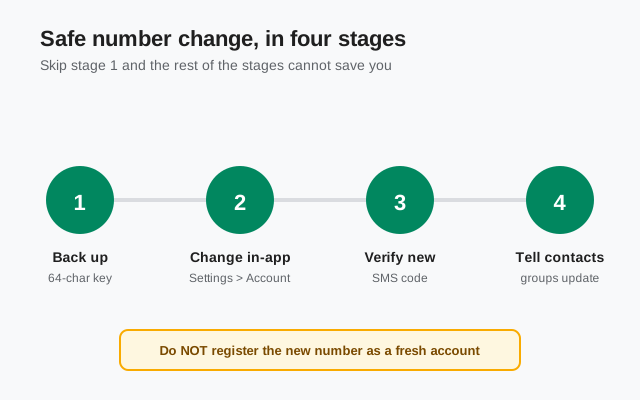
Do things in this order and nothing bad happens. The order is: back up, then change the number inside the app, then verify the new number, then tell your contacts. Most people who lose chats did step two before step one, or did something worse: uninstalled the app first, or registered the new number as a brand-new account.
The backup is your insurance policy. The Change Number feature is designed to keep your data on the phone, but if anything interrupts the process (the app crashes, the SMS code is delayed, the phone restarts), a fresh backup plus your recovery key is what lets you recover. Our backup guides cover every path if you need one.
Before you start: the SIM-side checklist
Run this five-point check before you touch the Change Number screen. It takes a few minutes, and it is what makes the change boring instead of stressful.
- Fresh backup, key on paper. Back up right now and write down your 64-character recovery key off the phone. The same key unlocks both current backup types. The backup section below covers the one legacy exception: old .backup files that still use a 30-digit passphrase.
- Test the new SIM first. Put the new SIM in, send yourself a text, and confirm it receives SMS. If the verification code cannot arrive, the change stalls halfway.
- Keep the old SIM for a week. Do not throw it away the same day. Bank codes, two-factor logins, and straggler messages can still land on the old number for days after you switch.
- List everything else tied to the old number. Bank apps, two-factor logins, payment apps, delivery apps: anything outside Signal that sends codes to your number needs updating the same week. Keep the old SIM alive until you have gone through the list.
- Warn key people yourself. Signal posts a number-changed note in your chats, but plenty of people will not notice. A short "new number, same me" message to key contacts saves weeks of confusion.
With this done, the worst case is a reinstall and a restore. An inconvenience, not a loss.
The in-app change flow, step by step
Keep your new SIM in the phone and make sure it can receive SMS. You will need a verification code sent to the new number. Then, inside your existing Signal install:
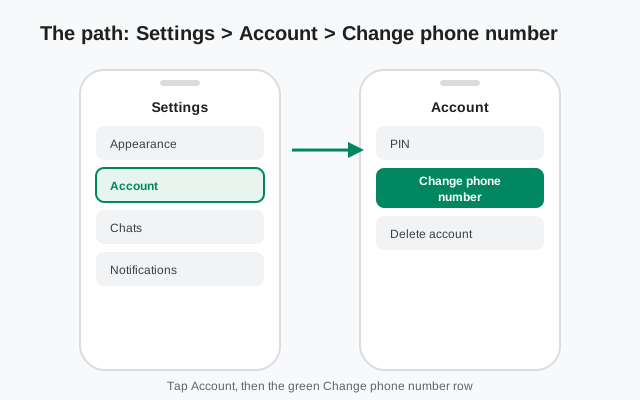
- Open Signal and tap your profile icon, then Settings.
- Go to Account.
- Tap Change phone number.
- Enter your old number first (the one the account currently uses).
- Enter the new number and confirm it.
- Wait for the SMS verification code on the new number and enter it.
That is the whole flow. Your account stays the same account. Only the number attached to it changes. Do not uninstall Signal before doing this, and do not tap through a fresh registration on the new number first. Change Number needs your existing, logged-in install with your data on the phone.
What moves with you, and what resets
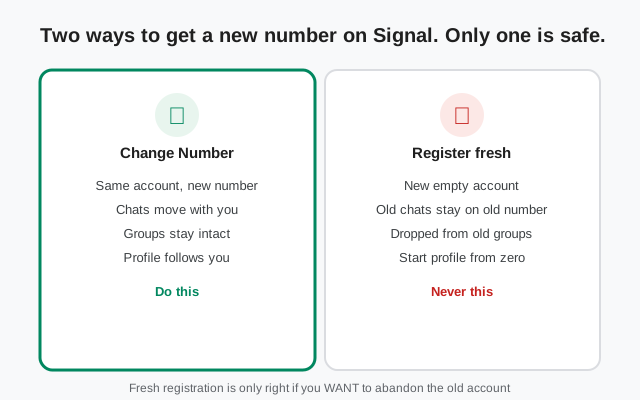
Change Number moves the account, not just the number. Here is what that means in practice:
| What | After a Change Number |
|---|---|
| Your chats | Stay on the phone, now under the new number. Nothing to re-import. |
| Your groups | You stay a member of every group. Members see a note that your number changed. |
| Your profile | Your name and photo carry over to the new number. |
| Your contacts’ view of you | Signal shows existing contacts a number-changed note in your chats with them. |
| Your settings | Stay as you configured them. |
| Safety numbers | Change with every contact. Re-verify the important ones before sharing anything sensitive. |
| Your account itself | Unchanged. It is the same account, just a new number attached to it. |
The safety-number point deserves a pause. A safety number is the fingerprint of an encrypted conversation, and it is tied to the phone number. After a change, every safety number is different, which is exactly what a paranoid friend should expect to see. Re-verify with the people who matter, in person or on a call, before you trust the channel again.
Back up before you start
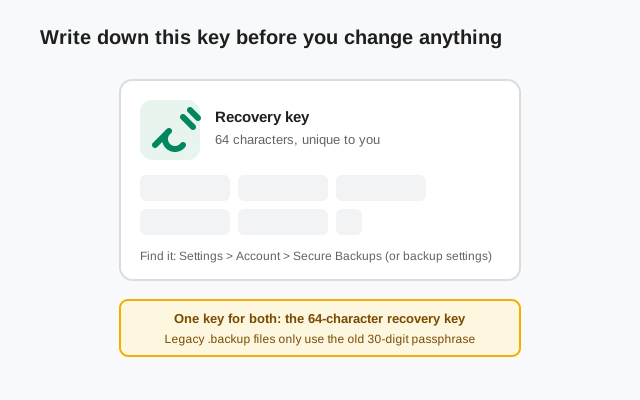
Before you touch the Change Number screen, run a fresh backup and find your recovery key. Signal’s current backup system uses a single 64-character recovery key for both backup options: Secure Backups and on-device backups. That key is the only thing that can restore your data on a new install or a new phone. Without it, a backup is a locked box with no key.
Note: there are two backup options and two eras of keys. The 64-character recovery key unlocks both current backup types: Secure Backups and on-device backups. The 30-digit passphrase belongs to the legacy era: older Signal versions saved on-device backups as a single .backup file, and only those old files still need it. The keys are not interchangeable. The 30-digit passphrase will not open a current backup, and the 64-character key will not open a legacy file. Our recovery key guide shows where to find the 64-character key, and Secure Backups, explained covers the hosted backup that survives even a lost phone.
Tell your contacts after the switch
Signal puts an automatic number-changed note in your existing chats, so most people will see the switch without you lifting a finger. Still, do a little outreach:
- Tell your close contacts directly. Some people ignore system notes.
- Check your important groups. You stay a member, but a quick “hey, this is me on the new number” avoids confusion.
- If anyone messages your old number out of habit, remind them once. You cannot receive messages sent to a number you no longer control.
Can someone else take your old number?
Yes, eventually. Phone carriers recycle numbers, and once you give one up, it can end up with a stranger, who could then register a Signal account on it. That is normal and not a problem for you: your account, chats, and groups moved with you to the new number. The old number is just a number now.
Two things follow from this. First, do not leave anything important tied to the old number: verification codes for other services, for example. Second, you cannot keep two numbers on one Signal account. If you want a second number on Signal, that is a second account on a second install, not an extension of the first.
Mistakes that cost people their history
- Uninstalling first. Change Number needs the existing install with your data on the phone. Uninstalling deletes the local data the feature is built to keep.
- Registering the new number fresh. The classic one. A fresh registration is a new, empty account. The old account and its history do not merge into it.
- Starting before the new SIM can receive SMS. If the verification code cannot arrive, the change stalls halfway. Test the SIM first.
- No backup, no recovery key. If the process breaks and you have no backup, there is nothing to restore from.
- Changing mid-transfer. If you are also moving to a new phone, finish the phone move first (see our restore paths), then change the number.
If you already registered the new number fresh and lost access to the old history on this phone, all is not necessarily lost. If you still control the old number, re-register Signal on the old number. That brings back the old account (without the local history). Then do the Change Number flow properly. And if you had a backup with its recovery key, you can restore the history first. Walk it through slowly.
FAQ
Will I lose my chats if I change my number on Signal?
No. Not if you use the built-in Change Number feature (Settings > Account > Change phone number). Your chats stay on the phone and move to the new number. You only lose chats if you register the new number as a fresh account instead, which creates a new empty account.
What happens to my Signal groups when I change numbers?
You stay a member of all your groups. Group members see a notice that your number changed, so a quick message confirming it is you avoids confusion.
Do my contacts get notified automatically?
Yes. Signal shows a number-changed note in your existing chats, so contacts see the switch. A direct heads-up to close contacts is still worth doing.
I already registered the new number as a fresh account. Can I fix it?
Maybe. If you still control the old number, re-register Signal on the old number to get the old account back, then use Change Number properly. If you also have a backup and its 64-character recovery key, restore the history first. If you have neither, the old history is gone.
Can I change back to my old number later?
Only if you still control it. The SIM must be able to receive the verification SMS. Once a number is recycled to someone else, you cannot use it.
How long does the number change take?
Minutes, once the verification SMS arrives. The slow part is usually waiting for the code, so make sure the new SIM is active before you start.
Do I need the old SIM to change my number on Signal?
You do not need the old SIM for the change itself. Only the new SIM matters, because the verification code goes to the new number. But keep the old SIM for a week anyway: bank codes, two-factor logins, and other services can keep sending messages to the old number for days.
What about two-factor codes and other logins tied to my old number?
Signal's number change does not update them. Bank apps, two-factor logins, payment apps, and delivery apps all need updating separately. Do that the same week, and keep the old SIM alive until you have.
Keep reading
- Keeping your chats while you switch: the pre-change SIM-side checklist keeps history intact
- Your recovery key, explained: find and guard the 64-character key
- Secure Backups, explained: the backup that survives a lost phone
- Every restore path in one place: if something already went wrong