
Signal Secure Backups: Encrypted Cloud Backups, Explained
Published: October 7, 2026 · Updated: October 8, 2026
For most of its life, Signal had one hard rule: your messages lived on your device and nowhere else. Lose the phone, lose the history. That changed with Secure Backups: Signal's opt-in, end-to-end encrypted backup service hosted on Signal's own servers. Your phone builds a fresh encrypted archive every day, and the only thing that can unlock it is a 64-character recovery key generated on your device. Signal never sees the key and cannot read the archive. This page explains exactly how the system works, what the free and paid tiers include, and how to set it up safely.
from Signal's official site — file hosted by Signal, not by us
For most of its life, Signal had one hard rule: your messages lived on your device and nowhere else. Lose the phone, lose the history. That changed with Secure Backups: Signal's opt-in, end-to-end encrypted backup service hosted on Signal's own servers. Your phone builds a fresh encrypted archive every day, and the only thing that can unlock it is a 64-character recovery key generated on your device. Signal never sees the key and cannot read the archive. This page explains exactly how the system works, what the free and paid tiers include, and how to set it up safely.
What Secure Backups actually are
Secure Backups are a hosted, encrypted copy of your Signal data. When you opt in, your device compresses your messages and recent media into an archive, encrypts it with keys only your device holds, and uploads it to Signal's servers, refreshed every single day, replacing the previous day's archive. Because the encryption happens on your phone before anything leaves it, Signal's servers store only ciphertext. The company describes the design as zero-knowledge: the archive is not linked to your account identity or your payment method, and media files are encrypted a second time with a key unique to your backup and padded to hide their real size, so nobody holding the files can compare them across users to figure out who shares a group.
Hosted backups add one more layer: a supplemental key that rotates daily inside a hardware Trusted Execution Environment, giving the archive forward secrecy on top of your own recovery key. You never interact with that layer directly. It is invisible plumbing that makes a stolen archive harder to attack over time.
The most important sentence in this whole guide: the archive is unlocked by the 64-character recovery key generated on your device. You can generate a new key at any time, but a new key does not open old archives. Lose the key and the archive stays encrypted forever. No support ticket, no reset email, no exceptions. Our backup key guide is worth reading before you enable anything.
Free vs paid: the two tiers
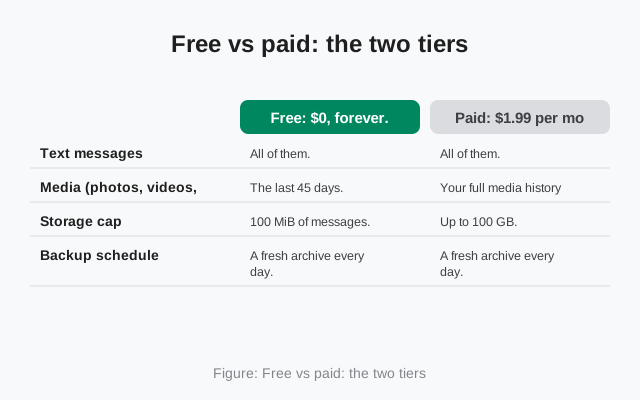
Signal is a nonprofit that cannot subsidize storage by selling data or ads, so large archives cost money to store. That is the entire reason the paid tier exists. Storage cost, nothing else. Here is what each tier includes:
| Price | Free: $0, forever. | Paid: $1.99 per month. (Signal has said this price is not fixed and could change.) |
|---|---|---|
| Text messages | All of them. | All of them. |
| Media (photos, videos, files) | The last 45 days. | Your full media history. No 45-day cutoff. |
| Storage cap | 100 MiB of messages. Text compresses well, so this covers even heavy users. | Up to 100 GB. |
| Backup schedule | A fresh archive every day. | A fresh archive every day. |
| Encryption | End-to-end, unlocked only by your recovery key. | End-to-end, unlocked only by your recovery key. |
Which tier do you need? If you mostly care about conversations and recent photos, free is genuinely enough. Signal designed it that way. If your Signal holds years of documents, voice notes, or family videos you would be heartbroken to lose, the paid tier is the honest answer. Either way, the daily refresh and the recovery key work identically on both plans.
The 64-character recovery key
The recovery key looks like a long string of letters and numbers grouped in fours. It is generated on your device when you first set up backups, it is never transmitted to Signal's servers, and it is different from your Signal PIN. The PIN verifies your account during registration and restores your profile and contacts; the recovery key decrypts your message archive. You need both, and they are not interchangeable.
During setup Signal makes you confirm the key before it lets you continue. This is deliberate friction, because an unconfirmed key is a key you will lose. Store it in a password manager or write it on paper and keep the paper somewhere safe. Do not keep it as a screenshot in your gallery, a note in a synced notes app, or pasted into a chat. Attackers actively phish for these keys, sometimes by impersonating "Signal Support" in chat and inventing an urgent sync problem. Real support will never ask for your key. Ever.
How to enable Secure Backups
Update Signal first
Install the latest version, from the Play Store or the official APK on Signal's own site. Backup features are newest-first; an old build may not show the Backups menu at all.
Open Settings → Backups
Tap your profile, open Settings, and choose Backups. Tap Setup to begin.
Save your recovery key
Signal shows the 64-character key. Write it down or save it in a password manager now, while you are looking at it. Confirm it when asked. Confirmation is mandatory.
Choose free or paid
Pick the free plan or the $1.99/month paid plan depending on how much media history you want protected.
Let the first backup finish
The first archive takes the longest. It is uploading everything. Keep the phone on Wi-Fi and plugged in. After that, your phone refreshes the archive automatically every day.
What is in the archive (and what is not)
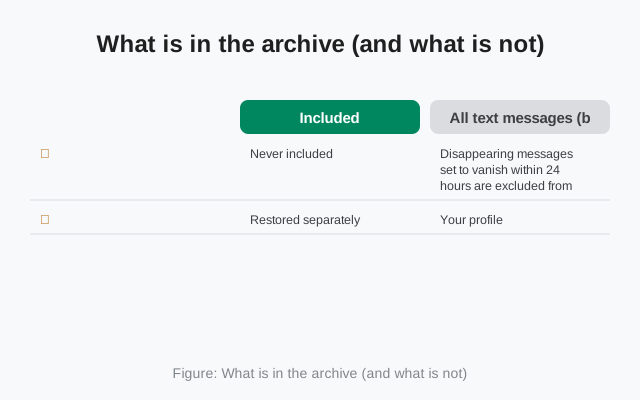
| Included | All text messages (both tiers), media within your tier's window (last 45 days free; full history paid), contacts, profile, and settings. |
|---|---|
| Never included | Disappearing messages set to vanish within 24 hours are excluded from backups by design. On both tiers. View-once messages are ephemeral and do not survive in archives either. |
| Restored separately | Your profile, contacts, and group memberships come back through your Signal PIN (Secure Value Recovery), not from the archive itself. |
Restoring from a Secure Backup
Restore happens during the first setup on a new (or freshly reinstalled) Signal. Register the same phone number, choose the restore option when offered, and enter your recovery key exactly. The archive downloads and decrypts in the background. Two rules: the number must match the one the backup was made with, and the restore prompt only appears during initial setup. Skip it and you will need to reinstall to see it again. The full sequence, with error fixes, is on our restore walkthrough.
What happens if you stop paying
Backups do not have a trapdoor. If you cancel the paid plan, your backups continue under the free tier's limits: future daily archives keep all your texts but only the last 45 days of media, within the 100 MiB message cap. Media older than 45 days simply stops being carried forward into new archives. That is why cancelling is fine as a decision, but a bad surprise if you did not know the rule. If you re-subscribe later, the wider media window applies to archives made from that point on; it cannot reach back and resurrect media that was already dropped.
When the backup stalls or the restore fails
Most backup problems are one of these five, and none of them mean your chats are gone:
- The first backup never finishes. Keep the phone awake, on Wi-Fi, and plugged in until it completes, and do not toggle backups off mid-upload. On the paid tier, a full media archive can take hours on a slow connection. That is normal, not broken. Give it a full night before you call it stuck.
- The restore never offers your backup. Two rules decide this. The phone number you register must match the number the backup was made with, and the restore prompt only appears during the first setup. If you skipped the prompt, you will need to reinstall Signal to see it again. There is no restore button later.
- The recovery key is rejected. The key is 64 characters and must match exactly. There is no "close enough." Enter it character by character, and double-check you are not mixing it up with the retired 30-digit format.
- Old media is missing after a restore. On the free tier this is expected, not a failure: only the last 45 days of media are carried in the archive. If years of photos matter, that is the paid tier's job.
- The last-backup timestamp is days old. Open Settings → Backups and check the date. If the daily refresh has quietly stopped, our backup troubleshooting guide walks through the causes, starting with battery optimization killing the background upload.
Three safety habits
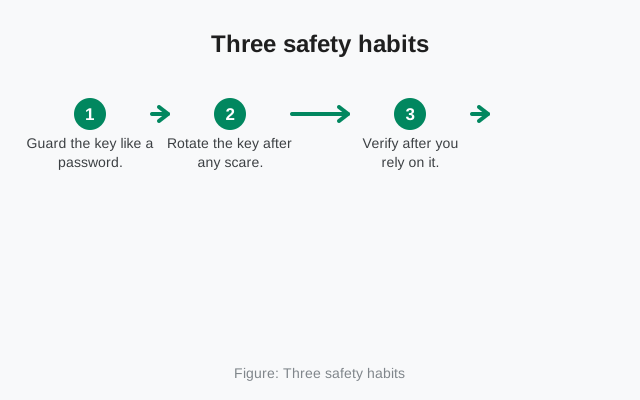
- Guard the key like a password. Anyone who holds your recovery key and can register your number can read your entire archive. Treat it with the same care as a banking password.
- Rotate the key after any scare. If you pasted the key somewhere you should not have, or someone saw it, generate a new one in Settings → Backups immediately. Remember: the new key protects future archives, not old ones.
- Verify after you rely on it. Once a year, or before any phone switch, open Settings → Backups and confirm a recent backup exists. A backup you never check is a backup you are only hoping works.
FAQ
Are Secure Backups really end-to-end encrypted?
Yes. Encryption happens on your device before upload, using a recovery key Signal never receives. Signal's servers store only ciphertext, and the archive is not linked to your account or payment method.
Can I use Secure Backups without paying?
Yes. The free tier backs up all your text messages plus the last 45 days of media, refreshed daily. The $1.99/month paid tier extends media coverage to your full history up to 100 GB.
What happens to my backup if I lose my phone?
Nothing happens to the archive. It stays on Signal's servers. Install Signal on the new phone, register the same number, and restore with your recovery key. The old phone is not needed.
Is the recovery key the same as my Signal PIN?
No. The PIN verifies your account during registration and restores your profile, contacts, and groups. The 64-character recovery key decrypts your message backup. You need both, for different jobs.
Can Signal reset my recovery key if I lose it?
No. Nobody at Signal can see or reset it. That is the point of the design. You can generate a new key while logged in, but it will not unlock archives encrypted with the old one.
Keep reading
- Moving Signal to a new phone: the full switch walkthrough
- Local backups on Android: the on-device alternative with no size cap
- Your recovery key, explained: storage, rotation, and loss
- Backup troubleshooting: when backups fail or stall