
What Disappearing Messages Cannot Protect You From
Published: October 7, 2026 · Updated: October 8, 2026
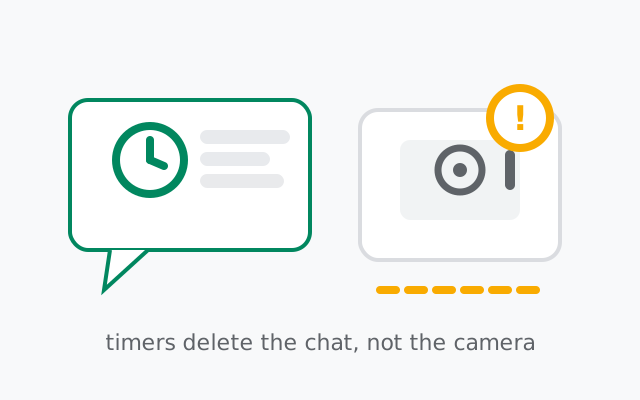
Disappearing messages delete messages from your phone and the other person's phone after a timer you set: anywhere from 30 seconds to 4 weeks. But they cannot stop the other person from taking a screenshot or photographing the screen before the timer runs out, and they cannot erase a message that already appeared in a notification preview or a backup taken earlier. What disappearing messages do genuinely well is shrink what exists later: if a phone is lost, stolen, or examined months after the fact, the old conversation simply is not there.
from Signal's official site — file hosted by Signal, not by us
First, what disappearing messages actually do
Set a disappearing timer on a chat and every new message in it gets a countdown. You can set one per conversation from the chat's settings, or set a default timer (Settings > Privacy > Default timer for new chats) so every new chat starts with one. Timers run from 30 seconds up to 4 weeks, with a custom option as short as 1 second. The clock starts when the recipient views the message, not when you send it.
The timer applies to everyone in the chat, in one-to-one conversations and groups alike. It covers photos, videos, and voice notes too, not just text. Linked devices follow the same timers. The full walkthrough of the timer options lives in our disappearing messages setup guide.
What matters for this page: disappearing messages are a deletion feature. They reduce what is stored. They are not an anti-screenshot feature, not an anti-copying feature, and not a way to unsend something someone already saved.
The limits, one by one
- 1. Screenshots on the other person's phone. Nothing in Signal stops the person you're chatting with from screenshotting on their device. Screen security (the setting that blocks screenshots) only works on your own phone: it hides your chats in the app switcher and stops you from capturing your own screen. It has zero effect on the other side. On Android there is no reliable way for an app to prevent the other person's device from taking a screenshot. Our screen security guide covers exactly what it can and cannot do.
- 2. A second camera. A photo of the screen leaves no trace at all. No notification, no marker, nothing added to the chat. This is the limit people forget most often. Disappearing messages defend against the future (old messages lingering), not against a recipient acting right now.
- 3. Copy and paste. Text can be copied into notes, documents, or other chats in the seconds before the timer fires. A copied message has no timer attached. Neither does a message someone retyped somewhere else.
- 4. Forwarded copies. Anything the other person forwards becomes a brand-new message in a new chat, outside your timer's reach entirely. Forwarding is quiet and takes two taps.
- 5. Notification previews. If the other person's phone shows message text in notifications, on the lock screen, in the notification shade, or in notification history, the words existed outside the chat before the timer fired. Disappearing deletes the chat copy, not the notification. You can stop your own phone showing message content in notifications (Settings > Notifications), but you cannot control their phone.
- 6. Backups. A backup made before the timer expires can keep a message alive past its deadline. Verified behavior worth knowing: messages with disappearing timers of 24 hours or less are left out of Signal's local backups entirely. Messages with longer timers can be included in a backup until they expire. Restoring from an old backup can bring back messages the timer already deleted on the live phone. If backups matter in your situation, keep timers short and treat the backup file itself as a copy of your chats.
- 7. The recipient's other devices. Timers run on every linked device, but each device runs them on its own schedule. A laptop that has been switched off for two weeks can still show messages from before it reconnects. The disappearing orders catch up when it syncs, not before.
- 8. Forensic recovery. Deleting a message inside the app is not the same as wiping it from storage. With physical access to the phone and the right tools, deleted data can sometimes be recovered until it gets overwritten. On rooted devices, the app's normal protections can be bypassed outright. Disappearing messages raise the cost of recovery. They are not a guarantee against a well-equipped examiner.
When disappearing messages genuinely help
None of the above makes timers useless. It makes them a specific tool: protection against later, not against now.
- A lost or stolen phone carries less history. Signal's local database is encrypted, but less data is simply less data for anyone who gets past the lock screen.
- A phone examined later shows far less. A border check, a workplace dispute, someone with brief access to an unlocked phone: all of these meet a short recent history instead of years of conversations.
- Over-the-shoulder glances see less. Someone scrolling your chat list while you look away finds only recent messages, not the full archive.
- Future breaches can't leak what was never kept. This is the real win. A timer deletes on a schedule, so an account compromise, a backup theft, or a legal demand a year from now finds nothing from the timed period. There is simply nothing on the server or the device to hand over or steal. Our metadata guide explains how little Signal's servers hold in the first place.
Threat vs. timer: a quick table
| The threat | Does a disappearing timer help? |
|---|---|
| Someone screenshots the message as it arrives | No |
| Someone photographs the screen with another phone | No |
| They copy the text into their notes | No |
| The text already appeared in their notification preview | No |
| They forward it to another chat | No |
| You lose your phone next month | Yes. Old messages are already gone |
| Someone glances at your chats over your shoulder | Partly. Only recent messages exist |
| A device is examined a year from now | Yes |
| Someone demands your messages from Signal | Not applicable. Nothing is stored on the server anyway |
Frequently asked questions
Do disappearing messages stop screenshots?
No. Nothing in Signal stops the other person from screenshotting on their device. Screen security only protects your own screen. It has no effect on the other side of the conversation.
When does the disappearing timer actually start?
When the recipient views the message, not when you send it. Until the message is opened, it waits. The countdown begins on viewing.
Are disappearing messages left out of backups?
Messages with timers of 24 hours or less are excluded from Signal's local backups entirely. Messages with longer timers can be included in a backup until they expire, so a backup taken early can preserve them past the deadline.
Do disappearing messages work on linked devices?
Yes. Timers run on every linked device. But each device runs them on its own schedule, so a laptop that has been offline can still show old messages until it reconnects and syncs.
Is 'delete for everyone' better than a disappearing timer?
They are different tools. Delete-for-everyone is a one-off remote delete you trigger manually; a disappearing timer is automatic and scheduled. Both share the same weakness: neither can stop a screenshot taken before deletion.
The settings bundle that actually works
A disappearing timer is one layer. It works best stacked with four others:
Disappearing timer: set a default
Use the default timer for new chats so every conversation is covered from the first message. You will forget to set it per chat; the default means you don't have to remember.
Screen lock
Settings > Privacy > Screen lock. A grabbed phone shouldn't open straight into Signal. This protects everything the timer hasn't deleted yet.
Screen security
Blocks screenshots on your screen and hides chats in the app switcher. Protects you from your own habits: saving receipts or addresses as screenshots that then live in your gallery forever.
Notification content off
Settings > Notifications: stop Signal showing message text in notifications. This closes the preview loophole on your side of the conversation.
View-once media for sensitive photos
For photos that should truly be seen once, use view-once media instead of a timed chat. One viewing, then gone, and the recipient can't open it again later.
Picking timers honestly
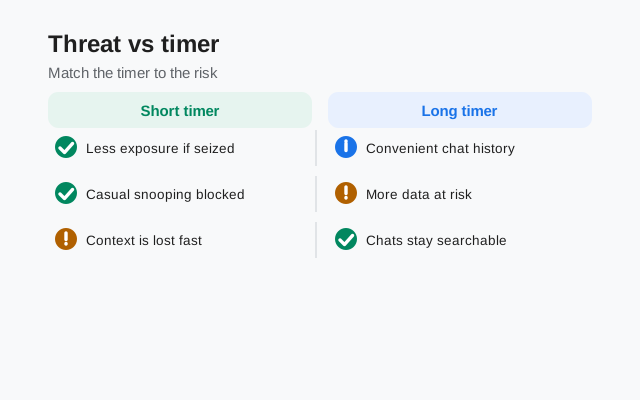
Shorter timers mean a smaller window of exposure. That is the whole game. A 30-second or 5-minute timer on a sensitive chat is a real privacy measure. A 4-week timer on a casual chat is mostly tidiness, not secrecy, and there's nothing wrong with admitting that. Match the timer to the sensitivity of the conversation, and let the default timer handle the chats you never get around to configuring.
When it truly must not exist
Here is the honest endpoint: if the information would cause real harm in the other person's hands (as a screenshot, a photo, a forwarded copy), no timer length fixes that. The protection in that situation is the recipient, not the app. Don't send it, or say it in person. Signal secures the channel between two phones; it cannot secure the person holding the other one. Our honest privacy assessment weighs this trade-off across the whole app.
Keep reading
- Disappearing message timers: how to set per-chat and default timers
- Screen security: blocking screenshots on your own screen
- View-once media: photos and videos that can only be opened once
- Screen lock: keeping Signal closed behind your phone lock
- What metadata Signal stores: how little exists on the server side
- deleting for everyone, honestly: the time window and the five escapes
from Signal's official site — file hosted by Signal, not by us