
Link previews are handy. Here is what they cost you
Published: October 7, 2026
When you send a link in Signal, the app can build a small preview card, a title, a snippet of text, and sometimes an image, before the message leaves your phone. That preview is generated on your own device. Your phone opens the link, reads the page's preview data, and packs the card into the message. The people you send it to then see the card without their phones having to visit the page. The privacy trade-off sits in two places. First, the moment your phone builds the preview, it contacts the link's server. The site learns that someone visited that exact URL, and when. Second, whoever receives the preview gets the full URL, even if you thought you were only sharing a headline. There is a simple toggle that stops previews from being generated at all, and knowing when to use it is the whole story of this guide.
Most links are harmless and previews make chats nicer to read. But some links are sensitive: a job posting you are reading, a medical page, a fundraiser you have not announced yet. For those, the preview step quietly tells the destination site that the page was opened, from the sender's network, before the message was even sent. This page explains how that works, who sees what, and the one setting that controls it.
What a link preview actually is
You have seen it a hundred times: paste a URL into the message box and a little card pops up under the text with the page title, a line or two of description, and maybe a thumbnail image. That is the link preview. It turns a bare URL into something a person can judge at a glance: is this worth opening, or is it clickbait?
The card is built from data the website itself publishes for this purpose (the same title-and-description data that powers previews on social media and search results). Your phone reads that data and formats it into the card. If the site does not publish preview data, you just get a plain clickable link. No card, no problem.
The important thing to hold in your head: the preview is made by your phone, before sending. It is not something Signal's servers generate for you. That one design choice determines the entire privacy picture, because it means the preview step is a network request from your device to the link's website.
How Signal builds the preview
Here is the honest, step-by-step version of what happens when you paste a link into Signal with previews enabled:
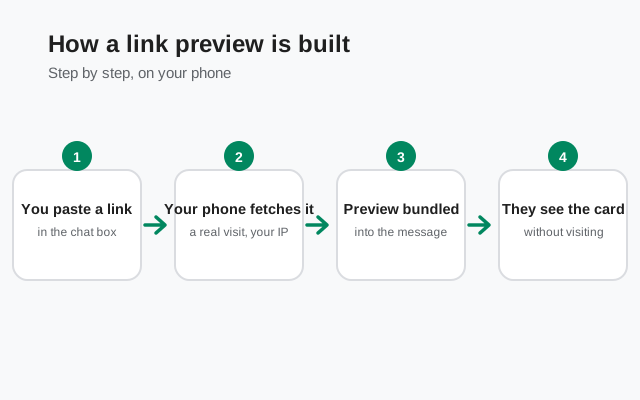
You paste a link
Signal notices the text contains a URL and gets ready to build a card for it.
Your phone fetches the page
Before the message is sent, your phone opens the link in the background and reads its preview data: title, description, image. This is a real visit from your device, over your network connection, to the site's server.
The preview is bundled into the message
Your phone packs the card data into the message and sends it, encrypted, like any other message.
Recipients see the card without visiting the site
The people you sent it to see the preview card immediately. Their phones do not need to fetch the page themselves to show it.
Step 2 is the one that matters for privacy. Fetching the page means the destination server sees a request for that exact URL at that exact moment. On the open web, servers log every visit: IP address, time, page requested. For an ordinary news article that is meaningless background noise. For a sensitive link it is a real signal: someone opened this page, at this time, from this network.
Compare this with how some other apps do it, and Signal's design looks good: if previews were generated on a central server, that server would learn every link everyone ever sent. Keeping the fetch on the sender's device avoids creating a central record of links. The trade-off is just that the sender's own visit is visible to the destination site, which it would be anyway the moment you open the link to read it.
Who sees what when you send a link
| Who | What they learn | When |
|---|---|---|
| The link's website | That someone's device fetched the page (the preview request); it can infer the visitor's network location from the connection | Before you even send the message: the preview fetch happens on your phone first |
| The people in the chat | The full, unshortened URL, plus the card | As soon as they open the message |
| Anyone the chat is forwarded to | The same: full URL and card travel with the forwarded message | Whenever it is forwarded |
| Your internet provider | That you connected to the site's domain (with HTTPS it sees the domain, not the full URL) | During the preview fetch |
The row most people miss is the second one. A preview card makes a link more readable, which means the URL itself is fully visible to every recipient, including any tracking parameters in it. If you paste a link with ?utm_source=... or a session token in it, the card does not hide that. Trim tracking junk from URLs before sending anything you would not want a stranger to read.
Also note what is not in the table: Signal itself does not learn the links you send. Because the preview is fetched on your device and the message is end-to-end encrypted, Signal's servers see only an encrypted message. They cannot read the URL, the card, or anything else inside it. The privacy boundary here is between you, the destination site, and the recipients, not the messenger in the middle.
What can leak: the real risks
Let us be concrete about when this actually matters, because "a website saw a visit" is usually nothing. It becomes something in these cases:
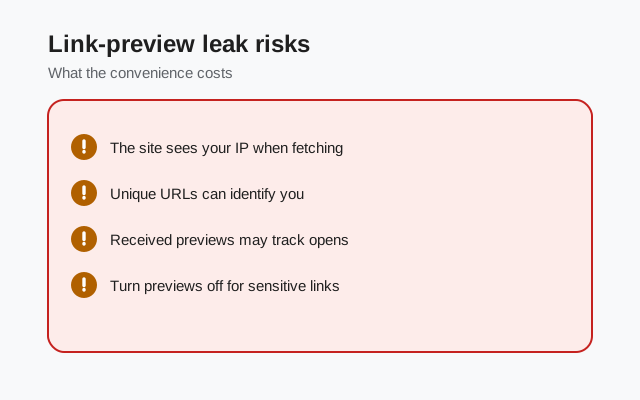
- Sensitive pages with unique URLs. A fundraiser draft, a document shared via a secret link, an unlisted video: pages whose URL itself is the access control. The preview fetch visits that URL, so the secret-link page gets opened by your phone before you send anything. If the URL was the only thing keeping the page private, the preview step already spent it.
- Timing tells a story. The preview fetch happens at send time. For a job posting you open while you should be working, a dating profile you check at 3 a.m., or anything you would rather not timestamp, the server log records when your device came calling.
- Your network location. The preview request comes from your IP address. On a home connection that roughly means your household; on office Wi-Fi it means your employer can see the domain in its logs. Combined with HTTPS the provider sees only the domain, not the full page. But the domain alone ("visited this specific clinic's site") is sometimes the whole secret.
- Preview images from untrusted sites. The card can include an image the site provides. That image is fetched by your phone during preview generation. On a malicious site this is an ordinary image fetch, but it is one more request the site logs.
None of this is a vulnerability in Signal. It is how link previews must work on any app that builds them on the sender's device. The fix is not technical; it is a habit, covered two sections down.
from Signal's official site — file hosted by Signal, not by us
The toggle: turning previews off
Signal gives you one control for this, and it is simple: a setting that turns link-preview generation off. You will find it in Signal's settings on your phone, in the chat or appearance area of the settings. The exact label can shift between versions, so look for a "link preview" option rather than a menu path you memorized from a guide. When it is off:
- Your phone never fetches link pages to build cards.
- Messages with links send as plain clickable URLs: no title, no snippet, no image.
- The destination site learns nothing from you until you or a recipient actually opens the link.
When it is on, the default, you get the nice cards and the preview fetch happens for every link you send. There is no per-link choice: it is all previews or no previews. That makes it a setting you set once according to your habits, not something you flip per message.
If you want previews in casual chats but not for sensitive links, the practical workaround is trimming. With previews on, avoid pasting raw sensitive URLs into Signal. Open them in your browser first and share a description instead, or paste the link with previews accepted as a calculated risk. Clumsy, but it is the honest answer: there is no "preview this one, skip that one" button.
When to keep them off
Most people can leave previews on and never think about it. Turn them off, or leave them off, if any of these describe your life:
- You handle sensitive links regularly. Journalists receiving leaked documents, researchers sharing unlisted pages, anyone passing around secret-URL content. The preview fetch visits the URL; for secret links that is the leak.
- You are on a monitored network. Office, school, or a restrictive country where your provider logs domains. With previews on, every link you paste in Signal adds a domain visit to that log before the message even goes out.
- You share links about health, money, or relationships you keep private. The domain alone can be revealing. A preview fetch of a specialist clinic's page is a visit to that clinic's page, full stop.
- You just prefer minimal metadata. Perfectly valid. Plain links are uglier but they leak nothing until someone taps them.
And the honest counter-case: if you mostly share news articles, YouTube videos, and shopping links with friends, previews on is fine. The privacy cost of those fetches is roughly zero. The sites are public, the visits are indistinguishable from normal browsing, and the cards make chats genuinely nicer. Do not turn your messaging app into a gray box of bare URLs for threats you do not have.
The habit that covers both worlds, regardless of the toggle: look at the URL before you send it. Strip tracking parameters, session tokens, and anything after a ? that is not needed for the page to load. That one habit protects you far more than the toggle ever will, because it protects the recipients' view of the link too.
What about previews you receive?
When someone sends you a link with a preview, your phone does not fetch anything. It just displays the card the sender's phone already built. So receiving a preview costs you nothing: no visit to the site, no log entry, no metadata. The sender did all the fetching.
The one thing to watch as a recipient is the image in the card. It came from the site the sender linked, chosen by that site's preview data. On an untrusted link from an unknown sender, the card image is exactly as trustworthy as the sender, which is to say, not at all. Treat preview cards as decoration, not verification: a card that looks like your bank does not mean the link goes to your bank. Check the actual URL before tapping, every time. Phishing lives and dies on people trusting the card instead of the address.
Frequently asked questions
Does Signal generate link previews on its servers?
No. Your phone fetches the page and builds the preview card before sending, so Signal's servers never see the URL or the preview content. The message stays end-to-end encrypted.
Can I turn off link previews in Signal?
Yes. There is a setting in Signal's chat/appearance settings that disables link preview generation. With it off, links send as plain clickable URLs and your phone never fetches the page.
Do link previews leak the URL to the website?
The preview fetch is a real visit from your phone to the site's server, so the site logs a visit to that exact URL at that time. That matters for secret or sensitive links; for ordinary public pages it is meaningless.
Do recipients see the full link?
Yes. Everyone in the chat sees the complete URL along with the card, including any tracking parameters. Trim tracking junk from links before sending.
Is the preview image safe to trust?
No. The card image and title come from the site's own preview data and can be faked. A card that looks like your bank does not mean the link goes to your bank. Check the actual URL.
Keep reading
- What metadata Signal keeps: the honest breakdown of what the service knows about you
- Sealed sender, explained: how Signal hides who messages whom
- Typing indicators & read receipts: another quiet source of presence leaks
- Privacy guides hub: every Signal privacy guide in one place
- link previews not showing: the fix guide