
Has Signal Ever Been Hacked? The Honest History
Published: October 7, 2026 · Updated: October 8, 2026
"Has Signal been hacked" is a fair question, and it deserves a straight answer instead of marketing. This guide gives you the honest history: what actually happened, what did not, what "hacked" claims usually turn out to be, and what to do if you think your account is compromised.
from Signal's official site — file hosted by Signal, not by us
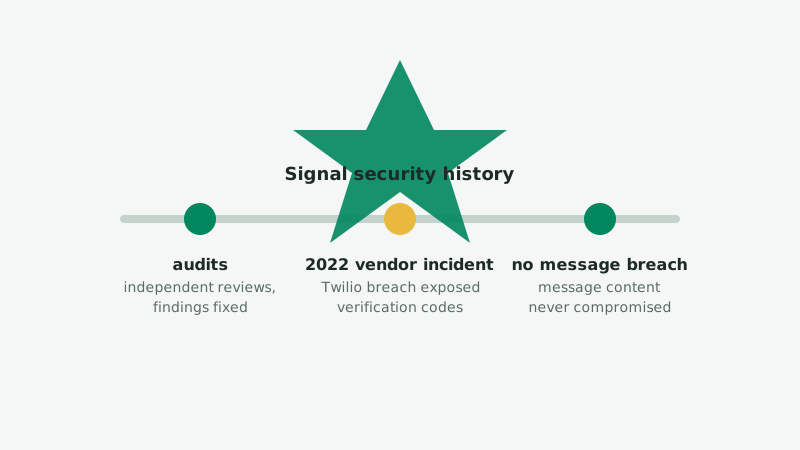
The record: what has and has not happened
- Signal's encryption has never been publicly broken. The Signal Protocol has survived years of scrutiny by cryptographers, including independent security audits, and adoption by other major messengers. No audit or public research has broken the core encryption.
- No breach of Signal's servers has ever exposed message contents. This is partly architecture: messages are end-to-end encrypted and Signal's servers do not store readable copies. There is no message database to steal.
- One vendor incident (2022). Attackers breached Twilio, a company Signal used to send phone-verification texts, and accessed verification codes and phone numbers for roughly 1,900 users. No message content, contact lists, or profile information was involved. Details below.
- User-level compromises happen regularly, but those are attacks on people and phones, not on Signal's systems. That distinction matters, and most confusion comes from blurring it.
The 2022 Twilio vendor incident, carefully explained
In August 2022, attackers carried out a phishing attack against Twilio employees and gained access to Twilio's systems. Signal used Twilio to deliver SMS verification codes when users register or re-register their phone numbers. Here is exactly what was and was not exposed (Signal's own incident write-up: Twilio Incident: What Signal Users Need to Know):
- Exposed: phone numbers and SMS verification codes for about 1,900 Signal users during the attack window. With a verification code, an attacker could re-register a victim's number on their own device and receive that victim's future messages.
- Not exposed: message history, contact lists, profile information, or anything else, because Signal never gave that data to Twilio in the first place. The vendor only ever saw phone numbers and codes.
- Signal's response: Signal disclosed the incident publicly, notified the affected users directly in the app, and advised them to re-register. Users with registration lock enabled were protected even if their code was exposed, because re-registration requires the PIN.
The honest lesson: the weakest link was not Signal's encryption or servers, it was a third-party vendor and SMS-based verification. Signal has since moved toward reducing dependence on phone numbers, including usernames that let you connect without sharing your number. The incident is also a good argument for enabling registration lock, covered below.
What "Signal hacked" stories usually turn out to be
When someone says "my Signal was hacked," investigation almost always finds one of these, none of which is a breach of Signal itself:
- Someone read their unlocked phone. A partner, colleague, or thief with physical access to an unlocked phone does not need to hack anything. Signal's screen lock and disappearing messages exist for this threat.
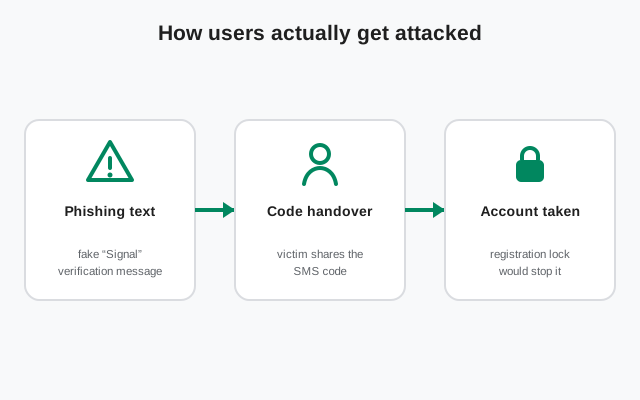
- A phishing message. "Your Signal account will be deleted, verify here" links steal credentials or install malware. Signal will never ask you to verify through a link.
- A SIM-swap attack. The attacker convinces the victim's mobile carrier to move the number to the attacker's SIM, then re-registers Signal. This attacks the phone company, not Signal.
- Spyware on the device. Commercial spyware reads messages on the phone before encryption. No messenger can defend against a compromised device.
- A fake app. The victim installed a repackaged "Signal Pro" or similar impostor. This is why verifying the APK signature against the fingerprint on Signal's download page matters; see our fingerprint verification guide and how to spot fake Signal APKs.
- Social engineering of contacts. "This is your bank, send the code" tricks work against humans, not against encryption.
The attacks that actually target Signal users
| Attack | Target | Defense |
|---|---|---|
| SIM swapping | Your carrier account | Carrier PIN; Signal registration lock PIN |
| Phishing links | You (credentials, malware) | Never tap verification links; verify senders |
| Device spyware | Your phone | OS updates; avoid sketchy APKs; screen lock |
| Physical phone access | Your unlocked device | Strong lock screen; Signal screen lock; disappearing messages |
| Fake Signal apps | Your install source | Download only from signal.org/android/apk; verify the signature |
Notice the pattern: every row is defended by something you control, not by something Signal failed to do. That is what "end-to-end encrypted with minimal data collection" buys you: the remaining risks move to the endpoints, which are yours to harden.
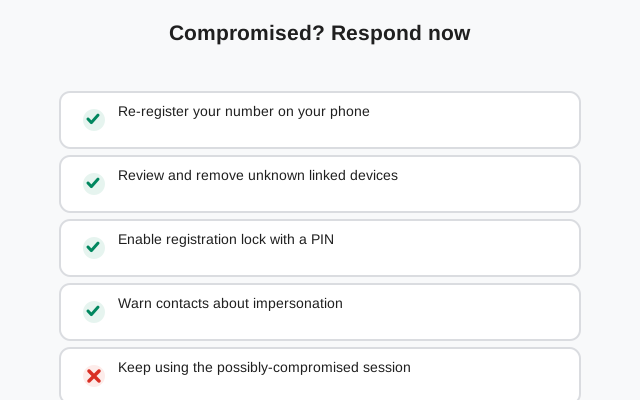
If you think you are compromised: response checklist
Work through this in order. Do not skip steps because one of them "seems unlikely."
- Re-register your number on a phone you physically control. This kicks any attacker's device off your account.
- Enable registration lock with a strong PIN you do not reuse elsewhere (Signal settings). This blocks future re-registration without the PIN, even after a SIM swap.
- Review linked devices in Signal's settings and unlink anything you do not recognize. Check this on a regular schedule afterwards.
- Contact your carrier about unauthorized SIM changes. Ask about a SIM-swap lock or port-out PIN on your mobile account.
- Check the phone itself. Update the OS, remove apps you do not recognize, and consider a factory reset if you suspect spyware. No account-level fix helps on a compromised device.
- Warn your contacts if the attacker may have messaged them as you. A quick "ignore anything odd from my number yesterday" prevents follow-on scams.
- Turn on disappearing messages for sensitive chats going forward, so a future compromise exposes less history.
Preventing it in the first place
- Registration lock PIN: the single highest-value setting. Turn it on today.
- Screen lock on Signal: requires your phone's unlock to open the app, defeating casual physical access.
- Download hygiene: get the APK only from signal.org/android/apk and verify the signature with
apksignerbefore installing. Our guides: check SHA-256 on desktop, hash vs signature. - Carrier account security: set a PIN or password with your mobile carrier so your number cannot be moved without it.
- Skepticism toward links and codes: Signal never asks you to verify through a link, and verification codes are never for sharing.
The bottom line is genuinely good news: Signal's core has held up, the one real incident was contained and disclosed, and the attacks that succeed are the ones you can defend against yourself. For the full picture, read Signal's security audits and is the Signal APK safe.
Frequently asked questions
Has anyone ever read Signal messages by hacking Signal?
There is no publicly known case of anyone compromising Signal's servers or encryption to read message contents. Signal's servers do not store readable messages, so there is nothing to steal that way.
What happened in the 2022 Twilio incident?
Attackers breached Twilio, a vendor Signal used for phone-number verification SMS. They accessed verification codes and phone numbers for about 1,900 Signal users. No message content, contact lists, or profile data were exposed, because Signal does not give that data to vendors.
Can my Signal account be hacked through SIM swapping?
Your Signal account is tied to your phone number, so a SIM-swap attack on your carrier can let an attacker re-register your number on their device. Enabling Signal's registration lock PIN is the defense: it blocks re-registration without the PIN even with a swapped SIM.
What should I do if I think my Signal was compromised?
Re-register your number on a device you control, enable registration lock with a strong PIN, review linked devices and unlink anything unfamiliar, and check with your carrier about SIM changes. Details are in the response checklist on this page.
Related guides
- our safety guides hub: all verification and safety walkthroughs in one place
- Signal's independent security audits: the audits behind the security claims
- Who owns Signal?: the nonprofit structure and incentives
- Verify the Signal APK SHA-256 fingerprint: make sure your copy is genuine
- How to spot a fake Signal APK: impostor apps are the common 'hack'