
Old Signal APK versions: why they are a security risk
Published: October 7, 2026 · Updated: October 8, 2026
Running an old Signal APK version means running with security holes that are already fixed in the current build. And the "old version" download sites that rank in search make the problem worse by serving repackaged, malware-laced files. Every Signal update ships fixes for bugs found since the last release; an old build never receives them, and its flaws are publicly known to attackers. Meanwhile the sites offering "Signal old versions APK download" are among the riskiest download sources on the web, because an old file is the perfect disguise for a tampered one. This page explains why old versions are vulnerable, why the archive sites are dangerous, and what to do instead of downgrading. No fear-mongering, just the mechanics.
The short answer
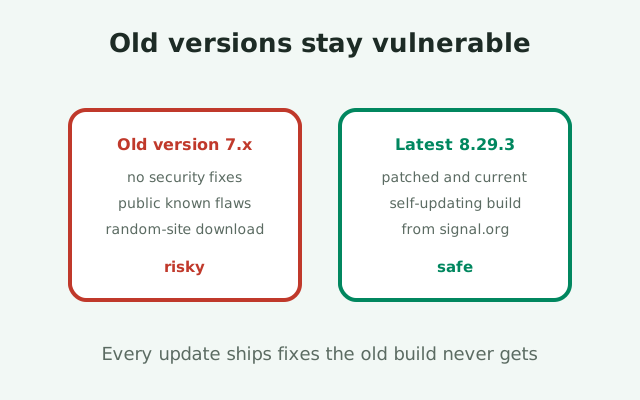
Do not run an old Signal version on purpose, and do not download old versions from archive sites. The current website build is 8.29.3, it updates itself, and staying on it is the entire security strategy. Old builds carry unpatched vulnerabilities that attackers know about, and "old version" APK sites are a favorite malware channel because a dated file gives the tampering perfect cover: you expect it to look different, so you do not question it.
There are only two legitimate reasons people end up on old versions: they turned updates off (or the updater broke), or their phone is too old for the current build. Both have better fixes than hunting for old APKs, and both are covered below. The short version of the fix: turn updates back on and let the website build do its job, or face the hardware reality honestly instead of downloading a stranger's repackaged file.
One clarification up front: this page is not saying old software explodes. Plenty of people run outdated apps for months without incident. The point is about odds and about which risks are worth taking. Running an old Signal build trades away free, automatic protection for no benefit at all, and fetching that old build from a third-party site adds a second, larger risk on top. It is a bad trade twice over.
Why old versions are vulnerable
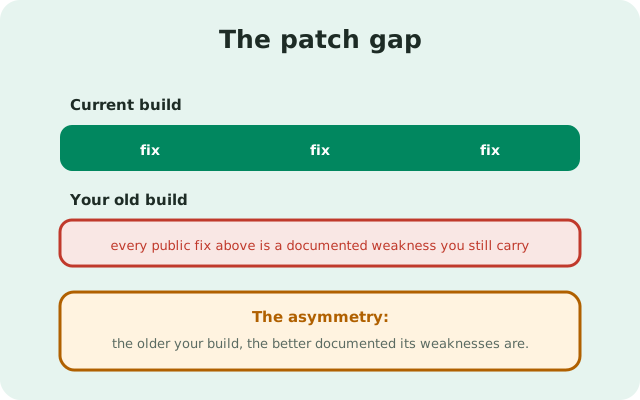
Every software update is, among other things, a list of mistakes the developers found and fixed. Signal's releases regularly include security fixes: memory-safety bugs, protocol edge cases, fixes for issues found in audits, hardening against new attack techniques. When you run an old version, you run with every one of those mistakes still in place. And because the fixes are public, attackers know exactly which mistakes to aim at. This is the core asymmetry: the older your build, the better documented its weaknesses are.
The cryptography ages too
The cryptography itself ages too. Protocols get tightened, weak configurations get removed, certificate handling gets stricter. An old client may negotiate with servers and contacts using parameters that were acceptable two years ago and are discouraged now. You will not notice any of this as a user; the app keeps working. That is precisely the problem. Vulnerability in a messenger is silent until it is exploited, and "it works fine" is not evidence of safety.
The platform underneath changes
Then there is the platform underneath. Android changes every year: permission models, background execution rules, encryption APIs. An old Signal build was tested against the Android of its time, and running it on a newer Android means running untested combinations: crashes, broken notifications, and subtle security behaviors the developers never validated. Conversely, running a new build on a very old Android is exactly the situation updates are designed to handle gracefully, which is another reason to stay current rather than freeze in place.
Staying current is nearly effortless
The website build makes staying current nearly effortless: it checks for updates itself and installs them, no Play Store needed. If you are on the website build and it is months behind, something is wrong with the updater, not with the concept of updating. Fix the updater (or reinstall the current file over your existing app; same package, same signing key, chats intact) instead of hunting for the version you remember fondly.
The 'old version' download site trap
Search for any app's old version and you will find the same ecosystem: archive sites with long lists of past releases, each with a green download button. For Signal, these sites are especially dangerous, and the reason is structural. An old version is the perfect camouflage for a tampered file. The victim has no recent memory of what the genuine old file should look like. They cannot compare it against the current official page, which only lists the latest. And they have already decided that "not from Signal" is acceptable for this download.
The tampering playbook
The tampering playbook is simple. Take Signal's open-source code at some old version, add spyware or fraud code, build it, and sign it with the attacker's own key. Upload it to the archive site as "Signal 7.x APK." The victim installs it, sees an app that looks like the Signal they remember, and grants it permissions with confidence. Because the file is old, nobody expects the current fingerprint to match. So the one check that would catch the tampering, comparing the signing certificate against Signal's published fingerprint, gets skipped as "not applicable to old versions." That skipped check is the whole attack.
Even genuine archives normalize a bad habit
Even the archive sites that serve genuine old files are a problem, because they normalize the habit of downloading APKs from strangers. The tenth download from an archive site feels as routine as the first, and the eleventh is the tampered one. Habits do not distinguish between the honest files and the malicious ones; only verification does, and verification against Signal's current published values cannot validate an old file. Our guide to telling real and fake APKs apart explains why the fingerprint check is the load-bearing wall here.
Stale SEO keeps intercepting people
There is also a quieter harm: stale SEO. Archive pages rank well and stay ranked for years, so they keep intercepting people long after the versions they host became dangerously outdated. A page offering a two-year-old build does not come with a warning that the build has known, fixed vulnerabilities. It just offers the button. The site has no incentive to tell you the file is unsafe; its business is downloads, not your security.
The only honest downgrade path
Sometimes people want an old version for an honest reason: the new release has a bug, changed a feature they relied on, or runs badly on their phone. The feeling is understandable. The downgrade is still a bad idea, and here is the honest version of why.
Downgrading a signed app is not clean
First, downgrading a signed app is not clean. Android will not install an older version over a newer one without a full uninstall, which means losing local data unless you have a proper backup. And Signal's backup story for the website build is exactly the kind of thing people discover mid-crisis. Second, the moment you downgrade, you reintroduce every vulnerability fixed between the old and new versions, deliberately. Third, you still have the sourcing problem: Signal's own page only offers the current build, so the old file must come from a third party, which puts you right back in the archive-site trap.
The honest path when a new version misbehaves
The honest path when a new version misbehaves: report the bug, wait for the fix (Signal ships frequently), and in the meantime use the app as-is if the bug is cosmetic. If the bug is severe, crashes on launch, messages not sending, reinstall the current build cleanly rather than reaching backward. A clean install of the current version fixes corrupted-update problems without any of downgrading's costs. Our parse-error troubleshooting guide covers the mechanics.
Notice what this advice never includes: a link to an old-version archive, a "safe" third-party source for old builds, or instructions for sideloading a downgrade. Those do not exist in honest form. Anyone offering them is either mistaken or selling something. The current build, from Signal's page, verified with the published fingerprint, is the complete answer.
Update urgency, without the fear
Security writing loves urgency, and urgency makes people tune out. So here is the calm version: updating Signal is one of the highest-value, lowest-effort security actions in your entire digital life. It is free, it takes a minute, and on the website build it mostly happens by itself. There is no reason to be anxious about it and no reason to postpone it. It is closer to brushing your teeth than to defusing a bomb: routine hygiene, not emergency response.
A reasonable cadence: let the auto-updater do its job, and once a month, glance at the version in Signal's settings and compare it against signal.org/android/apk. If you are one or two releases behind, that is normal. Rollouts are staged. If you are months behind, the updater is stuck: our stuck-on-an-old-version guide walks through every cause in order, and a manual install of the current file over your existing app is the usual fix. That monthly glance takes thirty seconds and catches the only failure mode that matters.
What not to do: do not chase every release the hour it drops (staged rollouts mean the "latest" you see on a third-party site may be newer than what Signal has actually published, another reason to trust only Signal's page). Do not treat a pending update as an emergency. The threat model here is months of neglect, not hours of delay. Calm, consistent updating beats frantic updating the same way it beats everything else.
What if your phone cannot run the new version?
This is the hardest case on the page, and it deserves honesty rather than a workaround. If your phone is so old that the current Signal build will not install or run on it, you have a hardware problem, not a software problem, and no APK download fixes hardware problems. Fetching an old Signal build from an archive site does not solve it either. It gives you an app with known vulnerabilities from an untrustworthy source on a device whose operating system itself stopped receiving security updates years ago. That combination is not a solution; it is three problems stacked in a trench coat.
The real fixes, in order of practicality
The real fixes, in order of practicality: first, check whether the current build actually fails. People often assume an incompatibility that is not real, and Signal supports many Android versions. Try the genuine current file from Signal's page before concluding anything. Second, if the phone truly cannot run it, the honest answer is that the phone cannot safely run a modern messenger, and the device needs replacing. A phone that cannot run current Signal is a phone that cannot run current anything securely.
What we will not recommend
What we will not do is point you at "light" or "old" APKs from third-party sites as a workaround. Those files are precisely the tampering vector described above, and recommending them would trade your security for our convenience. If a new device is genuinely out of reach right now, use Signal's desktop or linked-device options where available, and treat the old phone as the compromised-by-age device it is: fine for alarms and offline games, not for private communication.
Risk scenarios at a glance
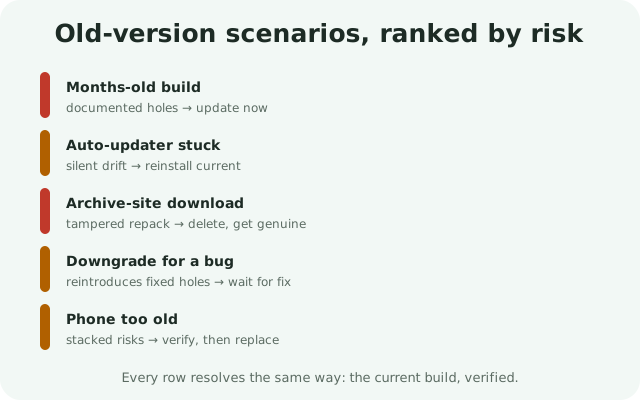
The information-gain element for this page: every old-version scenario, the actual risk, and the right move.
| Scenario | The real risk | Right move |
|---|---|---|
| Running a months-old build | Known, publicly documented vulnerabilities; aging crypto parameters | Update to the current build from Signal's page; check monthly |
| Auto-updater stuck or disabled | Silent drift further behind with every release | Reinstall the current file over the existing app; verify the fingerprint |
| Downloaded an old version from an archive site | Tampered repack signed with an attacker's key; the fingerprint check gets skipped as "not applicable" | Delete it; install the current build from signal.org; verify before installing |
| Considering a downgrade because the new version has a bug | Reintroduces fixed vulnerabilities; requires data-destroying uninstall; still needs a third-party source | Report the bug, wait for the fix, or clean-reinstall the current build |
| Phone too old for the current build | Old app plus unpatched OS plus untrustworthy source: three stacked risks | Verify incompatibility first with the genuine file; otherwise replace the device |
| "It works fine, why update?" | Silent vulnerability; "works fine" is not evidence of safety | Treat updates as hygiene: free, fast, automatic on the website build |
Every row resolves the same way: the current build, from Signal's page, verified. Old versions are not a resource to mine; they are a risk to retire.
from Signal's official site — file hosted by Signal, not by us
Frequently asked questions
Is it safe to use an old version of Signal?
No. Old versions contain security vulnerabilities that are fixed in the current build, and those flaws are publicly known. Update to the latest version from signal.org/android/apk instead.
Where can I download old versions of the Signal APK?
Nowhere trustworthy. Signal's own page only offers the current build, and third-party 'old version' archive sites are a known malware channel serving repackaged, tampered files. Don't use them.
Can I downgrade Signal to an older version?
It's a bad idea: Android requires a full uninstall (losing local data), you reintroduce fixed vulnerabilities, and the old file must come from an untrustworthy third party. If a new version has a bug, report it and wait for the fix.
My phone is too old for the latest Signal. What now?
First verify with the genuine current file, since assumed incompatibility is often wrong. If it truly won't run, the honest fix is a newer device; don't fetch old APKs from archive sites.
How often should I update Signal?
Let the website build's auto-updater work, and glance at your version monthly against signal.org/android/apk. Being a release or two behind is normal; months behind means the updater is stuck.
Keep reading
- the latest Signal version tracker: the current website build number, kept updated
- telling real and fake Signal APKs apart: why the fingerprint check is load-bearing
- stuck on an old version: the fix guide, when updates quietly stop arriving
- is the Signal APK safe?: the full safety picture, plainly explained