
Signal's download page has no QR code: what to do about the ones you see
Published: October 7, 2026 · Updated: October 8, 2026
There is no official QR code to scan. Signal's download page at signal.org/android/apk shows the current version and a Download button. It does not show a QR code (checked against the live page). So any QR code that claims to download the Signal APK came from somewhere else: a poster, a forwarded message, a third-party site. That does not automatically make it malicious, but it means the code borrows none of Signal's trust. This page explains how QR phishing works, the patterns attackers reuse, and the checklist that keeps you safe with any QR code you meet.
The short answer
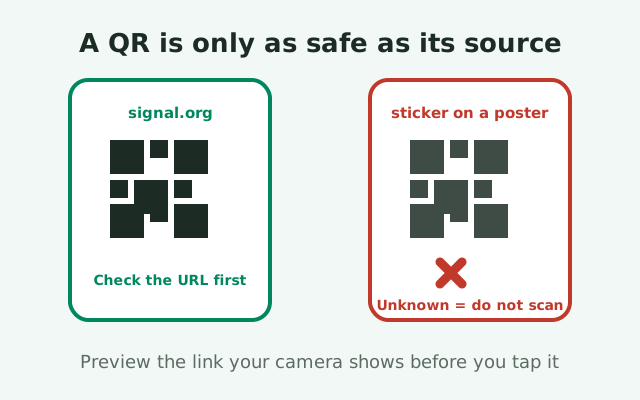
Scanning a QR code is safe when the code itself comes from a source you trust, and dangerous when it does not. Here is the catch for Signal: Signal's official download page has no QR code at all, so no QR code anywhere can honestly claim to be Signal's official one. The risk is never the technology; it is the source. A QR code printed on a flyer, forwarded in a chat, or stuck over another code can point anywhere, and your eyes cannot tell the difference between a code that leads to signal.org and one that leads to a lookalike.
Think of it this way: a QR code is a hyperlink with the address hidden. You would not click a link in a random message without looking at where it goes, and you should not scan a QR code without the same check. The good news is that your phone already gives you that check for free. Every modern camera app shows a preview of the URL before opening it. The entire safe method is reading that preview.
So the rule fits in one sentence: read the URL preview every time, and never trust a code just because it says Signal. Everything below is the detail behind that sentence: what Signal's download page actually shows, how attackers abuse QR codes, and what to do if you already scanned something suspicious.
What Signal's download page actually shows
Open signal.org/android/apk and you will find no QR code. The page shows the current website-build version (8.29.3 at the time of writing), a Download button, and the SHA-256 fingerprint of Signal's signing certificate so you can verify the file afterward. Tapping the button downloads the APK from updates.signal.org, Signal's own file server, over HTTPS. That is the entire official download flow: a button, not a code.
This matters because it removes the ambiguity. If a QR code claims to be Signal's official APK download, that claim is false on its face: the official page offers no QR code to copy. The code came from someone else, and "someone else" ranges from a helpful friend sharing a link to a scammer running a quishing campaign. The sections below give you the tools to tell which one you are looking at.
One more useful fact: the file URLs on Signal's servers can rotate between releases (which is why we always link the landing page rather than the file), but signal.org/android/apk stays put. Whatever a QR code's preview shows, compare it against that address: if the preview does not resolve to signal.org, the code is not pointing at Signal's download, whatever its label says.
Why QR codes are easy to abuse
The attack has a name in the security industry: quishing, QR phishing. It works because it removes the one defense people actually use against bad links, which is reading them. Nobody can look at a QR code and see the URL inside it. That single property turns every printed code into a leap of faith, and attackers build entire campaigns on that leap.
Context does the trusting for you
The second property attackers love is context. A QR code on a well-designed poster, in a message from a friend's compromised account, or on a sticker placed over a legitimate code inherits the trust of its surroundings. Your brain evaluates the poster, the friend, the shop window, not the code. The code itself is never evaluated, because it cannot be, until your camera decodes it. By then most people just tap the preview without reading it, which completes the attack.
Phone behavior hides the destination
The third property is phone behavior. On a desktop, hovering over a link shows the destination; on a phone, tapping a QR preview opens it immediately, and small screens truncate long URLs so you see the familiar-looking beginning and miss the suspicious ending. Attackers count on all three properties at once: unreadable code, trusted context, and hasty tapping. The defense has to be deliberate precisely because the attack exploits habit.
Why QR codes suit APK malware
This is also why QR codes are a favorite for APK malware specifically. The victim is already on their phone, already in "install" mode, and one tap away from downloading a file. A fake Signal QR campaign does not need to be sophisticated; it needs a plausible poster and a domain that looks close enough at a glance. The preview screen is the only moment the attack can be stopped cheaply, which is why the checklist below centers on it.
QR attack patterns, catalogued
This is the information-gain core of the page: the patterns, so you can recognize them in the wild. We do not list specific malicious domains (they change constantly), but the delivery methods barely change at all.
| Pattern | How it reaches you | What gives it away |
|---|---|---|
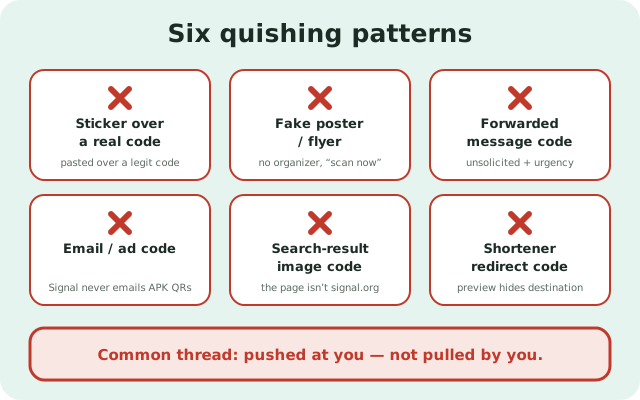
| Sticker over a real code | A fake QR sticker pasted over a legitimate code on a poster, shop window, or notice board | Edges lifting, mismatched print quality, the code looks newer than the poster around it |
| Poster and flyer codes | Entirely fake posters advertising a "Signal download" with a QR, placed where people look for tech help | No verifiable organizer, generic design, pressure language like "scan now" |
| Forwarded message codes | A QR image sent in a chat or group, often with a story: "new version," "faster download," "works without Play Store" | Unsolicited, comes with urgency, the sender cannot explain where the code came from |
| Email and ad codes | QR in a promotional email or a web ad promising the Signal APK | Signal does not email APK download QR codes to users; any such email is fake |
| Search-result image codes | QR images on third-party "download" pages that rank for APK queries | The page itself is not signal.org; the code is just the page's untrustworthiness in image form |
| Redirect-service codes | Codes that point to URL shorteners or dynamic QR services before reaching the final page | The preview shows a shortener domain instead of signal.org; the final destination is hidden from you |
Notice the common thread: in every pattern, the code arrives through a channel you did not choose. Compare that with Signal's real download page, which you navigate to yourself and which uses a plain Download button instead of a QR code. That difference, pulled by you versus pushed at you, is the most reliable signal in the whole catalog. Unsolicited QR codes for software downloads deserve a default answer of no.
The safe-scan checklist
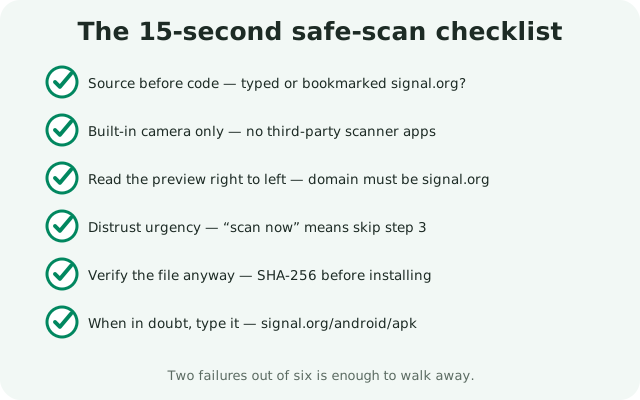
Run through these six steps whenever you scan a download QR code. They take about fifteen seconds once they become habit.
- Check where you found it. Signal's own page has no QR code, so every QR code you meet arrived through some other channel: a poster, a message, an email, a third-party site. Unsolicited codes get a default answer of no, regardless of how legitimate they look.
- Use your camera app, not a random scanner. Your phone's built-in camera shows a clean URL preview. Third-party "QR scanner" apps are themselves a classic malware vector; you do not need one.
- Read the preview, all of it. The camera shows the decoded URL before opening. Read it right to left: the domain must be signal.org, nothing added, nothing changed. If the preview shows a shortener, a different domain, or a long suspicious address, close it.
- Distrust urgency. "Scan now," "limited time," "new version only here". Legitimate downloads never need urgency. Urgency is there to make you skip step 3.
- After downloading, verify the file anyway. A safe scan gets you the genuine file, but the verification habit is what proves it. Check the SHA-256 fingerprint against the value published on Signal's page before installing.
- When in doubt, type it. signal.org/android/apk is short enough to type. Typing the address yourself removes the QR from the equation entirely, which is the only method with zero QR risk.
Two failures out of six is enough to walk away. There is no official Signal QR code to compare against, so a code earns trust only by passing these checks, never by wearing Signal's name.
If you scanned a bad QR code
If you scanned a suspicious code and tapped through, do not panic, but do not install anything either. The scan itself is harmless; the danger starts with the download and the install. Here is the recovery order.
First, look at where you actually went. Open your browser history and read the full URL of the page the code opened. If it was not signal.org, treat everything that page offered as hostile: do not download from it, and if you already downloaded a file, delete it without installing. A file sitting in your downloads folder cannot hurt you; an installed app with your permissions can.
Second, if you installed the file, take it seriously. Uninstall it completely, assume it saw everything while it was on the phone, change important passwords from a different device, and check for unexpected charges. Then install the genuine app from Signal's real page. Our APK malware guide covers the full cleanup.
Third, if the page asked for your phone number, a verification code, or your Signal PIN, re-register Signal yourself right away so any session the attacker started gets replaced, and change your PIN. A download never needs credentials; any page that made the download conditional on them was harvesting them.
Finally, report it. If it was a physical sticker or poster, tell whoever manages the location. If it was a website, our reporting guide shows where to file. Fake QR campaigns survive on nobody reporting them.
The simplest option: skip the QR entirely
Here is the honest conclusion: the QR code is a convenience, not a requirement, and the safest scan is the one you never need. Bookmark signal.org/android/apk in your phone's browser. When you need the APK, open the bookmark and tap the download button. No camera, no preview to misread, no sticker that could have been tampered with. The bookmark is a trust decision you make once, carefully, instead of a trust decision you remake at every scan.
This also simplifies helping other people. When family asks where to get Signal, do not send them a QR code image they have to evaluate. Download the file yourself from your bookmark and transfer it to their phone over USB or Bluetooth, then verify the transferred file so the copy is as trustworthy as the original. Most people's security fails on habits, not knowledge; give them the habit.
None of this means QR codes are evil. A QR code from a source you trust, pointing at an address you verified in the preview, is perfectly fine. It just means the QR is solving a typing problem, and typing a short address is a problem you can also solve by typing. Choose whichever method you will actually do carefully, and make it the only one.
from Signal's official site — file hosted by Signal, not by us
Frequently asked questions
Does Signal's download page have a QR code?
No. The page at signal.org/android/apk shows the version and a Download button, no QR code. Any QR code claiming to be the official Signal download was made by someone else: read the URL preview before opening anything it points to.
Can a QR code give me a virus?
A QR code itself is just a link and cannot infect anything. The danger is where the link points: a malicious QR can lead to a page serving a tampered APK. The scan is harmless; the download and install are where the risk lives.
How do I know a QR code is fake?
Start from this: Signal's page has no QR code, so no QR code is the official one. Then read your camera's URL preview right to left. Anything other than signal.org, or a URL shortener hiding the destination, means don't open it.
Someone put a QR sticker over a poster. Is that a scam?
Very often, yes. Stickers pasted over legitimate codes are a classic attack: the original code was trustworthy and the sticker is not. If a code looks added-on, newer than its surroundings, or has lifting edges, don't scan it.
Do I even need the QR code to download Signal?
No. Bookmark signal.org/android/apk and open it directly. The QR is only a shortcut for getting the link onto your phone, and typing or bookmarking the short address achieves the same thing with zero QR risk.
Keep reading
- where Signal's downloads actually come from: the supply chain behind the download button
- spotting fake Signal download sites: the typosquat pattern catalog
- verifying the APK's SHA-256 fingerprint: the check that settles authenticity