
Signal on rooted phones: risks and reality
Published: October 7, 2026
Yes, Signal runs on rooted phones. The website build has no hard block against root, because it does not depend on Google Play's integrity checks. It will install, register, and work. But "it works" is not the same as "it is safe": rooting removes the walls Android places between apps, which means any app with root access on your phone can read Signal's private data. The encryption that protects your messages from everyone else does not protect them from software running as root on your own device. This page gives the honest picture: what root actually changes, the real risks ranked by likelihood, why Signal does not block rooted devices, and our recommendation for different situations.
The short answer
Signal's website build installs and runs on rooted phones without complaint. There is no root check that refuses to open, no SafetyNet or Play Integrity gate. Those are Google Play concerns, and the website build is deliberately independent of Play services. If your question was just "will it work," the answer is yes.
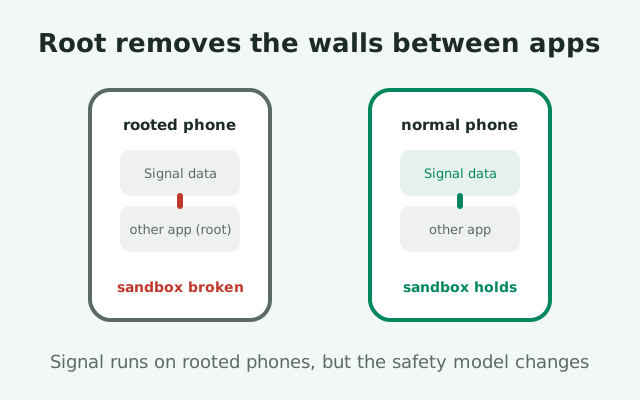
The question you should be asking is different: should a private messenger live on a device where the app sandbox is disabled? Rooting gives one app, and potentially every app you grant root to, the ability to read any other app's private files, including Signal's encrypted database and its keys. At that point the threat is not Signal's encryption failing; it is the device handing your data to software you cannot fully audit.
Our honest verdict, stated up front and defended below: for casual use, a rooted phone running Signal is a calculated risk most people will survive; for sensitive communication, activism, journalism, anything where exposure has real consequences, do not do it. Use a separate, unrooted device. The rest of this page explains exactly why, so the verdict is yours to keep or discard with open eyes.
What root actually changes
Android's security model rests on a simple idea: every app runs as its own user, in its own sandbox, and cannot read other apps' private files. Signal relies on this. Your messages are stored in an encrypted database, the encryption keys live in the app's private storage, and the operating system guarantees that no other app can reach them. That guarantee is the foundation everything else, the end-to-end encryption, the disappearing messages, the screen lock, is built on.
Rooting removes the foundation
Rooting removes the foundation. A rooted device has a superuser account that can read and write anything, and any app you grant root access to inherits that power. The sandbox walls do not get weaker; they stop existing for root processes. Signal's database encryption still works exactly as designed, but the keys to that database sit in files that root can read, which means the encryption protects against everyone except the device's own superuser, and everything running as superuser.
What this does and does not mean
It is important to be precise about what this does and does not mean. It does not mean Signal sends your messages in the clear, or that rooting magically decrypts anything. It means the confidentiality boundary moves. Instead of "only Signal can read Signal's data," it becomes "Signal plus anything with root can read Signal's data." On a phone where you carefully control which apps get root, that "anything" might be one tool you trust. On a phone where apps nag for root and you tap "grant" without thinking, it might be several apps you barely remember installing.
What the screen lock and PIN do not fix
The screen lock, the Signal PIN, and registration lock do not fix this. Those protect against a thief holding your locked phone, a SIM swap, and account takeover, all valuable, all intact on a rooted device. They were never designed to protect against software already running on the phone with full privileges. Different threats, different defenses; root defeats the device-integrity layer specifically.
The real risks, ranked
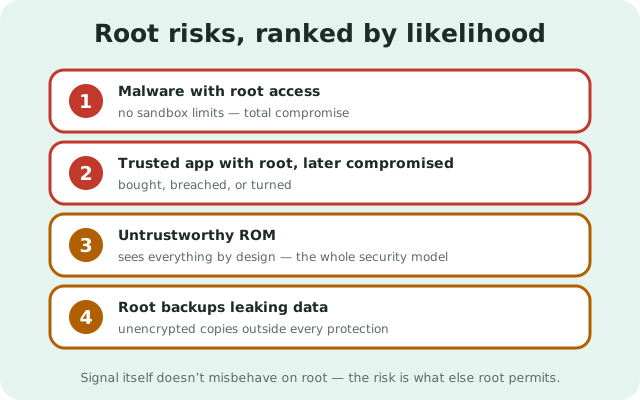
Not all root risks are equal. Here they are in rough order of how likely they are to actually hurt you.
- Malware with root access: game over. Ordinary Android malware is contained by the sandbox; it can phish and overlay, but it cannot silently vacuum up another app's database. Malware that obtains root, through an exploit or because you granted it, has no such limits. It can copy Signal's data directory wholesale, exfiltrate it, and decrypt it at leisure. This is the catastrophic case, and it is the reason every other risk on this list matters: root turns "annoying malware" into "total compromise."
- A legitimate app you granted root to, later compromised. The root manager, the backup tool, the system tweaker: you granted them root because they needed it to function, and you trusted them. But trusted apps get bought by ad companies, get breached, or ship malicious updates. On an unrooted phone, a compromised app is contained. On a rooted phone, a compromised root app inherits the keys to everything. Every root grant is a bet that the app stays trustworthy forever.
- The ROM itself. Many rooted phones run custom ROMs, and a ROM is the deepest software on the device: below every app, every permission, every sandbox. A ROM from a reputable community project with public source and a long track record is a reasonable trust decision. A ROM from an obscure download site, recommended in a forum thread, is not. Because the ROM sees everything by design, "trustworthy ROM" is not a detail; it is the entire security model of the device.
- Backups and file managers leaking data. Root enables powerful backup tools that copy app data freely, which is exactly the feature and exactly the risk. A full backup of Signal's data sitting unencrypted on an SD card, a computer, or a cloud folder is a copy of your messages outside every protection Signal provides. Convenient, and worth treating with the same care as the phone itself.
Notice what is not on the list: Signal itself misbehaving because of root. The app does not become buggy or insecure in its own code. The risk is entirely about what else the device now permits.
Why Signal does not block rooted phones
Some apps refuse to run on rooted devices, typically banking and payment apps, using Google's Play Integrity checks to detect root and shut down. Signal's website build does not do this, and the reason is philosophical as much as technical. Signal's position has consistently been that your device is yours: the app should not dictate how you configure your own hardware, and blocking rooted users would punish exactly the technically sophisticated users who most value independence from app stores.
The website build exists for people outside the Play ecosystem
There is a technical side too. The website build exists precisely for people outside the Play ecosystem: Huawei phones without Google services, de-Googled devices, regions where Play is blocked. Those users often run custom ROMs, and many custom ROMs come rooted or easily rootable. A root block on the website build would undermine the build's entire reason for existing. The Play Store build lives in Google's world with Google's checks; the website build lives in yours.
Not blocking root is not endorsing root
This is worth stating carefully, because it is easy to misread: Signal not blocking root is not Signal endorsing root. It is Signal declining to be your device's police. The responsibility for the device's integrity stays with you, which is exactly what this page is about. An app that refuses to run on your rooted phone is making a paternalistic safety decision for you; an app that runs anyway is trusting you to understand the trade-off. We would rather you understand it than discover it.
No integrity gate means no warning
One practical consequence: because there is no integrity gate, there is also no warning. Signal will not tell you your device is rooted and ask you to confirm. It just runs. If you did not root the phone yourself, a secondhand device, a "helpful" friend's setup, a pre-rooted ROM, you might not even know. Checking is easy: any reputable root-checker app, or your ROM's own settings, will tell you the truth in seconds. Know the state of your own device.
The detection cat-and-mouse, explained
A word on the broader ecosystem, described without instructions: some apps try to detect root and refuse to run, and a parallel ecosystem of tools tries to hide root from those detectors. This has been an arms race for a decade. Detection methods get smarter, hiding methods adapt, and the cycle repeats with every Android release. It is worth understanding that this exists, because it shapes what "rooted" even means day to day.
Hiding is never reliable
The key insight is that hiding is never reliable. A detector updated last month may catch a hiding method from last year; a hiding method updated yesterday may fool today's detectors. Anyone relying on "my root is hidden, so my banking app is safe" is betting that their hiding tool is currently ahead, a bet with no notification when it stops being true. For Signal specifically this matters less, since the website build does not play the game at all, but the unreliability principle applies to your overall device posture.
Why we will not provide evasion instructions
We will not provide instructions for evading root detection, and you should be skeptical of guides that do. Step-by-step evasion instructions age badly, vary by device and Android version, and frequently come bundled with downloads from untrustworthy sources, the classic vector for the exact malware this page warns about. If an app you need refuses to run on your rooted phone, the honest resolutions are to use that app on a separate unrooted device, or to accept the limitation. Fighting the arms race on your daily driver is a hobby, not a security strategy.
Our honest recommendation
Here is the verdict, by situation, without hedging.
If you root for tinkering and your chats are ordinary: running Signal on your rooted daily driver is a calculated, acceptable risk, provided you:
- Keep root grants minimal (one or two tools you genuinely trust).
- Keep the ROM from a reputable source and updated.
- Never grant root to apps casually.
Your threat model is opportunistic malware, and careful habits keep the odds in your favor. Verify your Signal install the same as anyone else: current build from Signal's page, fingerprint checked.
If your communication is sensitive
If your communication is sensitive: do not use a rooted phone. Not with careful habits, not with a trusted ROM, not with hidden root. The entire point of sensitive communication is eliminating single points of failure, and a rooted daily driver is a single point of failure wearing a trench coat. Get a separate, stock, unrooted device for Signal. It does not need to be expensive or new; it needs to be unmodified. Keep the rooted phone for everything else. Compartmentalization beats cleverness.
If someone else rooted your phone
If someone else rooted your phone: treat the device as untrusted until you understand its state. A secondhand phone, a gifted phone, a phone "set up" by someone else: check for root, check the ROM source, and if anything looks off, flash it back to stock or replace it before putting Signal on it. You cannot build private communication on a foundation you did not inspect.
If you are deciding whether to root
If you are deciding whether to root: weigh what you gain (ad-blocking, backups, customization) against what you lose (the sandbox guarantee for every app on the phone, including Signal). Most people overestimate the gains and underestimate the loss, because the loss is invisible until it matters. If Signal is the most sensitive thing on your phone, that alone is an argument for leaving the device stock.
Which setup fits your situation
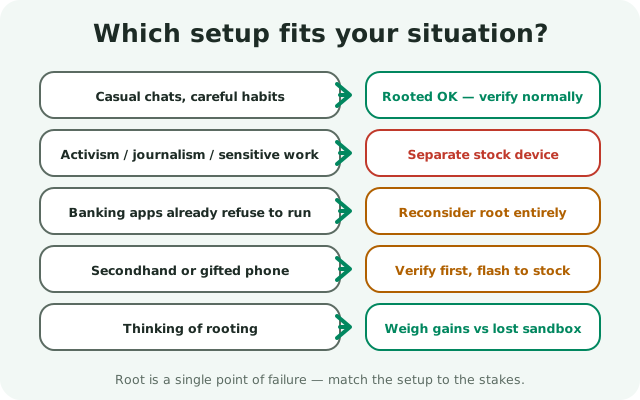
The information-gain element for this page: the decision framework in one table.
| Your situation | Rooted daily driver? | Why |
|---|---|---|
| Casual chats, careful root habits | Acceptable | Minimal root grants plus a reputable ROM keeps the realistic risk low; verify Signal normally |
| Activism, journalism, sensitive work | No: separate stock device | Root is a single point of failure; sensitive comms deserve a device with the sandbox intact |
| Banking apps already refuse to run | Reconsider root entirely | If your threat model includes financial apps, the apps themselves are telling you the device state is unsafe |
| Secondhand or gifted phone | Verify first, flash to stock if unsure | Unknown provenance means unknown software below the apps; inspect before trusting |
| Thinking about rooting for the first time | Weigh it honestly | List what you gain versus the sandbox guarantee you lose for every app, Signal included |
| Already rooted, grant-happy | Tighten up or unroot | Every casual root grant is a permanent bet on that app's future trustworthiness |
The through-line: root is a trade, not a sin. Make it deliberately, with the sandbox loss priced in, and keep Signal's most sensitive conversations on the side of the trade where the walls still stand.
from Signal's official site — file hosted by Signal, not by us
Frequently asked questions
Does Signal work on rooted phones?
Yes. The website build installs and runs on rooted phones with no hard block, since it doesn't depend on Google Play's integrity checks. It works normally, but the device's app sandbox is weakened, which changes the security picture.
Is it safe to use Signal on a rooted phone?
For ordinary chats with careful root habits, it's a calculated risk. For sensitive communication, no: any app with root access can read Signal's private data, so use a separate unrooted device instead.
Can root access read my Signal messages?
Yes, in principle. Root can read Signal's data directory including its encrypted database and keys. Signal's encryption protects against everyone except software running as root on your own device.
Why doesn't Signal block rooted devices like banking apps do?
Philosophy and purpose: Signal treats your device as yours to configure, and the website build exists for users outside the Play ecosystem, many on custom ROMs. Not blocking root is not the same as endorsing it.
I bought a secondhand phone. How do I check for root?
Use any reputable root-checker app or check your ROM's settings. If the phone is rooted and you don't know its history, flash it back to stock or replace it before using Signal on it.
Keep reading
- is sideloading safe?: the full picture on installing outside Play
- Signal APK malware guide: cleanup when something already went wrong
- verifying the APK's SHA-256 fingerprint: the check that settles authenticity