
Signal SMS scams and SIM-swap attacks: how to protect yourself
Published: October 7, 2026 · Updated: October 8, 2026
Scammers send fake "Signal verification code" texts to trick you into handing over your code, and in SIM-swap attacks they convince your carrier to move your number to their SIM so the codes go to them instead. Either way, the prize is your Signal account, and with it, your identity on the service. The good news: Signal's registration lock turns your PIN into a wall that a stolen SIM alone cannot climb. This page explains both attacks in plain language, shows how to tell real messages from fakes, and walks through the protection steps that actually work.
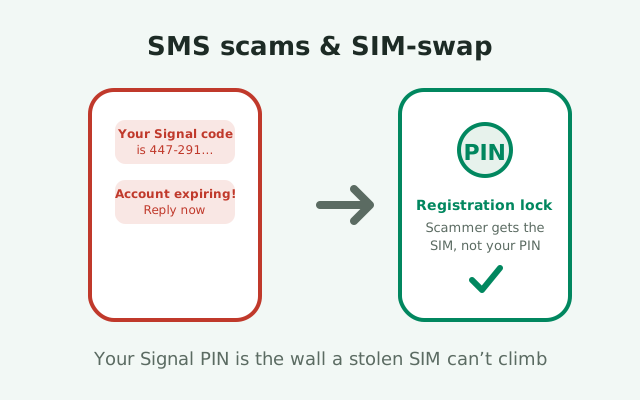
Fake verification-code texts
The simplest scam in this family arrives as a text message: "Your Signal verification code is 447-291. Do not share it." Sometimes it adds urgency: "Your account will be deleted in 24 hours unless you verify." Sometimes it comes with a follow-up from a "friend" or "support agent" asking you to read the code back to them. The mechanics are always the same. The scammer has started a Signal registration on their phone using your number. Signal sends the real code to your phone by SMS. The scammer needs you to hand it over, because that code is the only thing standing between them and your account.
What the code is for
Understand what the code is for and the scam loses its power. A verification code proves to Signal that the person registering a number can receive texts at that number. If you did not just start a registration yourself, a code arriving out of nowhere means someone else did. The correct response is to do nothing with it: do not reply, do not read it to anyone, do not tap any link in the message. Delete it.
The social-engineering layer
The social-engineering layer is what makes this effective. The follow-up message often comes from someone posing as a friend ("hey, I accidentally sent my code to your number, can you send it back?") or as support ("we need to verify your account"). Real friends do not ask for your codes. Real support never asks for your codes. More on that in our fake support scam guide. And Signal itself never sends you a text asking you to do anything; it only sends the bare code when you trigger a registration.
Real Signal messages vs fakes: a comparison
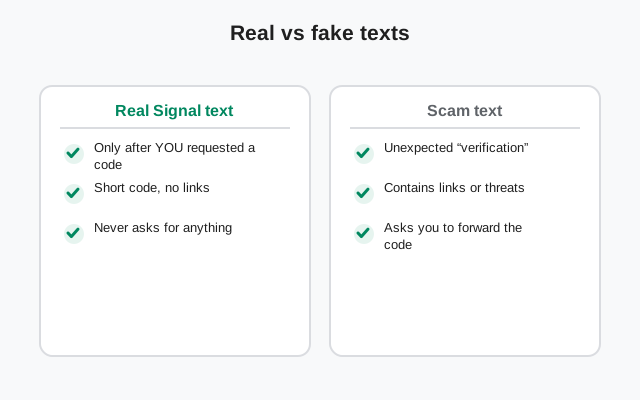
Here is the information-gain core of the page: how to tell them apart at a glance.
| Real Signal SMS | Scam SMS | |
|---|---|---|
| When it arrives | Only right after YOU start a registration or re-registration | Out of the blue, when you did nothing |
| Content | Just the code, nothing else | Code plus instructions, links, threats, or a request to reply |
| Links | Never contains links | Often contains a link to a fake "verify" page |
| Sender | A short code or service number | Can be any number; scammers spoof freely |
| Asks for anything | Nothing. You type the code into the app yourself | Asks you to reply with the code or tap through |
| Threats | None, ever | "Account deleted," "suspended," "expires today" |
The one rule that covers every row: if you did not request a code, any message about a code is suspicious. You do not need to analyze the sender or the wording. Unexpected code equals someone else's registration attempt, full stop. Report the message as spam in your SMS app if it offers the option, and move on.
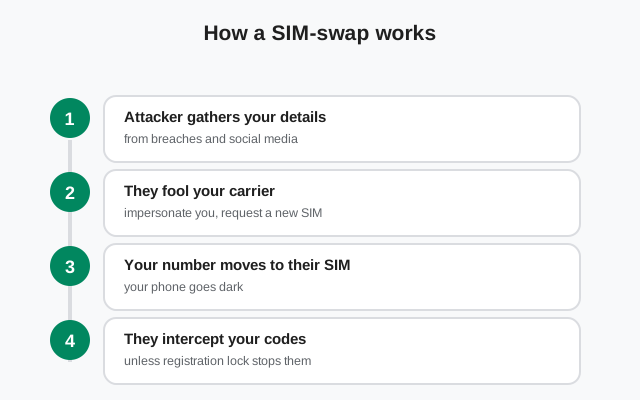
How a SIM-swap attack works
A SIM-swap attack skips the trickery of the fake text and goes after your carrier instead. The attacker calls your mobile carrier (or visits a store, or uses a compromised employee account) pretending to be you. They claim the SIM is lost or damaged, and ask for the number to be moved to a new SIM card: theirs. If the carrier's identity check is weak, and too often it is, your number starts ringing on the attacker's phone within minutes.
Once they hold your number, the SMS-based parts of your digital life fall over like dominoes. They request a Signal verification code; it arrives on their SIM; they register your number on their phone and your account is theirs. Password resets for email, banking, and social accounts that rely on SMS codes become theirs too. Your actual phone just shows "no service," which is often the first and only warning sign, and many people mistake it for a network outage.
This attack is worth understanding because it reframes the threat. You can be perfectly careful (never click a link, never share a code) and still lose your number to a carrier employee who was fooled or bribed. The defense therefore cannot depend on your vigilance alone. It has to be something the attacker cannot get from your carrier, which is exactly what registration lock is.
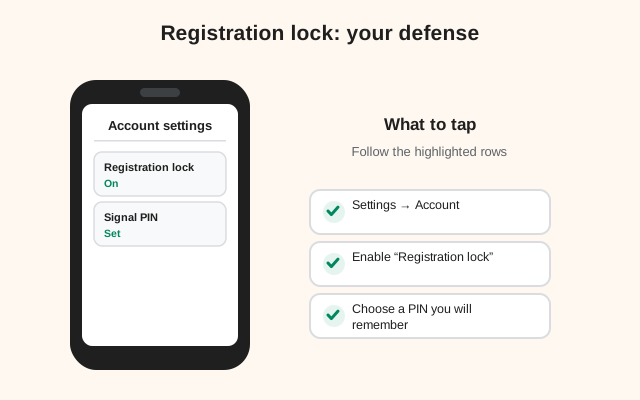
Registration lock: your main defense
Registration lock is Signal's answer to SIM-swap, and it is the single most important setting on this page. When it is on, re-registering your phone number on a new device requires your Signal PIN, not just the SMS code. An attacker who has swapped your SIM gets the SMS code easily, but without your PIN they cannot complete the registration. The number alone is no longer enough.
The seven-day nuance
There is one nuance to know: registration lock expires after seven days of inactivity on the account. That means if you stop using Signal entirely for a week, a fresh registration would need only the SMS code. In practice this rarely matters (active users re-register rarely, and the lock covers the window that counts), but it is worth knowing the mechanism rather than assuming it is permanent. Keep using the app normally and the lock stays on.
How to turn it on
Turning it on is simple: open Signal, go to Settings, then Account, and enable registration lock. You will need your Signal PIN, the same PIN you set when you first registered. If you have forgotten it, sort that out before you need it; our Signal PIN recovery guide covers your options. Then treat that PIN like a password: unique, stored in a password manager, never shared, never typed into a website. A registration lock is only as strong as the PIN behind it, and a PIN of 1234 protects nothing.
What registration lock does not protect
One more honest point: registration lock protects your Signal account specifically. It does not protect your email, your bank, or your social accounts from the same SIM-swap. For those, the defenses are app-based authenticator codes or hardware keys instead of SMS wherever the service allows it. Signal is the one account where the platform built the fix in; everywhere else, you have to choose it.
Carrier-level protection
Since the carrier is the weak link in a SIM-swap, harden the carrier account directly. Most carriers offer some combination of the following, and you should enable everything yours provides. First, a port-out PIN or number-transfer PIN: a code required before your number can be moved to another carrier, which blocks the most common swap path. Second, an account PIN or verbal password required for any changes, including SIM swaps. Set one that is not your birthday, and do not reuse your Signal PIN.
Third, ask your carrier about SIM-swap restrictions: some allow you to put a note or a flag on the account requiring in-store ID for SIM changes, or to disable remote SIM swaps entirely. Policies vary wildly by carrier and country, so call and ask specifically; the front-line agent may not volunteer these options. Fourth, if your carrier supports it, switch to an eSIM with proper account protections. It does not make swapping impossible, but it removes the "lost SIM, send a physical card" social-engineering script.
Keep expectations honest: carrier protections are uneven, carrier employees make mistakes, and insider-assisted swaps happen. These steps raise the cost of the attack substantially, but they are a complement to registration lock, not a replacement. The layered approach (carrier PIN plus Signal registration lock plus non-SMS two-factor elsewhere) is what turns a SIM-swap from a catastrophe into an inconvenience.
What to do if you have been SIM-swapped
If your phone suddenly shows no service and you did not change anything, treat it as a possible SIM-swap, not a network glitch. Act fast, because the attacker is working through your accounts right now.
- Contact your carrier immediately from another phone or a landline. Tell them you suspect an unauthorized SIM swap and ask them to reverse it and lock the account. Use your account PIN if you set one. This is the moment it earns its keep.
- Re-secure your Signal. Once your number is back on your SIM, re-register Signal yourself. With registration lock on, the attacker's registration attempt would have failed at the PIN step; without it, re-registering now kicks their session out. Either way, verify your safety numbers with important contacts afterward, because the attacker may have read or sent messages in the window.
- Check your other accounts. Email first, then banking, then everything else that uses SMS recovery. Look for password-reset emails you did not trigger, unknown sessions, and changed recovery addresses. Change passwords from a clean device, and switch every important account to app-based or hardware two-factor instead of SMS.
- Watch for aftershocks. Monitor bank and card statements for a few weeks. Consider a credit freeze or fraud alert if identity documents may be involved. File a report with your carrier's fraud department and, where available, with law enforcement. Reports create the paper trail that helps the next victim.
Then close the loop: enable registration lock if it was off, set the carrier PINs described above, and move your important two-factor methods off SMS. An attack you survive is an audit you did not have to pay for. For the broader picture of account takeover signs, see our guide on whether your Signal has been hacked.
from Signal's official site — file hosted by Signal, not by us
Frequently asked questions
I got a Signal code I didn't request. What should I do?
Nothing with the code itself: don't reply, don't share it, don't tap any link. An unexpected code means someone else started a registration with your number. Delete the message.
What is a SIM-swap attack?
An attacker convinces your mobile carrier to move your phone number to their SIM card, so SMS verification codes go to them instead of you. Your phone shows 'no service' while they take over SMS-protected accounts.
Does Signal's registration lock stop SIM-swap attacks?
Yes, for your Signal account. With registration lock on, re-registering your number requires your Signal PIN as well as the SMS code, so an attacker holding your swapped SIM still can't get in.
How do I turn on registration lock in Signal?
Open Signal, go to Settings, then Account, and enable registration lock. You'll need your Signal PIN. Keep the PIN unique and stored safely.
My phone suddenly has no service. Could it be a SIM-swap?
Possibly. Contact your carrier immediately from another phone, report a suspected unauthorized SIM swap, and ask them to reverse it. Then re-secure Signal and your other SMS-protected accounts.
Keep reading
- recovering a forgotten Signal PIN: because registration lock needs a PIN you actually remember
- the fake 'Signal support' scam: the other attack that starts with a message
- hiding your phone number on Signal: shrinking the attack surface further