
Signal Blocked on School or Work Wi-Fi: What to Do
Published: October 7, 2026 · Updated: October 8, 2026
Signal works on your mobile data but dies the moment you join the school or office Wi-Fi? The app is fine. The network is filtering it. Schools and workplaces routinely block messaging apps at the firewall, and no reinstall or settings tweak on your phone can undo that. Here is how to confirm it in two minutes, what you can honestly do about it, and what you should not do.
Why schools and workplaces block Signal
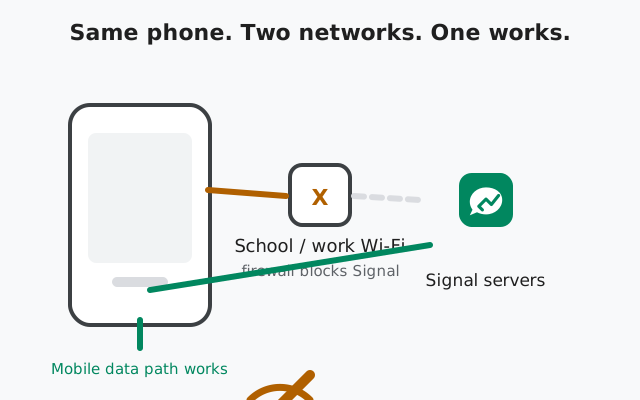
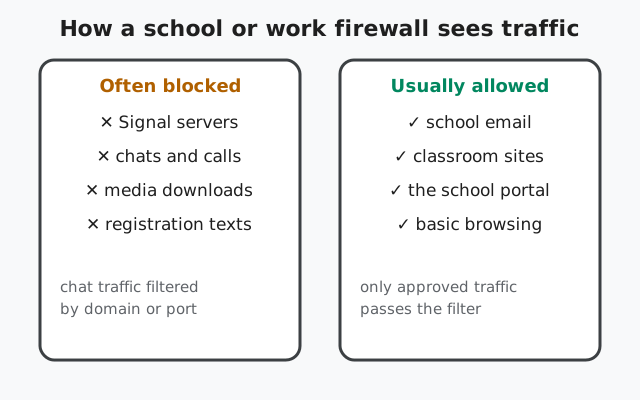
Most school and office networks run everything through a firewall that decides which apps may talk to the internet. This is not a bug and it is not aimed at you personally. Network admins block chat apps for three common reasons: to save bandwidth for schoolwork, to cut distractions in class, and to keep their filtering policies consistent.
Technically, the block usually works in one of two ways. The firewall may refuse connections to the domains Signal talks to (domain or DNS filtering), or it may block the network ports messaging apps use (port filtering). From your side both look identical: Signal opens, but messages hang, calls never connect, and media never downloads. The app cannot tell you which rule caught it. It just sees "no connection."
One thing worth understanding: this is a policy decision, not a technical failure. That matters, because the fixes that work for a glitchy home router do not apply here. Restarting your phone will not change a firewall rule.
Confirm it is the Wi-Fi (two minutes)
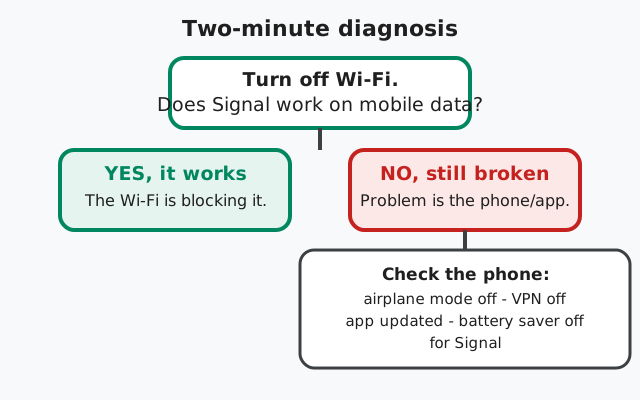
Before doing anything else, prove where the problem lives. The test is simple:
- Turn Wi-Fi off and let the phone fall back to mobile data.
- Open Signal and send a message to someone, or ask them to send you one.
- Watch what happens. If messages flow on mobile data, the Wi-Fi network is blocking Signal. If they still do not go through, the problem is on the phone. Run the checklist below.
If it works on mobile data but not Wi-Fi
That is a clean diagnosis: the network is filtering Signal. Nothing on your phone needs fixing. Your honest options are: ask the network admin, use mobile data for Signal, or (only if you are in a genuinely censored region) consider the app's built-in circumvention toggle. Each is covered below.
If it fails on mobile data too
Then the Wi-Fi is not the culprit. Run this checklist first:
- Airplane mode is off and you have a working data connection (other apps load).
- No VPN is active (a VPN can break Signal on its own: see our guide to VPN problems).
- Signal is updated to the latest website build (v8.29.3 at the time of writing).
- Battery optimization is turned off for Signal (some phones kill background connections).
If everything above checks out, work through our messages not sending guide instead. That page covers account and device-level causes.
What you can honestly do about a blocked network
1. Ask the network admin
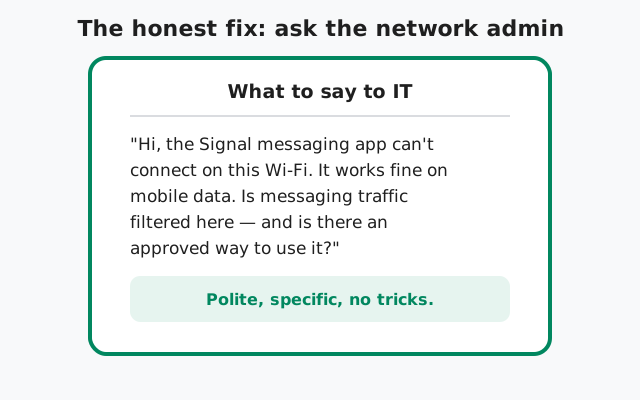
This is the only legitimate way past a school or work block, and it works more often than people expect. Admins sometimes block whole categories by default and will allow a specific app on request, especially at workplaces where Signal is used for real communication. Tell them exactly what you observed: "Signal works on mobile data but not on this Wi-Fi." That one sentence skips the diagnosis and makes you sound like someone reporting a problem, not someone trying to sneak around one.
If they say no, accept it. Schools and employers are allowed to set network rules, and many prohibit bypassing their filters outright. Getting caught dodging a school firewall is a disciplinary problem, not a tech problem.
2. Use mobile data for Signal
The simplest honest option. If your plan allows it, leave Wi-Fi off when you need Signal, or let Signal run on mobile data while everything else uses Wi-Fi. It costs data, but Signal messages are tiny. A month of texting uses less than most people burn scrolling one video feed.
3. The censorship circumvention toggle: what it is NOT for
Signal has a built-in censorship circumvention toggle at Settings → Privacy → Advanced. It is designed for people in regions where governments block Signal. It changes how the app connects so basic filters cannot recognize the traffic.
Be clear about what this is not: it is not a tool for getting around your school's or employer's rules. Using circumvention tech to defeat an institutional firewall is exactly the kind of policy violation that gets devices confiscated or accounts suspended at work. If you are a student or employee on a managed network, the toggle is not your answer. The admin is. Save the toggle for its real purpose: travel through genuinely censored regions.
What helps, what does not, what backfires
| Approach | Works? | Notes |
|---|---|---|
| Ask IT to allow Signal | Often | Legitimate; the only proper way past a policy block |
| Switch to mobile data | Yes | Simple, honest; costs a little data |
| Reinstalling Signal | No | The app is not broken; the network is filtered |
| Changing phone settings at random | No | No device setting overrides a firewall rule |
| Circumvention toggle at school/work | Maybe, but don't | Built for censorship, not for dodging institutional policy |
| Random "unblocker" apps from shady sites | No | Often malware; some steal credentials |
What NOT to do
- Do not install random proxy or "unblocker" apps to sneak past the filter. Many are adware or worse, and on a school or work device they can be a policy violation on their own.
- Do not try to defeat the firewall with tricks you found online. If the network is managed, attempts get logged, and the consequences (lost device privileges, disciplinary action) are worse than being without Signal for a few hours.
- Do not factory-reset your phone. This is a network block; wiping your phone changes nothing except deleting your data.
- Do not assume the app is broken and download Signal from a random site. If you ever need a fresh copy, the only safe source is Signal's own APK paions
Quick answers to the questions we hear most about Signal on restricted Wi-Fi.
Why does Signal work on mobile data but not on Wi-Fi?
Because the Wi-Fi network is filtering it. Schools and workplaces commonly block messaging apps at the firewall while mobile carriers do not, so the app works the moment you switch networks. Nothing on your phone needs fixing.
Can I get Signal working on school Wi-Fi without asking anyone?
There is no legitimate way we can recommend. The block is a policy set by the network owner. Ask the admin, or use mobile data. Trying to defeat the filter can violate school or workplace rules.
Does the censorship circumvention toggle unblock school Wi-Fi?
Technically it might, but it is not meant for that. It exists for people in censored regions. Using it to dodge your school's or employer's firewall is a policy violation, so we do not recommend it there.
Will reinstalling Signal fix it on blocked Wi-Fi?
No. Reinstalling fixes broken apps, not blocked networks. If Signal works on mobile data, the app is fine. Save yourself the hassle of re-registering.
Is it legal for my school to block Signal?
On their own network, yes. Network owners can set usage rules. We are not lawyers, but this is standard practice and not something a settings change overrides.
Get the verified Signal APK
Running an old or modified build can cause odd connection problems. If your copy of Signal is outdated, grab the current website build (v8.29.3) from Signal's own download page.
from Signal's official site — file hosted by Signal, not by us