
Your contact’s Signal safety number changed: here’s what that really means
Published: October 7, 2026 · Updated: October 8, 2026
Seeing a “safety number changed” alert almost never means someone is spying on you. The safety number is a fingerprint of your contact’s encryption keys, and it changes whenever those keys change, which happens every time they reinstall Signal or set it up on a new phone. In the vast majority of cases that is all it is: routine. This guide explains what actually triggers the alert, the rare case where you should be cautious, and how to verify the number properly so you can keep chatting with confidence.
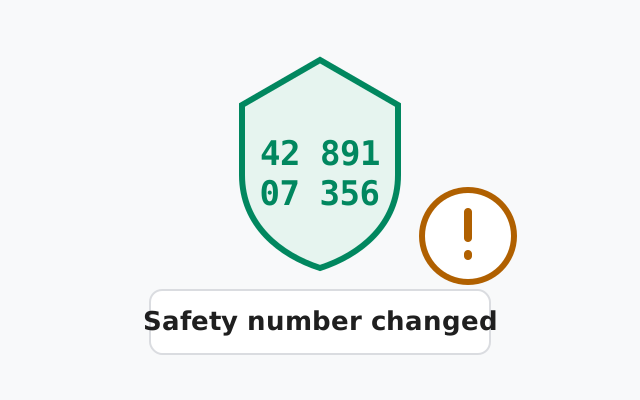
What the safety number actually is
Every conversation in Signal has a safety number: a long fingerprint built from your encryption keys and your contact’s encryption keys. Its whole job is to prove that the person you’re talking to is really them, not someone sitting in the middle intercepting the conversation. Because it comes from the keys themselves, any change to either person’s keys changes the number. The alert is Signal telling you “hey, the keys on the other end are different now”.
That is all it is. It is not a hack warning. It is not a message that your chat was read. It is just key bookkeeping. If you want the full background on how these fingerprints work and what they protect, read the safety number explainer first. This page focuses on what to do when one changes.
The 5 reasons a safety number changes
Listed from most to least common:
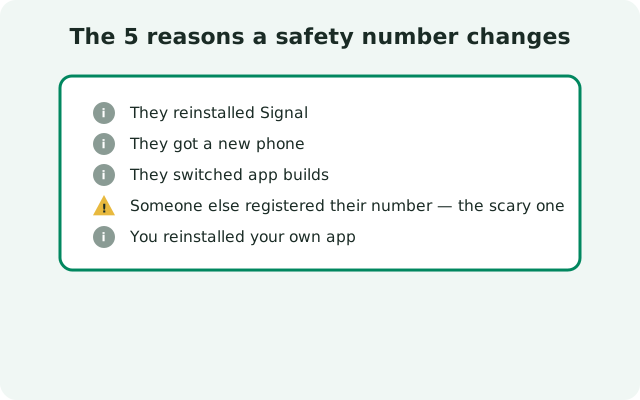
Your contact reinstalled Signal
The most common cause by far. Reinstalling generates brand-new encryption keys, which means a brand-new safety number. If they mention a reinstall, a factory reset, or a glitchy app, this is your answer.
They moved to a new phone
New phone, new app install, new keys. Even if they transferred chats, the underlying keys are fresh, so the number changes. Expect this every time someone upgrades their phone.
You reinstalled, not them
The safety number comes from both people’s keys. If you reinstalled Signal or moved to a new phone yourself, every contact’s safety number with you changes. If many contacts changed at once, the change is on your side.
They re-registered the same number
Re-registering, for example after losing a phone and setting Signal up again on the same number, also creates new keys. The number stays the same, but the safety number changes.
A genuine interception (extremely rare)
The safety number system exists for this case: someone tampering with the connection so your messages reach the wrong keys. This is the reason verification exists, and the reason the system alerts you instead of failing silently. It is vanishingly rare in practice, and the other four causes explain nearly every alert you will ever see.
Routine or red flag? Decide in 30 seconds
Most alerts need no action at all. Use this table to decide:
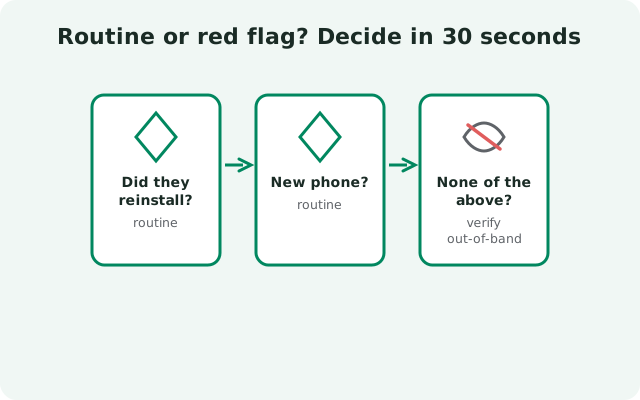
| What happened | Verdict | What to do |
|---|---|---|
| They told you they got a new phone or reinstalled | Routine | Nothing: just keep chatting |
| Number changed right after they fixed a crashing app | Routine | Nothing: a reinstall explains it |
| Several contacts’ numbers changed at once | Routine | You reinstalled: nothing to fix |
| Changed with no explanation from a contact who never changes phones | Check it | Verify before sending anything sensitive |
| Changed mid-conversation while they insist they did nothing | Verify | Compare the number over a separate channel |
| Changed and their behavior or messages look wrong | Be cautious | Verify in person before trusting the chat |
How to verify the number properly
Verification sounds technical, but it takes under a minute:
Open the safety number
Open the conversation, tap their name at the top, and choose View safety number. You’ll see a long string of digits (and a QR code on the same screen).
In person: scan the QR code
If you’re with them, point your phone’s camera at their QR code from this screen. A match confirms the keys, and the number, are genuine.
At a distance: read it over a trusted channel
Call them, or message them in a different app you already trust, and read out the first few and last few digits. If they match, the connection is good. The honest caveat: verifying over the same Signal chat you’re unsure about proves nothing. Use a channel you already trust.
Mark it verified
Once it matches, mark the safety number as verified in the app. You won’t be asked about it again until the keys change a second time.
Safety numbers in group chats
You don’t have one safety number. You have one per conversation, and group chats are no exception. Each member of a group has their own safety number with you, built from your keys and theirs. So if one person in a five-person group gets a new phone, you’ll see the alert for that person only; the other four numbers are untouched.
Practically, this means two things. First, a safety-number change in a group does not mean the whole group is compromised. It means one member’s keys changed, and the usual suspects (new phone, reinstall) apply. Second, verification in groups is one-to-one: you verify that member’s number with them, the same way as in a private chat. You don’t need to re-verify everyone else.
One more thing worth knowing: in a group, Signal handles the key change for you automatically once the member re-registers. Your messages to the group keep flowing to their new keys. The alert is informational. It’s telling you the change happened, not asking you to fix anything.
When you should actually worry
Here is the honest answer: real man-in-the-middle attacks on Signal are extremely rare, and pulling one off requires compromising Signal’s servers or the network path. Not something a random person can do from their couch. A safety-number change alone, with no other suspicious sign, is essentially never evidence of spying.
The sensible posture is simple: if nothing else is unusual, treat the alert as routine. If something else is also off (the contact denies reinstalling, messages sound unlike them, or the change happened mid-conversation for no reason), take a minute to verify over another channel before sending anything you wouldn’t want read. And until a number is verified, avoid sending the most sensitive things (passwords, financial details) through that conversation.
Notification settings for this alert
Signal can warn you inside the conversation whenever a safety number changes, and there is a related toggle under the app’s Privacy settings controlling these alerts. Leave it on. Turning it off does not make the changes stop happening. It just makes you blind to them, which removes the one layer of visibility that lets you verify.
One more practical note: after you verify a contact’s number, future changes will trigger the alert again. That is by design. Each verification only covers the keys as they are right now.
from Signal's official site — file hosted by Signal, not by us
Frequently asked questions
Why did my contact’s Signal safety number change suddenly?
Almost always because they reinstalled Signal or moved to a new phone. Both actions create fresh encryption keys, which changes the number. A sudden change with no explanation is worth verifying, but it is not evidence of spying on its own.
Do I need to do anything when the safety number changes?
Usually no. If you know they got a new phone or reinstalled, just keep chatting. If you don’t know why it changed, take a minute to verify the number over a trusted channel before sending anything sensitive.
How do I see a contact’s safety number?
Open the conversation, tap their name at the top, and choose View safety number. You’ll see the digits plus a QR code you can scan when you’re together.
What does ‘mark as verified’ do?
It records that you checked the number and it matched. The app stops asking about it until the keys change again, at which point you’ll get a fresh alert.
Can a safety number change if someone is reading my messages?
A change means the keys on the other end changed, which is exactly what an interception would also cause. That’s why verification exists. But in practice, reinstalls and new phones explain nearly every change.
Why did all my contacts’ safety numbers change at once?
That means the change is on your side: you reinstalled Signal or moved to a new phone, so your keys are fresh and every safety number with you was recalculated.
Keep reading
- How Signal safety numbers work: the full explainer on fingerprints, QR verification, and what they protect
- Message stuck on one check: why messages sit undelivered after a contact re-registers
- Backing up Signal chats: keep your history safe before reinstalls and phone moves
- Troubleshooting hub: every Signal fix guide in one place