
Signal Desktop Release History: The Story So Far
Published: October 7, 2026 · Updated: October 8, 2026
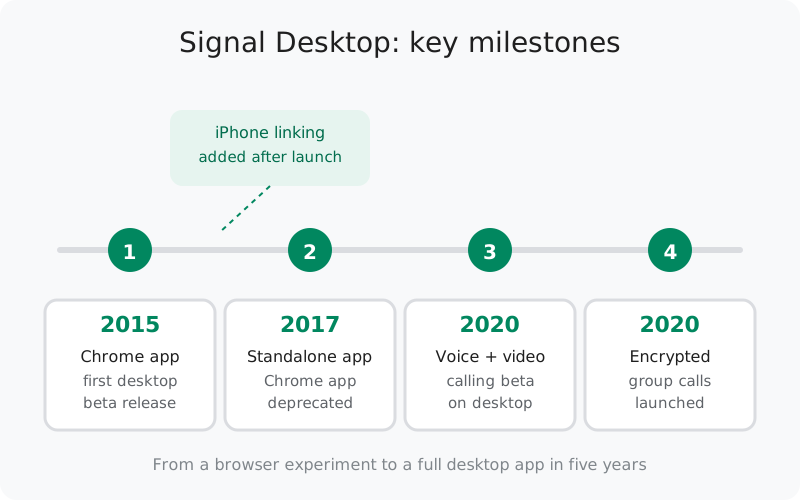
The milestone timeline
Signal does not publish a version-by-version changelog for Desktop the way some apps do. What it does publish is blog announcements for the big turns in the road. Here is the complete verified trail: nothing here is reconstructed from third-party lists.
| When | Milestone | What changed |
|---|---|---|
| Dec 2015 | Chrome app beta | Signal Desktop launched as a Chrome app, linking with Android phones only. Messaging only. No voice calls. |
| Later update | iPhone linking | A follow-up blog post announced multi-device support for Signal for iPhone, so iPhone users could link a desktop client too. |
| Oct 2017 | Standalone app | Signal Desktop became a standalone program for Windows, macOS, and Linux. The Chrome app was deprecated, with an export-import path for existing users. |
| Aug 2020 | Voice & video calling beta | One-to-one voice and video calls arrived on desktop for beta testers. They were end-to-end encrypted, on macOS, Windows, and Linux. |
| Late 2020 | Encrypted group calls | Group calls launched across Signal's apps including desktop, initially capped at 5 participants, free and end-to-end encrypted. |
Notice what is not in the table: minor version numbers and patch releases. Those ship constantly and quietly. You can read their notes on the GitHub releases page, but they are not "history" in any meaningful sense. The story below covers each milestone in more detail.
2015: the Chrome app beta
On December 2, 2015, Open Whisper Systems announced the Signal Desktop beta. Not as a standalone program, but as an app that ran inside Google Chrome. The pitch in the announcement was "private messaging, now with all ten fingers": your phone's conversations, continued on your computer, with the same end-to-end encryption. Because it was a Chrome app, the desktop experience literally lived inside the browser. You needed Chrome open, and the app linked with your phone so messages appeared consistently on both.
Two honest limitations came with the beta:
- Android linking only, at first. The initial release could only link with the Android app. iPhone support was promised "in the near term." The promise took a follow-up update to fulfill.
- No voice calls. The desktop beta was messaging-only. Voice calls lived on the phone apps; the desktop would wait years for calling.
The Chrome app approach made sense in 2015: it let a small team ship a desktop experience without writing three native apps. But it tied Signal Desktop's fate to Google's Chrome Apps platform. Google was already planning to shut that platform down.
iPhone support arrives
In a follow-up announcement titled "Desktop support comes to Signal for iPhone," Signal added multi-device support to the iOS app, letting iPhone users link a desktop client for the first time. The post emphasized something that is still true of the desktop app today: once linked, you can switch to the desktop at any time, whether your phone is online or not.
The same update introduced a new iOS-flavored theme for the desktop app, enabled by default when you linked from an iPhone. A small touch, but it shows how early the team was thinking about making the desktop app feel native to each user's phone ecosystem. With this update, both phone platforms could feed the same desktop client, and the "Android only" asterisk on the 2015 beta was gone.
2017: the standalone app
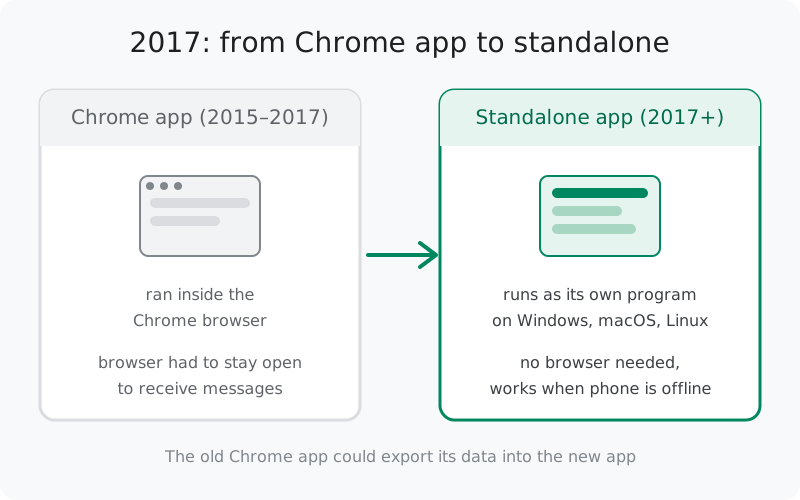
In October 2017, Signal announced that Signal Desktop was "now available in a new, standalone form." The Chrome app was deprecated. The reason was straightforward: Google was winding down Chrome Apps, so Signal rebuilt the desktop client as a standalone program that ran independently of any browser. Firefox and Safari users no longer needed Chrome installed at all, and Chrome users no longer had to keep the browser open to receive messages.
The new app launched with support for Windows 64-bit (7, 8, 8.1, and 10), macOS 10.9 and above, and APT-based Linux distributions like Ubuntu and Debian. That is essentially the same platform coverage the app has today. For people already on the Chrome app, Signal provided an export-then-import path so old conversations and contacts carried over.
This was the moment Signal Desktop stopped being an experiment and became the product people actually use: a real, installable program, downloaded from Signal's download page, that just sits in your dock or taskbar. The underlying architecture (built on the Electron framework) stayed the same for years afterward. What changed was that users finally got a desktop app that behaved like one.
2020: calling comes to desktop
For its first five years, Signal Desktop was a messaging app. Calls, the thing that made Signal famous on phones, were nowhere to be found on the computer. That changed in August 2020, when Signal's blog post "A new platform is calling" invited beta testers to try one-to-one voice and video conversations on Signal Desktop.
The announcement was candid about the state of the feature: it was preliminary support, offered to beta users first so the team could evaluate call quality and performance. The blog even flagged the technical groundwork behind it. Follow-up posts would cover concepts like ICE forking and other behind-the-scenes changes that improved calls everywhere. In other words, desktop calling was not just a feature port; it forced improvements in the calling infrastructure that benefited every platform.
The feature went to production shortly after the beta, making desktop calling end-to-end encrypted and free like everything else on Signal. If you use Signal Desktop for calls today, this 2020 beta is where that capability began. More on the current state of desktop calls in our desktop calling guide.
2020: encrypted group calls
Later in 2020, Signal launched encrypted group calls across its apps, desktop included. The blog announcement described the feature plainly. Group calls are "free, private, and end-to-end encrypted — like everything else on Signal." Starting a call was as simple as opening a group chat and tapping the video call button. Participants appeared in a grid view, with an option to focus on the active speaker.
The honest constraints at launch: group calls were limited to 5 participants, and they only worked in the new-style Signal groups (legacy groups were being migrated at the time). Both limits were later raised. But the launch itself was the milestone that mattered, because it closed the biggest remaining feature gap between the desktop app and the phone apps. Desktop was no longer the "messaging-only" companion; it was a full communications client.
Stable vs beta releases
Signal Desktop ships in two channels, and knowing which one you are on explains a lot about what you see:
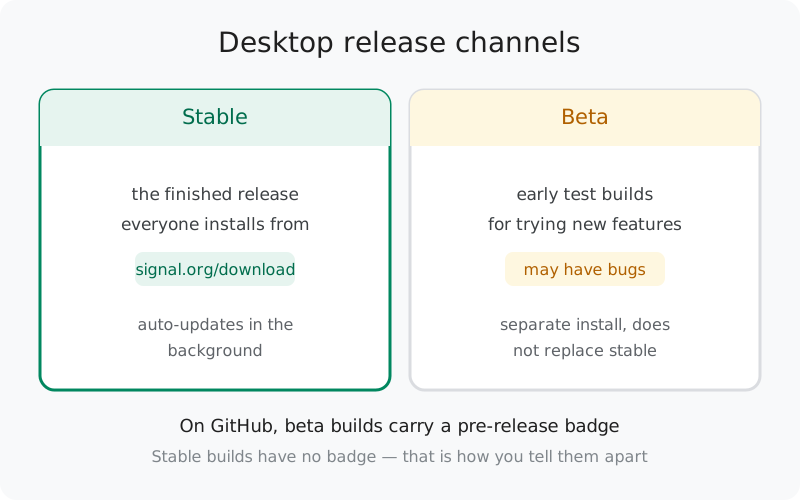
- Stable is the finished release everyone downloads from Signal's site. It updates quietly in the background and is what "Signal Desktop" means for almost all users.
- Beta is a separate install for testing upcoming features. It can have bugs, and it does not replace your stable install. The 2020 calling beta was exactly this kind of release: desktop calling arrived in beta before it went to everyone.
How to tell them apart on GitHub: beta builds carry a "pre-release" badge on the releases page. Stable builds have no badge. If you are ever unsure which channel a build belongs to, that badge is the answer. Our desktop beta guide covers installing and using the beta properly.
Checking your desktop version
You do not need to memorize version numbers, but you do need to know where yours is when something looks wrong or a support page asks. In Signal Desktop, the version number sits with the app info in settings. Compare it with the latest release on the GitHub releases page, and you will know instantly whether you are behind.
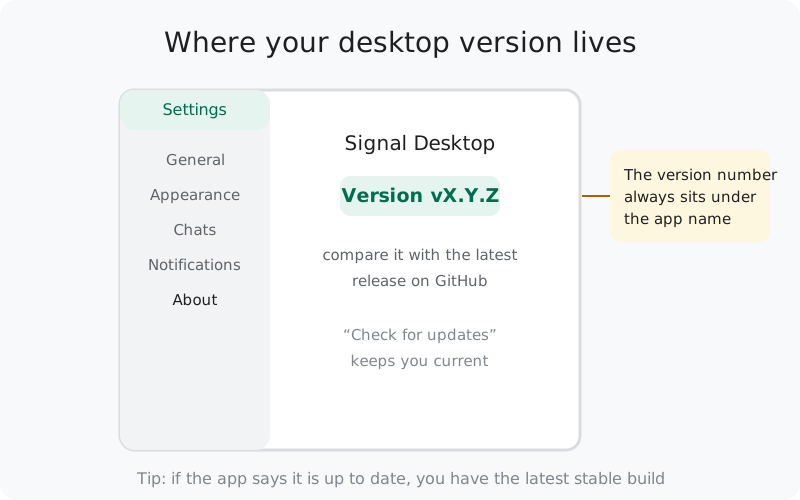
Two version habits worth building:
- Let the app update itself. Signal Desktop checks for updates on its own and prompts you to install them. Most "why doesn't this feature exist" mysteries trace back to an app that has been declining updates for months. If an update keeps failing, see our update-failure guide.
- Check the minimums before installing on an old machine. Platform support has moved forward since 2017's Windows 7 era. See the current desktop requirements if you are putting the app on aging hardware.
Where to follow new releases
Because Signal does not maintain a single official changelog, here is the honest map of where release information actually lives:
- The Signal blog (signal.org/blog): announcements for launches and major features. This is where every milestone on this page was first published. Routine updates never get blog posts, so it is not a changelog. Think of it as the highlight reel.
- The GitHub releases page (signalapp/Signal-Desktop): every public build, tagged, with notes. Major versions get written notes; small patch builds often ship with a one-line "tweaks and fixes" note. This is the canonical record.
- The app itself: sometimes a short "what's new" summary appears when an update installs. Brief by design; the GitHub page has the full story.
Our release notes guide explains how to read these sources, including what "pre-release" means and why some updates arrive with no notes at all. And one deliberate omission on our part: we do not maintain our own version-by-version changelog here, because anything beyond Signal's own sources would be guesswork.
from Signal's official download page — installers are hosted by Signal, not by us
Frequently asked questions
Where is Signal's official Desktop changelog?
There is no single official changelog page. The two places that matter: the Signal blog (announcements and major features) and the GitHub releases page for signalapp/Signal-Desktop (every build, with beta builds marked as pre-releases). We do not republish a version-by-version changelog here. Anything beyond those sources would be invented.
Does Signal Desktop update itself?
Yes. The desktop app checks for updates on its own and prompts you to install them, so most people never think about versions. You can also trigger a manual check from the app's settings if you want to be sure you are current.
Can I download an older version of Signal Desktop?
Older builds are listed on the GitHub releases page. That said, running an old build is rarely a good idea. You miss security fixes and eventually the old build stops working with Signal's servers. Install the latest from Signal's download page unless you have a specific, technical reason not to.
What is the difference between the stable and beta desktop apps?
Stable is the finished release everyone downloads. Beta is a separate install for testing upcoming features, and it can have bugs. On GitHub, beta builds carry a pre-release badge; stable builds do not.
Can I still use the old Chrome app version of Signal Desktop?
No. The Chrome app was deprecated in 2017 when the standalone app launched, and Google has since shut down the Chrome Apps platform itself. Only the standalone app is supported: Windows, macOS, Linux.
Does Signal Desktop still need a phone in 2026?
You still need a phone to register and to link the desktop app. The phone is the primary device on the account. After linking, the desktop works on its own, even with the phone switched off.
When did Signal Desktop get voice and video calls?
One-to-one voice and video calling arrived in a desktop beta in August 2020, and encrypted group calls followed later that year. Before that, the desktop app was messaging-only.
Keep reading
- Link Signal Desktop to your phone: setup walkthrough with common mistakes
- Signal Desktop system requirements: what your computer needs today
- The Signal Desktop beta: trying new features early
- Voice and video calls on desktop: the feature the 2020 beta introduced
- Where Signal publishes release notes: reading GitHub, blog, and in-app notes