
Signal Versions: Channels, History, and Updates Explained
Published: October 7, 2026 · Updated: October 8, 2026
This section holds 28 guides in three groups:
- Channels, numbering, and the file itself: the latest version, what each part of the official APK filename means, how version numbers work, why the APK and Play version numbers disagree, what "universal APK" means, the prod and beta build flavors, how often Signal updates, and where the official release notes live.
- Release history: the full Android version history, per-release guides, the 2026 roundup, the 2025 recap, major security updates, and the desktop and iOS histories for cross-platform users.
- Beta, support, and upgrading: the beta program, beta vs stable, what to do when you are stuck on an old version, why downgrading is risky, the Android support timeline, old-Android end of support, the Signal Login beta, linked phones, upcoming features, tablet UI, and when an old phone needs replacing.
A few verified facts anchor this whole section. The current website build is 8.29.3, and the official file is named Signal-Android-website-prod-universal-release-8.29.3.apk. Read it left to right: Signal's Android app, the website channel, the production build, one universal file for all device architectures, a release build, version 8.29.3. The website build and the Play build are signed with different keys, which is why you cannot install one over the other. It is also why their version numbers can disagree even when the underlying code is the same. "Universal" means one APK covers every architecture, so there is no arm64-vs-32-bit choice to make; the universal APK guide explains how that works.
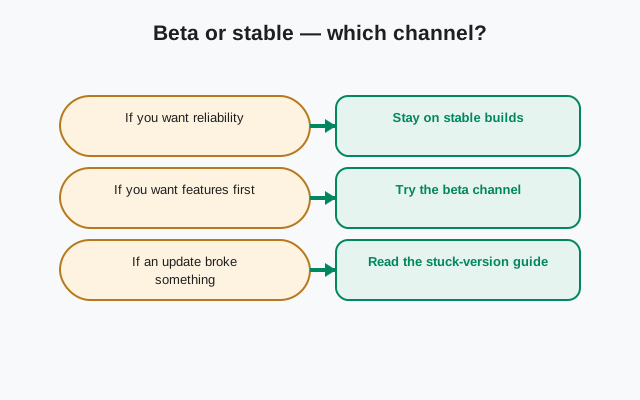
The beta question comes up constantly, so here is the short version: the beta channel gets new features earlier and bugs earlier. It exists so problems get found before they reach everyone. If Signal is how you talk to your family, your doctor, or your sources, stay on stable. If you enjoy testing and can tolerate the occasional broken build, the beta program guide shows how to join. The beta-vs-stable guide walks through the decision properly. Either way, back up before switching channels, because moving between builds can require a reinstall.
Two honest cautions. First, version numbers move. Any page that states a "current" version is a snapshot, and this section is no exception. When in doubt, the version on Signal's own download page is the truth, not any guide. We never invent version numbers, and any site offering a version far ahead of the official page is offering fiction. Second, old Android versions eventually lose support. Signal drops the oldest Android releases over time because keeping them means keeping known-insecure code paths alive. If your phone is on Android 7 or 8, read the end-of-support guide now rather than the morning your app stops working.
How to choose the right version guide
Start from your question.
| Your question | Start here |
|---|---|
| What is the newest version and what changed? | Latest Signal version |
| What does the APK filename mean? | Filename decoded |
| Why does my version differ from my friend's? | APK vs Play version difference |
| Should I join the beta? | Beta vs stable, then the beta program |
| My app will not update to the latest | Stuck on an old version |
| Can I go back to an older version? | Downgrade risks: read before you try |
| Will Signal keep working on my old phone? | Support timeline |
| What is coming next? | Upcoming features (official announcements only) |
| Where are the official release notes? | Release notes guide |
| Can I use Signal without a phone number? | Signal Login beta |
from Signal's official site — file hosted by Signal, not by us
Channels, numbering, and the file itself
Release history
Beta, support, and upgrading
Staying current without thinking about it
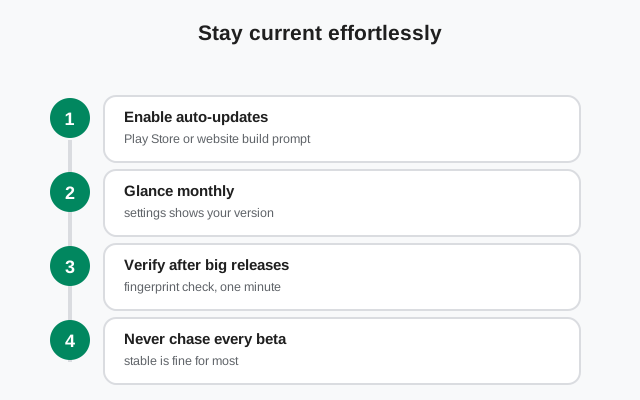
The website build checks for its own updates, so in practice staying current means saying yes when the app offers an update. If an update stalls, re-download from the official page. The Play build updates through the Play Store like any other app. Either way, updates are how security fixes reach you; running an old build because "it still works" means running known bugs. If you take one habit from this section, take this: when Signal offers an update, install it the same day.
Frequently asked questions
What is the latest Signal APK version?
The current website build is 8.29.3 (as of October 2026). Always confirm on Signal's own download page: that page is the source of truth, not any guide. See latest version.
Why is the APK version different from the Play Store version?
Same code, different release channels. The two builds are versioned and released separately. See why the versions differ.
Should I install the beta or the stable version?
Stable, unless you specifically want to test new features and can tolerate bugs. Beta vs stable walks through the decision.
What does the long APK filename mean?
Each part describes the file: Android app, website channel, production build, universal (all architectures), release, version. See the filename decoded.
Can I download an old version of the Signal APK?
Not from Signal. Their download page only publishes the current version — there is no official archive. Running an old copy from a mirror means trusting a third party and using code with known-fixed bugs, so stay on the latest release.
Other guide sections: Safety guides · Comparison guides · Backup & transfer guides · Troubleshooting guides
Sources
Official references we check against: