
Signal Call Links: Calls Without a Group Chat
Published: October 7, 2026
Call links are Signal's answer to the meeting-link era: a shareable URL that drops people straight into an encrypted call, no group chat required. This guide covers creating links, approving joiners, revoking links, and the decision framework for when a link beats a group call.
from Signal's official site — file hosted by Signal, not by us
What a call link actually is
A call link is a shareable link that opens a Signal call directly. Anyone on Signal who opens it can join the call. No group chat required. Before call links existed, a group call meant creating a group chat first, adding every person, and only then calling. The link removes all of that: create, share, talk.
The practical properties, straight from Signal’s announcement:
- Reusable. The same link works for every call. A weekly team check-in or a standing call with family uses one link forever.
- Named. You can give the link a name (“Sunday family call”) so people know what they are joining.
- Approval-gated by default. Unless you change it, you must approve each person before they join.
- Host-controlled. You can remove people from the call and block them from rejoining.
- You can have more than one. You are not limited to a single link. Create separate links for separate purposes.
- Same 75-person cap as group calls, and the same end-to-end encryption as every Signal call.
Create your first call link
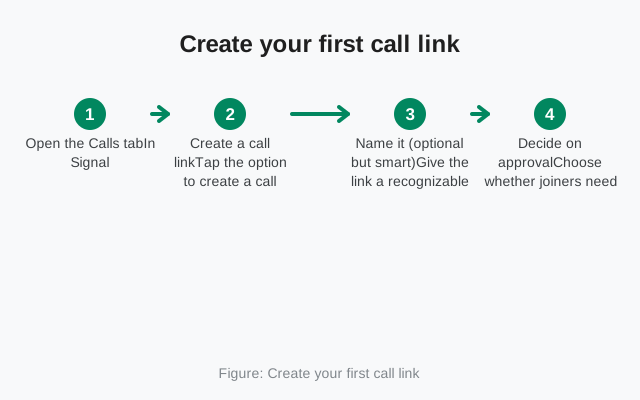
Open the Calls tab
In Signal, go to the dedicated Calls tab on the home screen. This is where your call history lives and where links are created.
Create a call link
Tap the option to create a call link. You will get a fresh link instantly.
Name it (optional but smart)
Give the link a recognizable name. “Book club” beats an anonymous URL when it shows up in someone’s messages six weeks later.
Decide on approval
Choose whether joiners need your approval. By default, approval is required. You see each request and accept or decline it. You can switch to open joining, but understand what that means first (next section).
Share the link
Send it however you like: a Signal message, an email, a calendar invite. Anyone on Signal who opens it lands at the call.
When it is time to talk, open the link yourself (or from the Calls tab) to start the call. Participants join as they arrive.
Approving joiners and managing the call
The approval setting is the whole security model of a call link, so get it right:
- Approval on (default): when someone opens your link, you get a join request. Approve the people you expect; decline the rest. This is the right setting for anything you would not want a stranger wandering into.
- Approval off: anyone with the link joins immediately, no gate. Convenient for a public webinar-style call. Dangerous if the link leaks somewhere you did not intend.
During the call, the link creator has host powers: remove a participant from the call, and optionally block them so they cannot rejoin through the same link. Combined with approval, this is a complete door policy: a bouncer at the entrance and the ability to eject troublemakers.
One habit that prevents most incidents: create a separate link per purpose. Your family link, your work standup link, and your one-off interview link should be three different links. That way, revoking one never breaks the others.
Revoking a link: how to kill it
Links do not expire on their own. A call link keeps working until you delete it. When a link has served its purpose, or when it has spread further than you wanted:
Find the link
Go to the Calls tab and open the call link you want to retire.
Delete it
Delete the link. From that moment, the old URL stops working. Anyone opening it can no longer reach a call.
Create a fresh one if needed
If the call series continues (a new project, a new semester), create a new link and share it only with the people who should have it.
Deleting is the only reset mechanism, and it is absolute: there is no “pause this link for a week.” If you only want a breather, keep the link but turn approval on. Requests pile up harmlessly until you are ready.
Call link or group call: the decision framework
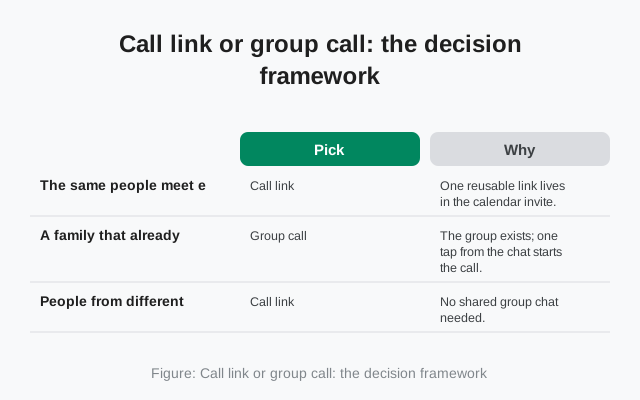
This is the information-gain element of the page. Both tools get up to 75 people on an encrypted call; the difference is entirely about who the people are and how often you call them.
| Situation | Pick | Why |
|---|---|---|
| The same people meet every week | Call link | One reusable link lives in the calendar invite. Nobody maintains a group chat nobody chats in. |
| A family that already chats daily in a Signal group | Group call | The group exists; one tap from the chat starts the call. A link adds nothing. |
| People from different organizations | Call link | No shared group chat needed. Each person joins from the link, and nobody sees anyone else’s group memberships. |
| A one-off call: interview, support session, class | Call link | Create, share, call, delete. No group chat lingering afterward. |
| A public or semi-public event | Call link + approval on | Share widely, gate at the door. Approval keeps the audience curated; blocking handles disruptors. |
| Two people who call each other constantly | Neither | Just call from the one-to-one chat. Links and group calls solve the many-people problem. |
The pattern: group calls serve groups that already exist; call links serve calls that do not need a group. When in doubt, ask whether these people will still be chatting next month. If yes, you probably want the group anyway. If no, take the link.
Three setups people actually use
Abstract advice is forgettable; setups are not. Here are three call-link configurations that match real routines:
- The weekly standup: one named link (“Team standup”), approval on, shared once in the team chat and pinned in the calendar invite. The same link runs for months. New hires get the link on day one; departing members lose nothing because the link never lived in their personal chats.
- The family call: one named link (“Sunday call”), approval on, shared in the family group. Grandparents who struggle with group chats just tap the same link every week. If the link ever leaks beyond the family, delete it and share a fresh one. The group chat itself is untouched.
- The one-off interview: an unnamed link, approval on, shared by email an hour before, deleted an hour after. No group chat created, no lingering membership, nothing to clean up. This is the setup where call links most clearly beat group calls. Creating a whole group for a 30-minute conversation was always silly.
Notice what the three share: approval stays on, links are named when they will be reused, and each purpose gets its own link. That is the entire operational discipline of call links in one paragraph.
Privacy still holds, with one rule
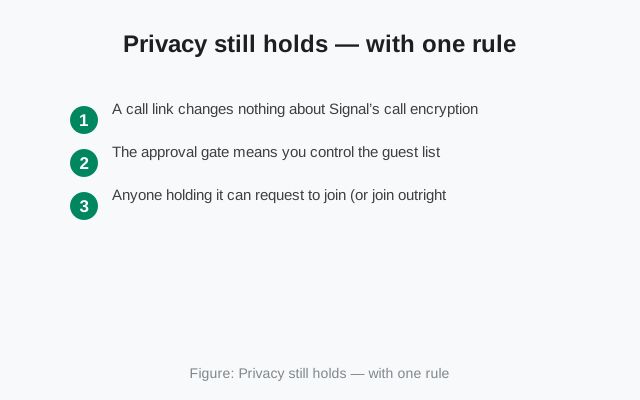
A call link changes nothing about Signal’s call encryption: the audio and video are end-to-end encrypted whether the call started from a group chat or a link. The approval gate means you control the guest list, and the remove-and-block controls handle anyone who misbehaves.
The one rule: the link is the key. Anyone holding it can request to join (or join outright, if you turned approval off). Do not post call links publicly, do not forward them casually, and prefer approval-on for anything you would not want a stranger sitting in on. A leaked link with approval off is an open door; a leaked link with approval on is just a knock you can ignore.
What the joiner sees
It helps to picture the other side of the link. Someone taps your call link and Signal opens a pre-join screen: the link’s name, a camera/mic preview, and a join button. If approval is on, they land in a waiting state (“waiting for the host to let you in”) until you approve them. If approval is off, they drop straight into the call.
That pre-join screen is why naming the link matters. An unnamed link joining a call you did not expect is confusing; a link named “Sunday family call” is self-explanatory. It is also why you should start the call yourself a few minutes early for anything with an audience. The first joiner should never arrive to an empty, unstarted call wondering whether the link is broken.
Limits and fine print
- 75 participants maximum: the same cap as group calls.
- Everyone needs Signal. The link opens a Signal call; there is no browser guest mode and no dial-in number.
- Everyone needs a current Signal version. Call links, raise-hand, and reactions arrived together in the calls update. Outdated apps may not see the full experience.
- No built-in scheduling. Signal will not start the call for you at 3pm. The reusable link is the scheduling solution: put the same link in every calendar invite and it just works.
- Call quality follows the same rules as any Signal call: Wi-Fi beats weak data, muting the room helps, and the relay setting trades a little quality for IP privacy. See the call-quality guide if a link call sounds bad.
FAQ
Do Signal call links expire?
No. A call link is reusable and keeps working until you delete it. That makes one link perfect for a recurring weekly call. Deleting it is the way to retire it.
Does someone need a Signal account to join via a call link?
Yes. Everyone joining must have Signal installed and registered. There is no browser-based guest access and no dial-in number.
How many people can join a call through a call link?
Up to 75 participants: the same limit as group calls started from a group chat.
Can I require approval before people join my call link?
Yes, and it is on by default. You see each join request and approve or decline it. You can switch to open joining, but only do that when you are comfortable with anyone holding the link entering directly.
Someone is disrupting my call. What can I do?
As the link creator you can remove them from the call and block them so they cannot rejoin through the same link. For the future, keep approval on and share the link only with people you trust.
Keep reading
- calls from inside a group chat: group video calls
- when a group chat fits better: Signal groups, explained
- one-to-one voice calls: the encrypted calling guide
- call won't start: connection fixes