
Switching back from Molly to Signal
Published: October 7, 2026 · Updated: October 8, 2026
Moving back from Molly to official Signal works the same way as moving to Molly did: make a backup in Molly first, uninstall Molly, install official Signal from signal.org or Google Play, and restore your backup during setup. The two apps understand the same backup format, so your chat history comes with you. People switch back for honest, boring reasons: they want updates the day Signal ships them, they want one official support channel, or they simply decided the fork's extras were not worth the extra moving parts. Whatever your reason, the backup-first discipline applies here exactly as it did going the other way.
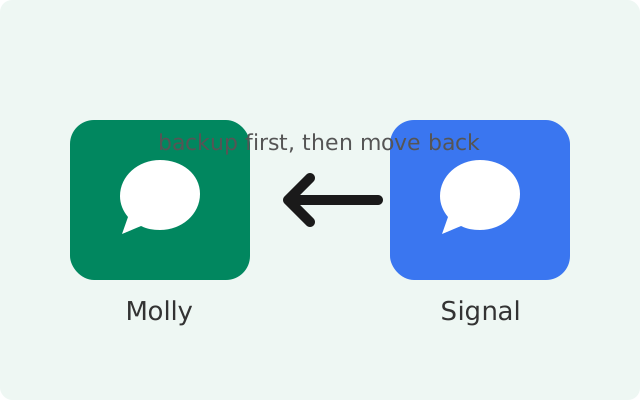
Honest reasons people switch back
There is nothing wrong with trying Molly and deciding official Signal suits you better. The reasons we hear most often are practical, not ideological. Official Signal ships updates first; Molly's releases follow with a gap, because a small independent team has to review and rebuild each new Signal version. If you like being on the newest version on day one, that alone is a reason to be on the official app.
Support is another one. With official Signal there is one support site and one team. With Molly, you are dealing with the fork's own developers and their own issue tracker, and some problems turn out to be "that's how the official app behaves too". Then there is simplicity: one app, updates from the Play Store, notifications through the standard Google push channel with nothing extra to configure. If you installed Molly-FOSS on a phone that actually has Google services, you gave up the most reliable push path for no benefit, and switching back is the obvious fix.
There is also the update rhythm. Molly is a good citizen about tracking upstream, but every Signal release has to be reviewed, adapted, and rebuilt by the fork's team before it reaches you. Most of the time that delay is invisible. But when a release fixes something you personally care about, waiting for the fork's build while everyone on the official app already has it gets old. Switching back removes that waiting entirely: you are on Signal's own release schedule from the moment you reinstall. None of this is a verdict on Molly's quality. It is just the structural reality of using a fork, and plenty of people try the fork, appreciate what it taught them, and return to the official app with no regrets.
None of this means Molly is bad. It means forks are tools for specific situations, and when your situation changes, changing tools is rational. For the full picture of what the fork is for, see what Molly actually is.
Before you start: the backup, again
The rule from the Signal-to-Molly migration applies in reverse with equal force: do not uninstall Molly until you have a fresh, verified backup. Open Molly's backup settings and create a new backup with a passphrase you will remember. Molly uses the same backup format as Signal, so what you create here restores cleanly into the official app.
Save your 64-character recovery key where you can find it. The retired 30-digit format is long gone; the long key is the current one. Copy the backup file to a computer over USB as a second copy. Check the file is there and looks complete. Only then proceed. A migration without a verified backup is a gamble, and the stakes are your entire chat history.
Step-by-step: Molly back to Signal
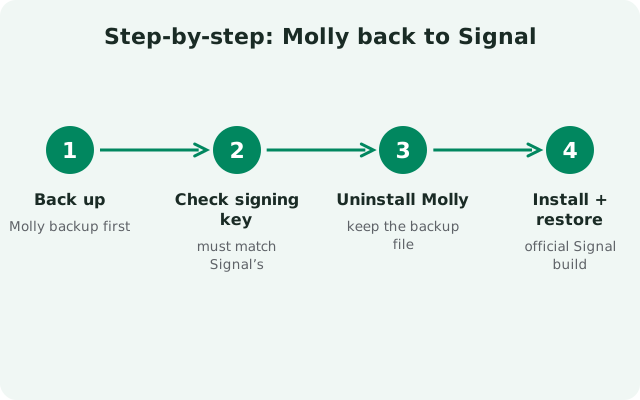
- Create a fresh backup in Molly. Back up with a passphrase you will not forget, and confirm your 64-character recovery key is saved somewhere safe.
- Copy the backup file off the phone. Keep a second copy on a computer. Verify it exists before you continue.
- Uninstall Molly. Official Signal is signed with Signal's own key, which differs from Molly's, so the two cannot coexist as an in-place swap.
- Install official Signal. Use Google Play if you have it, or download the official APK from signal.org (currently version 8.29.3, package org.thoughtcrime.securesms).
- Verify your number. Register the same phone number you used in Molly and complete SMS or call verification.
- Restore during setup. Signal will detect the backup. Enter your passphrase carefully and let the restore finish completely.
- Verify everything. Scroll through key conversations, check that media-heavy chats restored, and send a test message.
Molly is distributed by its own developers. The only safe sources are the official site and its official F-Droid repository.
Open molly.imF-Droid users: add molly.im/fdroid as a repository instead.
Same signing-key rule, reversed
Android's signature check means one app can never update another in place when the signing keys differ. That's why official Signal can never "upgrade" your Molly install, and Molly could never upgrade Signal. The two are separate apps that could sit side by side, but only one can hold your number's registration at a time, so the clean move is a full swap: back up in Molly, uninstall it, install Signal fresh, restore.
Your account is not on the phone, it is tied to your number on Signal's servers. Your history is in the backup. So the uninstall is safe as long as the backup from the previous section is real and verified. Say it once more: verified backup first, uninstall second.
What transfers and what changes
| Item | Outcome | Notes |
|---|---|---|
| Your account (phone number) | Transfers | Same number, same Signal network, re-verified. |
| Chat history | Transfers via backup | Restore during setup; there is no later import. |
| Contacts and groups | Transfer | Re-sync from the server after restore. |
| Linked devices | Must re-link | Signal sees a new primary device. Remove old links, link again. |
| Notifications | Change to standard push | On a phone with Google services, notifications now use Google's push channel. No UnifiedPush setup needed. |
| Updates | Change source | Updates come from the Play Store or Signal's own APK page, on Signal's schedule. |
| Molly-only extras | Go away | Fork-specific features such as passphrase-locked database encryption do not exist in the official app. |
| App settings | Mostly reset | Reconfigure appearance, notifications, and privacy options. |
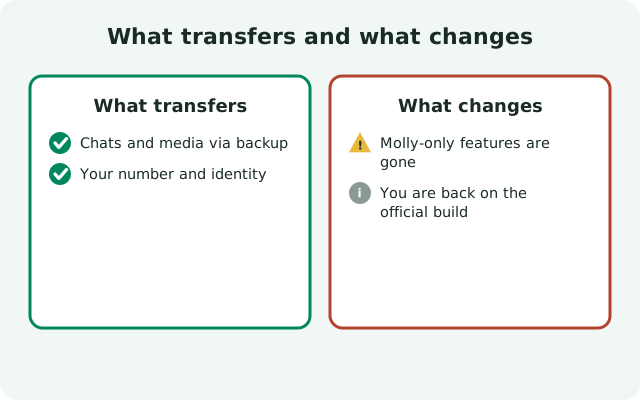
The biggest practical differences you will feel: updates arrive on Signal's own schedule with no fork lag, notifications need no extra configuration on a normal phone, and anything Molly-specific simply stops existing. If you relied on Molly's database passphrase lock, note that the official app does not offer it; your protection there becomes your phone's own lock screen and encryption.
After you are back on Signal
Run the same short settling-in list as any fresh install. Re-link Signal Desktop and any other linked devices. Walk through notification settings and send yourself a test message from a friend's phone if you can. Check that media auto-download and backup settings match what you want going forward; set up a backup schedule in the official app so your next migration, in either direction, starts from a fresh backup instead of a scramble.
Keep one copy of your last Molly-era backup file for a week or two, somewhere safe, in case a conversation turns out to have restored incompletely and you want to compare. After that, the official app's own backup routine takes over. And if you ever want the fork's extras again, the path back to Molly is the same process you just did, mirrored.
from Signal's official site (file hosted by Signal, not by us)
If something goes wrong
Restore asks for a passphrase you cannot recall. The backup is encrypted and there is no reset. Check your password manager and notes before you do anything destructive.
Signal cannot find the backup. Recopy the file from the second copy on your computer. Make sure the copy finished completely; a truncated file will not restore.
"App not installed" during Signal's install. Molly is still on the phone or left data behind. Uninstall it fully and try again.
Chats restored but media is missing. Media restores with the backup, but very large restores sometimes need a second pass or a stable connection. Give it time before assuming the worst, and compare against the computer copy if needed.
Frequently asked questions
Will I lose my messages moving from Molly back to Signal?
No, as long as you back up in Molly first and restore during Signal's setup. The two apps understand the same backup format, so history transfers cleanly.
Do my contacts notice that I switched back?
No. Both apps use the same Signal network and protocol, so nothing about your account looks different to your contacts.
Why would anyone switch back to official Signal?
The common reasons: updates arrive on Signal's own schedule with no fork lag, there is one official support channel, and notifications work through the standard push service with no extra setup.
What happens to Molly's extra features when I switch back?
Fork-specific extras do not exist in the official app. The notable one is passphrase-locked database encryption; after switching back, your on-device protection is your phone's own lock and encryption.
Can I go back to Molly again later?
Yes. It is the same backup-first process in reverse, described in our Signal-to-Molly migration guide.
Keep reading
- Signal to Molly migration guide: the reverse migration, same backup-first discipline
- Which Molly should you choose?: in case you reconsider and want the fork again
- Download the official Signal APK: the verified safe source for the official app
- Restoring a Signal backup: restore mechanics in detail