
Home / Privacy / Contact discovery
How Signal Finds Your Contacts Without Reading Your Address Book
Published: October 7, 2026 · Updated: October 8, 2026
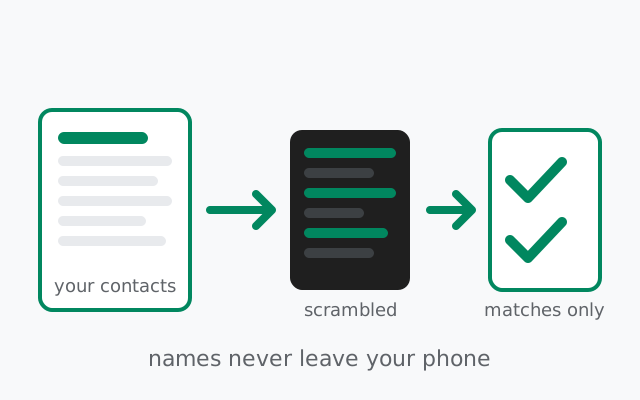
Signal needs to answer one question: which people in your address book already use Signal? To answer it, your phone scrambles every number with one-way cryptography before any comparison happens, then runs a private matching process against Signal's list of registered numbers. The server learns which scrambled numbers match real accounts. That much is unavoidable, but it never sees your contact names, nicknames, or who matters to whom. Your address book never leaves your phone in readable form.
from Signal's official site — file hosted by Signal, not by us
Why contact discovery exists at all
Messaging needs a directory. When you open Signal and look at your contacts, the app has to answer a simple question for each number: is this person registered? Without that answer, you'd have to guess who uses Signal and invite everyone one by one: the way messaging worked in the bad old days.
The lazy way to answer the question is to upload the whole address book to the server in readable form and let the server do the matching. Plenty of apps have done exactly that, and it's why address books became one of the most harvested datasets in mobile. Signal's design goal is the opposite: get the answer (who uses Signal) while the server learns as little as possible about your address book.
The process, in plain steps
You grant contacts permission (optional)
Discovery only runs if you allow Signal to read your contacts. Declining is allowed. You just add people manually instead. More on that below.
Your phone scrambles each number
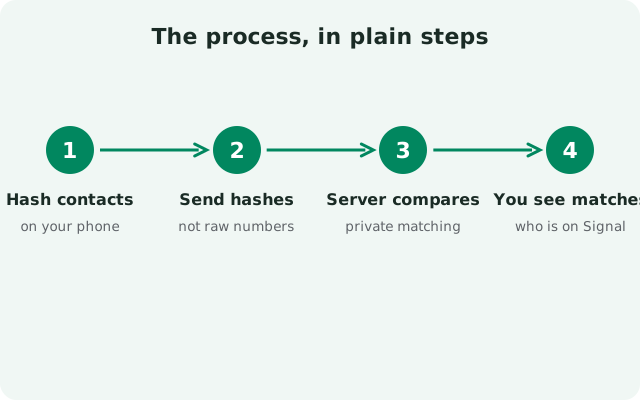
Before anything leaves your phone, each phone number is run through one-way cryptography: hashing. The result looks like random noise, and it can't be reversed to recover the original number. Your names, labels, and notes aren't even part of this step: only the numbers get scrambled. Think of it like sealing each number in an envelope that can be compared but never opened.
A private comparison runs on Signal's hardware
The scrambled numbers are compared against Signal's own list of registered numbers using a cryptographic technique called private set intersection. The name is technical, but the idea is simple: the comparison is designed so the only thing revealed is which numbers match. Neither side dumps its full list on the table. Your phone never sends its scrambled list in the clear for the server to keep, and the server never sends its user list to your phone.
Only the matches come back
Your phone learns which contacts are on Signal and marks them in your contact list. Your contact names never left your phone, so there's nothing for the server to attach the matches to. It sees scrambled numbers, not names like "Mom" or "Work (do not answer)".
Contrast this with the old, lazy approach some apps used: uploading the entire address book (names, numbers, emails, notes) to company servers in readable form, where it could be stored, mined, and leaked. Signal's discovery exists precisely to avoid building that database. The question "who uses Signal?" gets answered, and the raw material of your social life never becomes a server-side asset.
What each side actually learns
| Who | Learns | Does NOT learn |
|---|---|---|
| Signal's server | Which of the scrambled numbers you checked are registered Signal accounts | Your contact names, nicknames, labels, notes, or how people relate to you |
| Your phone | Which of your contacts use Signal | N/A |
| Anyone else | Nothing. The comparison happens between your phone and Signal's hardware only | N/A |
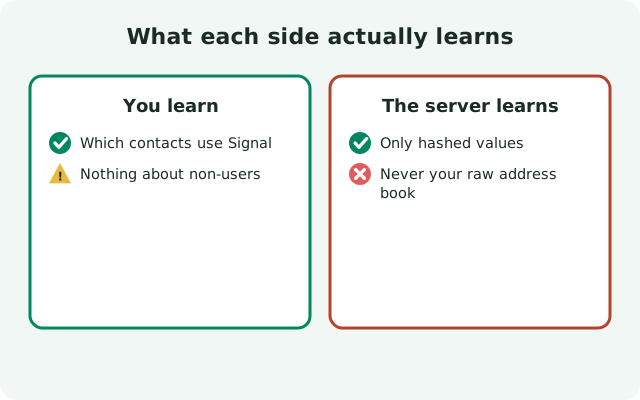
The key honest point: the server must learn which numbers match. There is no way to tell you "these 12 contacts use Signal" without the matching step knowing which 12 they are. The privacy engineering isn't about hiding the matches. It's about making sure the matches are all the server learns. No names. No relationships. No social graph.
The honest caveats
Discovery works both ways. If your number sits in someone else's address book and they've granted contacts permission, you can show up in their contact list as a Signal user. Your privacy settings decide how much that reveals. See the opt-out section below.
A lookup is still a lookup. The server necessarily sees that you ran a discovery check over a set of scrambled numbers. The cryptography keeps the contents private; it doesn't hide the fact that the question was asked.
Your number is still the account. Registration uses a phone number today, and discovery is built around numbers. Usernames have changed how much that matters in daily use. You can now be messaged through a username while keeping your number hidden, but the number remains the underlying identifier. Our usernames privacy guide explains the split between the number-as-credential and the username-as-handle.
Discovery lookups repeat. Your phone re-runs discovery periodically: contacts change, people join Signal. Each run is the same privacy-preserving comparison, but it's worth knowing discovery isn't a one-time event; it's ongoing maintenance of your contact list.
Turning discovery down: your options
Revoke permission. Granted contacts access during setup and regretting it? Turn it off in your phone's system settings (Apps > Signal > Permissions > Contacts). Signal keeps working. Your existing chats are untouched, but it stops refreshing which contacts use Signal, and newly added contacts won't be auto-detected. Revoking stops future lookups; it does not erase the matches already computed. But remember what those matches were: scrambled numbers that matched, with no names attached. There is no address book on the server to delete, because one was never uploaded.
Opt out entirely. If you deny Signal access to your contacts from the start, the app works fully. You just add people by typing their number or username yourself. That is the real opt-out: no permission, no discovery lookups at all.
Limit who finds you. For the other direction (who can discover you), check your number visibility settings: who can see your number, and who can find you by it. Tightening these means fewer strangers can connect your number to your Signal presence. The hide-your-number guide walks through every setting, and who can find you by number explains the discovery controls from the other side.
Frequently asked questions
Does Signal upload my address book?
No. Not in readable form. Your phone scrambles each number with one-way cryptography before any comparison, and the private matching process reveals only which numbers match registered accounts. Names, labels, and notes never leave your phone.
Can Signal see my contact names?
No. Names are never part of the discovery process. Only phone numbers are scrambled and compared. The server sees scrambled numbers that matched, with no names attached to them.
Can I use Signal without giving contacts permission?
Yes. Declining contacts permission is fully supported. You just add people manually by typing their phone number or username. Everything else in the app works normally.
Can people find me if I never share my number?
If your number is in someone's address book, discovery can surface you to them. Sharing a username instead of your number, and tightening who can find you by number, shrinks this significantly.
Why does Signal need my number at all, then?
The number is the account identifier used for registration and sign-in. Usernames now handle the day-to-day identity part, but the number is still required to create the account today.
If I revoke contacts permission, is my data deleted from Signal?
There is no address book on Signal's servers to delete. One was never uploaded. Revoking permission stops future discovery lookups; the server only ever saw scrambled numbers that matched, with no names attached.
Does Signal tell my contacts that I joined?
Signal doesn't announce your registration to your contacts. But if someone with your number in their address book runs contact discovery, you can appear in their Signal contact list as a registered user.
Practical setup: discovery without oversharing
- Decide on contacts permission deliberately. Granting it is convenient. Your Signal contact list fills itself in. Denying it is private. You add people manually. Either choice works; make it a choice, not an accident.
- Set a username and share that instead of your number. The fewer people who hold your number, the fewer address books it sits in. Usernames are the cleanest way to shrink your discoverable footprint.
- Review who can find you by number. If you don't want strangers connecting a number to your Signal account, tighten this setting.
- Remember the two-way nature. Privacy here isn't just about your phone. It's about whose address book your number is in. Share the number itself sparingly.
The bigger picture: contact discovery is one of the places Signal's design is most careful, precisely because address books are so sensitive. No readable upload, no stored social graph, no names on the server. Just a cryptographic yes-or-no per number. How little the server retains overall is covered in our metadata guide.
Keep reading
- Hide your phone number: the full settings tour for number privacy
- Who can find me by my number: discovery controls from the other side
- Usernames vs phone numbers: how usernames changed the privacy model
- What metadata Signal stores: how little the server retains overall
- Signal usernames: setting up and sharing your username
- Molly's contact discovery without Google: how the fork handles lookups
from Signal's official site — file hosted by Signal, not by us