
Molly contact discovery without Google: how it really works
Published: October 7, 2026 · Updated: October 8, 2026
Yes. Molly finds your contacts with no Google Play Services involved. Molly is an independent FOSS fork of Signal from molly.im. It is not official and not affiliated with Signal Foundation, and its FOSS build reworks contact discovery so Google services are out of the loop entirely. How it works, in one sentence: your phone hashes your contact list locally, sends only the hashes to Signal's discovery server, and gets back which hashes belong to Signal users. Your raw address book never leaves the phone, and Google never sees it. Below: exactly how the lookup works, what permission it needs, and the honest limits you should know before you tap Allow.
How the lookup actually works
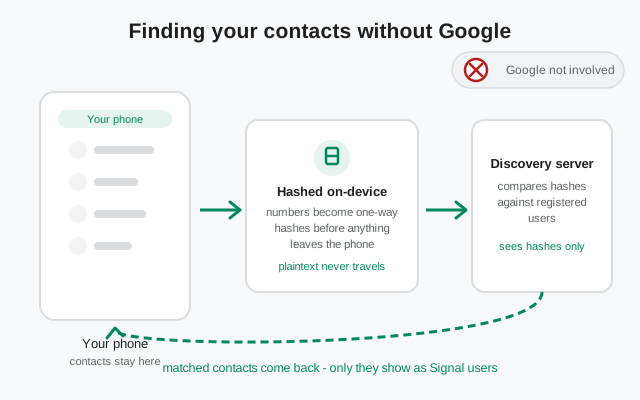
Contact discovery answers one question: which of my contacts already use Signal? The tricky part is answering it without handing your entire address book to anyone: not to Signal's operator, and definitely not to Google. Here's the flow Molly uses, step by step.
Step one: you grant the contacts permission (more on that below). Step two: Molly reads your phone numbers and hashes each one on your device. A hash is a one-way transformation: you can turn a number into a hash, but you can't turn a hash back into a number. Think of it like a fingerprint of the number: useful for matching, useless for reading. Step three: only those hashes travel to Signal's contact discovery server. Your names, your notes, your full contact list: none of it leaves the phone. Step four: the server compares your hashes against the hashes of registered Signal users and returns the matches. Step five: your phone shows those matches as Signal contacts in your list.
Two things matter about this design. First, the server learns very little: a pile of hashes and nothing to attach names to. Second, and this is the part people get wrong: Molly didn't change this privacy math. It uses the same discovery server and the same protocol as official Signal, because it speaks the same protocol to the same network. What Molly changed is the plumbing around the lookup: which other software on your phone gets to touch the process. On the FOSS build, the answer is none. No proprietary Google code anywhere in the path.
Signal's own documentation describes the discovery service as built so the server operator can't read your contact list, and since Molly uses that same service, it inherits that design. We won't go deeper into the cryptography here on purpose: the exact internals change between releases, and this guide doesn't invent technical claims. The qualitative picture above is what you need to make an informed decision.
What the FOSS build removed
Official Signal's Android client has historically leaned on some Google-adjacent pieces around discovery. The Play build assumes Google Play Services are present, and the path is smoothest when they are. That's fine on a normal phone, and it's one of the reasons official Signal works so well out of the box for most people.
The Molly-FOSS build reworks those touchpoints so discovery runs with zero proprietary Google code. Why does that matter? Because a growing number of phones don't have Google services at all: Huawei devices on HarmonyOS, de-Googled custom ROMs, GrapheneOS setups without sandboxed Play. On those phones, official Signal's discovery path can behave oddly or need workarounds. Molly-FOSS was built for exactly these phones. Its discovery flow assumes Google is absent and works anyway.
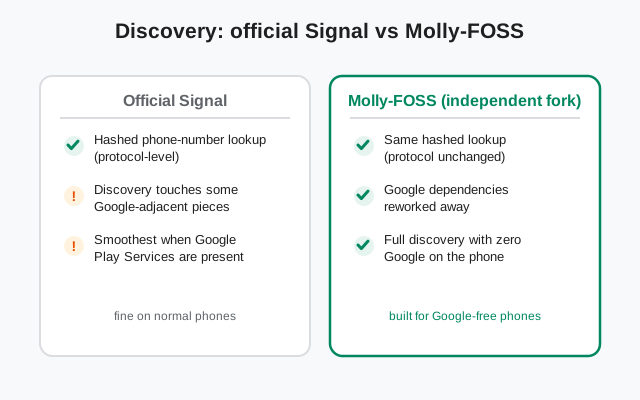
One honest note: on a normal phone with Play Services installed, both apps discover contacts just fine, and most users would never notice a difference. The Google-free path isn't "more private" in the lookup sense. It just removes a dependency that some phones can't satisfy. Pick the FOSS build because your phone needs it, not because the comparison sounds better in a screenshot.
The contacts permission: what to tap
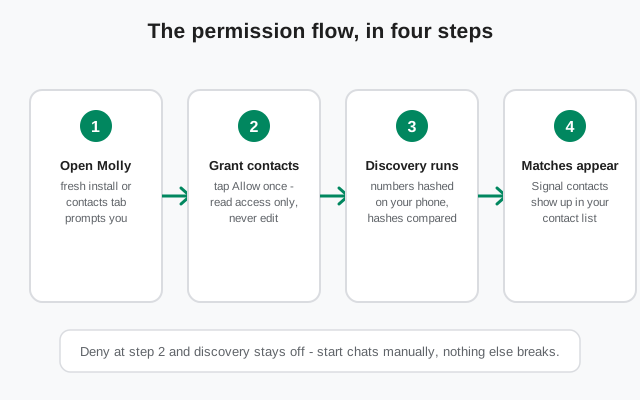
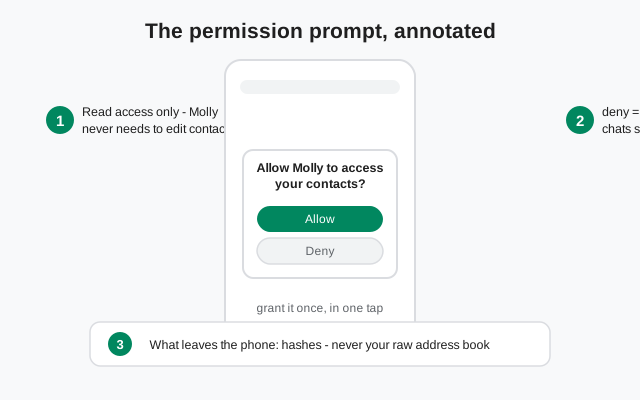
When you first open Molly, or the first time you visit the contacts tab, Android shows a system prompt: "Allow Molly to access your contacts?" This is the moment that matters, so let's be precise about the two choices.
Allow: Molly gets read access to your contacts. Read, not edit: it can't change, add, or delete anything in your address book. With access granted, it hashes the numbers locally and runs the discovery lookup described above. You grant it once; reopening the contacts tab later re-runs the check so newly-joined contacts show up.
Deny: discovery stays off. Molly works fine otherwise. You can still start chats by entering a phone number manually or opening an invite link someone sends you. Nothing else breaks. If you deny and change your mind later, Android lets you flip the permission in Settings, and Molly will run discovery on the next contacts-tab visit.
Revoking works the same way in reverse: take the permission away in Android Settings and Molly simply stops re-scanning. It can't phone home with data it no longer has. And a reminder that surprises people: the permission is per-app, so granting it to Molly doesn't grant it to anything else, and official Signal's permission (if you ever installed it) is a separate decision.
The honest limits (read this before complaining)
Discovery is useful, but it's narrow by design. The table below is the whole truth in one place. Read it before you assume something is broken.
| Question | Honest answer |
|---|---|
| Does it find Signal users in my address book? | Yes: by phone-number match. If the number in your contacts is the number registered on Signal, it shows up. |
| Does it work without Google on the FOSS build? | Yes: the lookup path has no Google dependencies in the FOSS build. |
| Does it upload my contacts in plaintext? | No. Numbers are hashed on your phone first; only hashes travel. |
| Does it update when a contact joins Signal? | Only when it re-scans: typically when you open the contacts tab. It doesn't watch continuously in the background. |
| Does it find people by name or username? | No. Discovery matches phone numbers. A username lets someone reach you without your number, but discovery itself is number-based. |
| Does it work with the permission denied? | No: deny the permission and discovery is off. Manual chat starts still work. |
| Does a missing contact mean they left Signal? | Not necessarily. It just means no match at scan time: different number, unregistered, or a stale scan. Re-open the contacts tab to re-check. |
The row people trip over most is the re-scan one. Your friend installs Signal on Tuesday; your Molly contact list from Monday doesn't know. Open the contacts tab and it re-checks. That's not a bug. A messenger that constantly uploaded your address book in the background would be the privacy problem, not the solution.
Contacts who don't use Signal
They simply don't appear as Signal contacts. There's no "your friend might like Signal" banner fed by discovery, no nudge spam, no shadow list of almost-users. The lookup returns matches and nothing else.
If you want someone on Signal, the honest tool is a direct invite: send them your invite link or username yourself, person to person. Discovery can't convert anyone, and you shouldn't want it to. A discovery system that marketed to your non-user contacts would be exactly the kind of address-book abuse this design avoids.
Three privacy notes worth knowing
One: the server still sees a lookup happened. Hashed or not, the discovery server learns that somebody looked up a batch of hashes right now. That's inherent to any messenger's discovery. There's no way to ask "who of my contacts is here" without asking. If even that bothers you, skip the permission and add contacts by hand.
Two: your phone is the real weak link. Discovery privacy is about the network, not the device. Anyone holding your unlocked phone can open your contacts app directly. No hashing involved. The discovery design protects your address book from servers and third parties, not from someone with your phone in their hand. Lock your screen.
Three: "Google-free" is about dependencies, not the lookup. We'll say it once more because marketing copy loves to blur it: Molly-FOSS doesn't make the lookup more private than official Signal's. Same server, same protocol, same hashes. What it does is remove Google from the phone-side path, which matters a lot on a Google-free phone and barely at all on a Pixel. Judge it by your phone, not by the adjectives.
If the FOSS-vs-standard question is still open for you, our standard vs FOSS build guide walks through which to pick. For the notification side of going Google-free, see how Molly handles notifications without Google. And if you're still deciding between the fork and the upstream app, the Molly vs Signal comparison lays out the full tradeoff.
from Signal's official site — file hosted by Signal, not by us
Frequently asked questions
Does Molly contact discovery need Google Play Services?
No, not on the Molly-FOSS build. Its discovery path was reworked to run with zero proprietary Google code, which is exactly why it suits Huawei phones, de-Googled ROMs, and GrapheneOS setups. The standard Molly build behaves like official Signal here.
Does Molly upload my contacts to its own server?
No. Numbers are hashed on your phone and only the hashes go to Signal's contact discovery server. It's the same server official Signal uses. Molly's own infrastructure isn't in the loop, and your raw address book never leaves the device.
What happens if I deny the contacts permission?
Discovery simply stays off. You can still start chats by entering phone numbers manually or via invite links; nothing else breaks. Re-grant the permission in Android Settings later and Molly will scan on your next visit to the contacts tab.
Why isn't a contact showing up in my Signal list?
Discovery only shows matches at scan time. The usual causes: they're not on Signal, the number in your contacts differs from their registered number, or your last scan predates their signup. Re-open the contacts tab to trigger a fresh check.
Is Molly's contact discovery more private than Signal's?
Not in the lookup itself. Same protocol, same server, same hashed design. Molly-FOSS's advantage is situational: it keeps Google out of the phone-side path, which matters on Google-free phones. Against the network, the privacy is identical.
Keep reading
- Molly hub: the full map of fork guides
- What is Molly: the fork explained from scratch
- Molly or Molly-FOSS: which build to pick
- Safe Molly install walkthrough: the install path from molly.im
- Molly notifications without Google: how UnifiedPush works