
What Signal's rate limit means and how to wait it out
Published: October 7, 2026 Updated: October 8, 2026
Signal rate-limits registration to stop abuse: too many code requests, wrong codes, or suspicious patterns from your number trigger a temporary lockout that grows from minutes to hours to a full day. There is no bypass. The counter is server-side. The way out is to stop all attempts, wait out the full timer, and come back with one careful try.
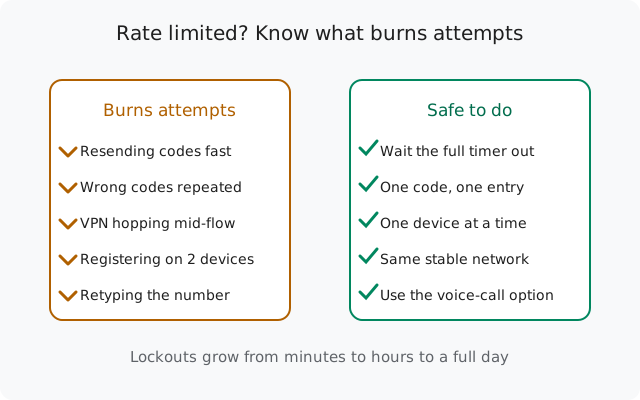
What rate limiting is (and isn't)
Rate limiting is Signal's abuse shield. Sending verification codes costs money and is a classic attack vector. Without limits, anyone could flood any phone number with codes, or probe the system at scale. So Signal caps how much registration activity a number (and the surrounding signals, like IP address) can generate in a window of time.
What it is:
- A temporary throttle on registration actions for your number.
- Escalating: the more you push against it, the longer it lasts.
- Server-side: tied to your number, not your phone or app install.
What it isn't:
- Not a permanent ban. Your number isn't blacklisted.
- Not a judgment on you. The system can't distinguish a frustrated real user from a script. It just counts.
- Not something support can lift for you. Waiting is the mechanism.
This guide is about the rate-limit system itself: what feeds it and how to stay out of it. If you're currently staring at the "too many attempts" screen, the companion guide to failed registrations covers the lockout mechanics and the registration-lock PIN in detail.
What actually triggers it: the attempt-cost table
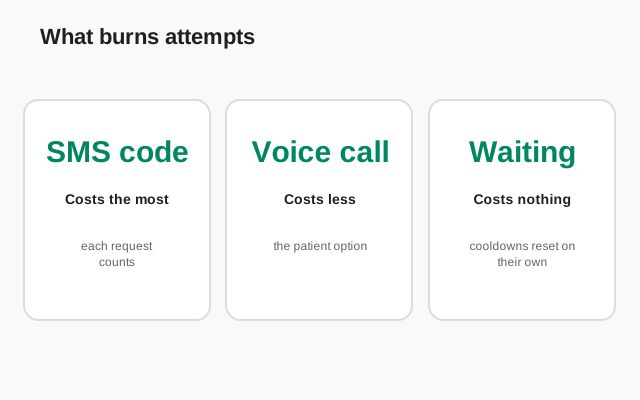
Not every tap costs the same. Here's an honest breakdown of which actions feed the limiter and which are safe:
| Action | Burns attempts? | Notes |
|---|---|---|
| Requesting a verification code | Yes | Each request counts, even if the SMS never arrives |
| Requesting the voice-call code | Yes | Counts like an SMS request. Use it instead of a 3rd SMS, not as well as. |
| Entering a wrong/expired code | Yes | Old codes from earlier requests are already invalid |
| Reinstalling and re-registering | Yes | Fresh flow, fresh attempts burned, zero benefit |
| Registering the same number on a 2nd device | Yes | Same number, same counter |
| Correcting the number and retrying | Yes | Necessary sometimes, but get it right on paper first. |
| Waiting out the timer | No | The only free action. Costs nothing. |
| Opening the app to look | No | Doesn't reset anything, but resist tapping retry. |
| Using Signal normally after registering | No | Rate limits apply to registration, not messaging |
The pattern: anything that asks Signal's servers for a new code or a new registration burns budget. Patience is the only free move. Most people get limited not by one mistake but by stacking small ones (three resends, two wrong codes, one reinstall) until the counter tips over.
Honest wait times
Signal doesn't publish exact lockout durations, so here's the honest version instead of invented precision:
- First brush with the limit: minutes. Wait it out, come back, and you'll usually register fine.
- After pushing through a short lockout: hours. This is where most frustrated users land. An afternoon of retrying turns a 10-minute problem into a half-day one.
- After sustained hammering: up to a full day. At this point the only correct move is 24 hours of complete silence on registration.
- Extreme cases: longer. If you've been at it for days, give it several days off.
Two rules govern the wait: the timer shown is real (retrying early extends it), and silence is cumulative in your favor (every quiet hour lets the counter cool). There is no action that shortens a lockout. Only the absence of actions.
How to avoid burning attempts
Prevention is a short checklist. Do all of it before your first code request:
Enter the number carefully: once
Full international format, correct country code, trunk zero dropped. Check it digit by digit. A typo doesn't just lose a code. It burns an attempt and sends your code to a stranger.
Use one device at a time
Pick the phone you'll actually use. Don't start registration on a second phone "just in case". The attempts stack on the same number.
Use one stable network
Same Wi-Fi or same mobile data for the whole flow. Don't switch networks mid-registration and don't enable a VPN halfway through.
Request one code, then wait
One tap on "request code," then hands off until the timer fully expires. If the code hasn't arrived, take the voice-call option instead of a second SMS.
Enter only the newest code
Each request invalidates earlier codes. If three codes arrived, the latest is the only live one. Entering the older ones just burns attempts on guaranteed failures.
Two patient attempts per day, max
If two careful attempts fail, the problem needs investigation (wrong number? carrier filtering? VOIP block?), not a third attempt. Debug first, retry tomorrow.
The theme across all six: make every attempt deliberate. The limiter punishes volume, not intent. So keep the volume low and each attempt high-quality.
What NOT to do: myth vs reality
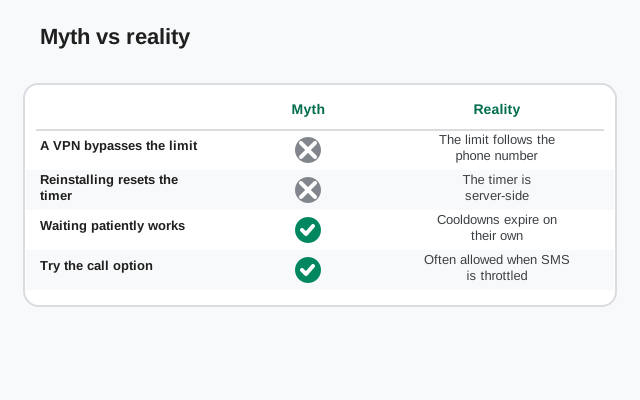
Lockout desperation breeds bad advice. Here's what's actually true:
| The "trick" | Reality |
|---|---|
| Clear app data / reinstall to reset the timer | Myth. The counter is server-side, tied to your number. You lose nothing except time, and burn attempts re-registering. |
| Switch VPN servers to look like a new user | Harmful. IP-hopping during registration mimics abuse automation. It can trigger stricter limiting, not looser. |
| Try on a second phone | Myth. Same number, same counter. It just burns attempts faster. |
| Use a public SMS-receiver site for the code | Dangerous and blocked. Those numbers are mostly rejected by Signal, and any code shown publicly lets strangers hijack the registration. |
| Keep tapping "resend" until one gets through | The core mistake. This is precisely the behavior the limiter exists to punish. Every tap extends the wait. |
| Contact support to lift the limit | Won't help. Rate limits are automatic and time-based. There is no manual override to request. |
| Wait the full timer in silence | The actual fix. Boring, free, and the only thing that works. |
Already locked out? What to do now
If the damage is done and you're rate-limited right now:
Stop everything
Close Signal. No "one more try," no second device, no reinstall. The counter cools only in silence.
Read the timer and double it in your head
If it says an hour, plan for longer. Early retries got you here. Set a reminder for after the timer expires, not at it.
Use the wait productively
Figure out what went wrong: wrong number format? Carrier filtering verification SMS? A virtual number Signal won't accept? Fix the underlying cause now, while it's free. The missing-code checklist walks through all of them.
Come back with the clean retry
One device, one stable network, number verified on paper, one code request, full timer waited out, voice-call fallback ready. The exact sequence is in the registration-failure guide.
And if you've been locked out for what feels like forever: the counter always resets eventually. Numbers aren't permanently banned for enthusiastic retrying. Give it a few quiet days and start clean.
from Signal's official site, file hosted by Signal, not by us
Frequently asked questions
What does "rate limited" mean on Signal?
It means you've made too many registration attempts (code requests, wrong codes, re-registrations) in a short time, so Signal temporarily refuses further attempts. It's automatic abuse prevention, not a ban. It clears on its own if you stop trying.
How long does a Signal rate limit last?
It escalates with your behavior: minutes for a first brush, hours after pushing through, up to a full day after sustained retrying. Signal doesn't publish exact times. Retrying before the timer expires extends the lockout.
Does requesting the voice-call code count toward the limit?
Yes. A voice-call code request counts like an SMS code request. Use it instead of a second or third SMS request, not on top of them.
Will a VPN get me rate limited?
Simply using a VPN doesn't, but hopping between VPN servers or toggling it during registration looks like automated abuse and can trigger stricter limiting. Use one stable connection for the whole registration flow.
Can I register a second number while the first is rate limited?
Technically the limit is per-number, but registering multiple numbers in quick succession from the same device or IP is exactly the pattern abuse systems watch for. Don't stack registrations. Finish one cleanly first.
Is there any way to bypass a Signal rate limit?
No legitimate one. The counter is server-side and tied to your number. Reinstalling, clearing data, switching devices, or changing IPs doesn't reset it, and tricks that try usually make the lockout longer. Waiting is the bypass.
Related: fixing "too many attempts" failures, the missing SMS code checklist, registration without a mobile number, moving Signal to a new phone, and the troubleshooting hub.