
Signal registration failed with too many attempts: here's how the wait works
Published: October 7, 2026 · Updated: October 8, 2026
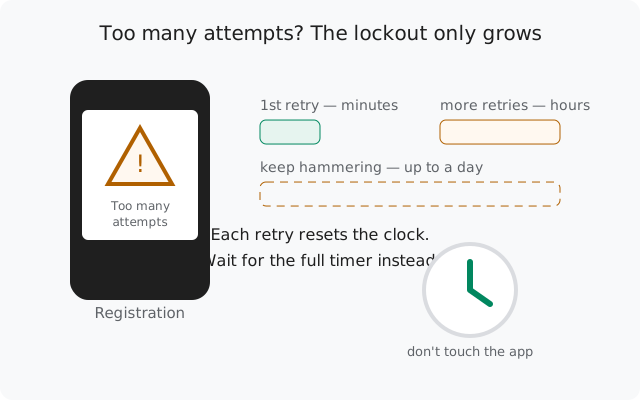
"Too many attempts" means Signal has temporarily locked your number out of registration because of too many code requests in a short time. The only fix is to stop and wait. The lockout starts at minutes and grows to hours or a full day if you keep retrying. Every new attempt resets the clock. Close the app, wait out the full timer, and come back once.
What "too many attempts" actually means
Signal limits how many verification codes can be requested for a number in a short period. This is abuse prevention: without it, attackers could spam codes to any number. When you cross the limit, registration is refused with a "too many attempts" message and a wait timer.
Three things people get wrong about this screen:
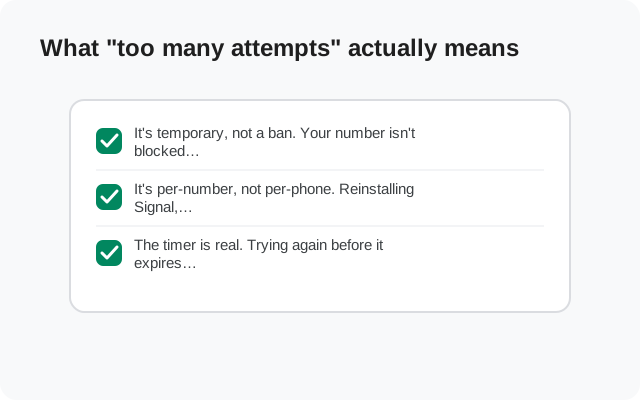
- It's temporary, not a ban. Your number isn't blocked forever. The lock expires on its own. You just have to let it.
- It's per-number, not per-phone. Reinstalling Signal, clearing data, or trying on a different phone with the same number does not reset it. The counter lives on Signal's servers, tied to your number.
- The timer is real. Trying again before it expires doesn't "test" whether the lock lifted. It extends the lock. The system counts the attempt and pushes the expiry further out.
The single most important sentence in this guide: when you see this screen, close Signal and don't open it again until the timer has fully expired. Everything below explains why.
How the wait time grows
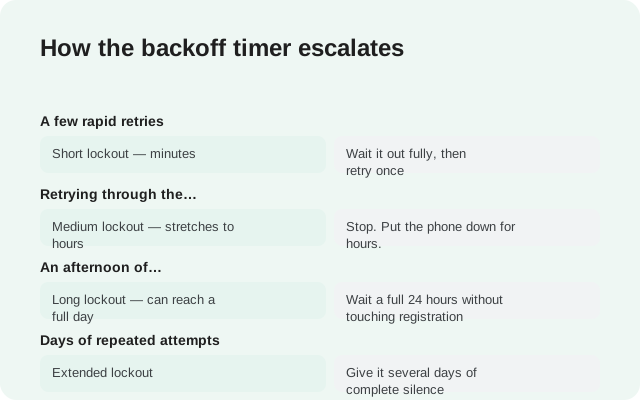
Signal doesn't publish the exact schedule, and any site that quotes you precise minute counts is guessing. What is certain, from the behavior of the system, is the escalation pattern: the more attempts you burn, the longer each lockout gets.
| Your behavior | What happens | What to do |
|---|---|---|
| A few rapid retries | Short lockout: minutes | Wait it out fully, then retry once |
| Retrying through the short lockout | Medium lockout: stretches to hours | Stop. Put the phone down for hours. |
| An afternoon of hammering resend | Long lockout: can reach a full day | Wait a full 24 hours without touching registration |
| Days of repeated attempts | Extended lockout | Give it several days of complete silence |
The pattern is deliberately punishing: the system can't tell a frustrated real user from an automated attack, so it treats persistence as suspicion. Your only winning move is to look as un-suspicious as possible: one attempt, then silence.
Why repeated registration burns attempts
Almost nobody hits the limit on their first try. The typical story goes like this:
The code doesn't arrive
SMS is delayed, filtered, or the number was typed wrong. (The full SMS troubleshooting is in the missing-code checklist.)
You tap resend
Reasonable, but each resend is a new attempt on the counter, and it invalidates the previous code.
An old code arrives and you enter it
It's already invalid. Wrong code entries also count against you.
You reinstall "to fix it"
The reinstall changes nothing server-side, and the fresh registration flow burns more attempts.
Lockout
By now the counter is deep in the red, and the wait stretches to hours.
Notice the tragedy: every step felt like progress. The fix for a missing code was patience, but the instinct was speed, and speed is exactly what the rate limiter punishes. If you're reading this before you hit the limit, the lesson is: one code request, one full timer waited out, then the voice-call option.
What to do while you wait (and what not to do)
You're locked out. Here's how to wait correctly:
- Do: note the timer, close Signal completely, and set a reminder for after it expires. Use another messaging app in the meantime.
- Do: while waiting, double-check the things that caused this: the exact number format (country code, no trunk zero), which SIM holds the number, whether your carrier filters verification SMS.
- Don't: open Signal "just to check." Opening the app doesn't reset anything by itself, but the temptation to tap retry when you're staring at the screen is how lockouts grow.
- Don't: request a code on a second device "to test." Same number, same counter. It burns attempts too.
- Don't: toggle VPNs or change networks hoping to look like a different user. IP-hopping during registration looks like abuse automation and can make things worse. The full reasoning is in the rate limit guide.
- Don't: factory-reset your phone. The lock is on the server, not your device.
If the timer said hours and you waited hours, try once. If it still refuses, the counter needs longer. Give it a full day of silence this time. Escalating lockouts need escalating patience.
Registration lock PIN: what it changes
There's a second, separate lock that confuses people: registration lock. This is an opt-in security feature (Settings → Account → Registration lock). When it's on, re-registering your number requires entering your Signal PIN. It's protection against SIM-swap attacks, where someone who stole your number tries to hijack your Signal account.
How it interacts with a failed registration:
- If you know your PIN: enter it when asked during re-registration. That's the whole hurdle. The PIN plus the SMS code completes the flow.
- If you forgot your PIN: you cannot skip it immediately. The registration lock expires after 7 days of inactivity on the account. After that, the SMS code alone is enough to register. There's no legitimate shortcut around the 7 days; that's the point of the feature.
- Don't confuse the two locks. "Too many attempts" (rate limit) clears in minutes to a day. Registration lock (forgotten PIN) clears in 7 days. They're independent. You can be hit by both at once if you're unlucky.
If you're setting up Signal fresh and never enabled registration lock, this section doesn't apply to you. Skip it. If you're re-registering after a reinstall or a new phone, check whether you had it on before you start burning attempts on the wrong problem.
And a practical note for the future: when you do get back in, save your backup passphrase and keep your PIN somewhere safe. Most re-registration pain comes from missing credentials, not from Signal.
The one clean retry
When the timer has fully expired and you're ready to try again, make it count. One careful attempt beats ten hopeful ones:
Verify the number on paper first
Write down the full international format (country code, number, no trunk zero) and check it digit by digit before typing it into Signal.
Use one device, one stable network
No second phone, no VPN, no network hopping mid-flow. Boring and stable is the goal.
Request the code once
One tap. Then put the phone down and wait the full timer.
Use the newest code only
If multiple codes arrived, the latest one is the only valid one. Enter it carefully. Wrong entries burn attempts too.
If SMS fails again, use the voice call
Don't request a third SMS. When the timer ends, take the "call me instead" option. It bypasses whatever was eating your texts.
If it still fails, stop for the day
Two patient attempts in a day is the maximum. Beyond that you're feeding the backoff. Come back tomorrow.
from Signal's official site, file hosted by Signal, not by us
Frequently asked questions
How long does "too many attempts" last on Signal?
It escalates: a few rapid retries lock you out for minutes, continued retrying stretches it to hours, and a sustained hammering can reach a full day or more. Signal doesn't publish exact durations. The only reliable approach is to wait out whatever timer you're shown, completely, without retrying early.
Will reinstalling Signal reset the too-many-attempts lockout?
No. The attempt counter is server-side and tied to your phone number, not your app installation. Reinstalling changes nothing about the lockout and burns more attempts when you register again.
Can I register on a different phone to bypass the lockout?
No. Same number, same server-side counter. A second device burns attempts just like the first one. Wait out the timer on one device instead.
What's the difference between "too many attempts" and registration lock?
"Too many attempts" is a temporary rate limit from too many code requests. It clears in minutes to a day. Registration lock is a security feature requiring your Signal PIN when re-registering; if you forgot the PIN, it takes 7 days of inactivity to expire. They're separate systems.
I forgot my Signal PIN and registration lock is on. What now?
Wait 7 days without any registration activity on the number. After that, the registration lock expires and you can register with just the SMS code. There is no legitimate way to skip the 7 days.
Does using a VPN cause the too-many-attempts error?
A VPN alone doesn't cause it, but IP-hopping during registration looks like automated abuse and can contribute to stricter limiting. Register on one stable network without a VPN for the cleanest attempt.
Related: the missing SMS code checklist, understanding rate limits, registration without a mobile number, moving Signal to a new phone, and the troubleshooting hub.