
Your Signal SMS code didn't arrive. Here's the checklist that fixes it.
Published: October 7, 2026 · Updated: October 8, 2026
If your Signal SMS code never arrives, don't request another one yet. Resending too fast can trigger a rate limit and make everything worse. Work through this ordered checklist instead: wait out the full timer, confirm the number format and country code, check carrier filtering and spam folders, fix dual-SIM routing, and use the "call me instead" voice option. One of these fixes nearly every missing-code case.
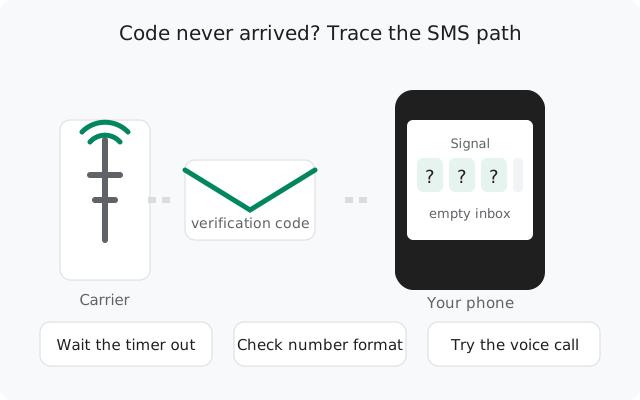
The 10-step ordered checklist
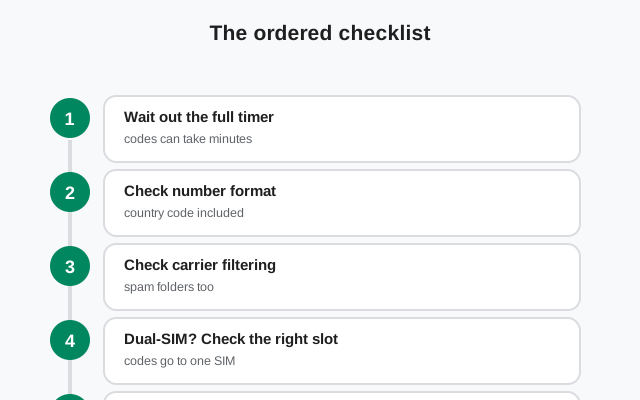
The order matters. Each step is cheap; skipping ahead to resending is expensive (it burns registration attempts). Go in order:
Wait out the full timer
Let Signal's countdown finish completely before touching anything. SMS delivery can lag several minutes. Why this matters.
Confirm the country code
Make sure the selected country and code match your number: e.g. +92 for Pakistan, +91 for India, +1 for the US.
Drop the trunk zero
Type the number in international format: +92 300 1234567, not +92 0300 1234567. The leading zero is only for domestic dialing. Format details.
Check blocked and spam folders
Open your SMS app's spam/blocked folder and any "unknown sender" filter. Carrier filters eat verification texts silently. Carrier details.
Verify the right SIM is active
On dual-SIM phones, the code goes to the number you registered. Make sure that SIM is in the phone, active, and has signal. Dual-SIM notes.
Use "call me instead"
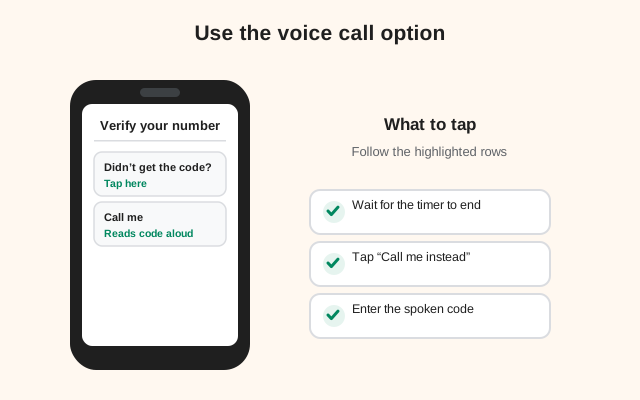
When the timer ends, Signal offers a voice call that reads the code aloud. This works even when SMS is being filtered. How it works.
Rule out VOIP/virtual numbers
Signal rejects most virtual and app-based numbers. If yours is virtual, SMS codes usually never come. The honest picture.
Check for a rate limit
If Signal now shows "too many attempts" or a wait timer, the problem isn't SMS delivery anymore. It's lockout. Rate limit vs missing SMS.
Check your SMS app and permissions
Make sure Signal has SMS permission (for auto-fill) and that your messaging app isn't archiving unknown senders. SMS app fixes.
Retry once, patiently
Only now request a fresh code. Then wait the full timer again. One patient retry beats five frantic ones.
Step 1: wait out the full timer
This is the step everyone skips, and it's the one that causes half the rate-limit cases. Signal shows a countdown after requesting a code. Every time you tap resend, the timer restarts and the request counts as another registration attempt. Hammer the button five times and you've burned five attempts for one code.
SMS delivery is not instant everywhere. On congested networks or with certain carriers, a verification text can take several minutes to arrive. The code also stays valid for a while. An "old" code from your first request usually still works when it finally lands. So the correct move is boring: request once, put the phone down, and wait for the timer to fully expire.
If the code arrived but you already requested a new one, use the newest code. Each new request invalidates the previous one.
Steps 2–3: number format and country code
The most common self-inflicted cause of a missing code: the number Signal sent it to isn't your number. Two mistakes cover almost all of these:
- Wrong country code selected. Signal defaults to a country based on your SIM or region. Check it. A Pakistani number needs +92, an Indian number +91. If the code selector is wrong, the SMS went to a stranger in another country.
- Trunk zero included. Domestic numbers start with a zero (0300…, 0987…) that must be dropped in international format. Type +92 300 1234567, never +92 0300 1234567. With the zero left in, the SMS routes nowhere.
Also double-check for typos. One wrong digit sends your code to someone else, and you'll wait forever for a text that arrived on a stranger's phone. Read the number back digit by digit before requesting the code.
Steps 4–5: carrier filtering and spam folders
Some carriers aggressively filter automated SMS, especially short-code and international verification texts. The message is sent. It just never reaches your inbox. This is a carrier problem, not a Signal problem, and it has a few signatures:
- Check spam/blocked folders first. Open your SMS app and look in Spam, Blocked, or "Unknown senders" folders. Filtered verification texts often sit there unread.
- Look for sender-blocking rules. Some carrier apps and third-party SMS apps auto-block unknown or short-code senders. Whitelist verification senders or disable the aggressive filter temporarily.
- Corporate or family-plan filters. Some plans include SMS content filtering that silently drops automated texts. If you're on a managed plan, this is worth asking about.
- Roaming delays. If you're roaming, SMS delivery can lag badly or fail on certain partner networks. The voice-call option (step 7) usually works where roaming SMS doesn't.
If you suspect carrier filtering, don't keep requesting SMS codes. Switch to the voice call option instead. More SMS requests to a filtering carrier just burn more attempts.
Step 6: dual-SIM quirks
Dual-SIM phones add a layer where things go wrong quietly:
- The code goes to the registered number's SIM. Make sure that physical SIM is actually in the phone, seated properly, and showing signal bars. A SIM in a drawer can't receive anything.
- Data vs SMS SIM confusion. Your phone may use SIM 1 for data and SIM 2 for calls/SMS. That's fine. The code arrives on whichever SIM holds the registered number. Just confirm that SIM is enabled in Settings → SIM cards.
- Temporarily disable the other SIM. If messages seem to vanish, disable the non-registered SIM during registration. Some phones route incoming texts oddly when both SIMs are active.
- eSIM profiles. If the number is on an eSIM, make sure that profile is turned on. A disabled eSIM is the same as a removed SIM.
Step 7: use the voice call option
When the SMS timer expires, Signal offers "Call me instead" (wording varies slightly by version): an automated voice call to your number that reads the verification code aloud. This is the single best fallback, and many people don't notice it exists.
Why it works when SMS doesn't:
- Voice calls aren't subject to SMS spam filtering. It's a different channel entirely.
- It works on landlines (more on that in the guide to using Signal without a mobile number).
- It works while roaming in places where SMS delivery fails.
Have a pen ready or keep the phone on speaker. The code is read once or twice and the call ends. Enter it promptly. If you miss it, you can request the call again, but give it a proper wait between attempts.
Step 8: VOIP and virtual numbers
Honest answer: Signal actively blocks most VOIP and virtual numbers. Numbers from free texting apps, virtual-number services, and temporary-number providers are rejected by Signal's abuse-prevention systems. The SMS code is never even sent. This isn't a delivery glitch you can fix with the checklist; it's a policy block.
- App-based virtual numbers (free texting apps): almost always rejected.
- Paid virtual numbers: sometimes work, often don't. Failure rates are high and there's no list of which providers pass.
- Temporary/disposable numbers: blocked, and using one for a messaging account is a bad idea anyway. Anyone who gets the number later can take over the account.
If you don't have a real mobile number, your realistic options are a landline (via the voice call option) or waiting for Signal's numberless signup to leave beta. Both are covered in the no-phone-number guide.
Step 9: is it actually a rate limit?
There's a trap here: a missing code and a rate limit look similar ("I can't register"), but they're different problems with opposite fixes. If you keep requesting codes for an SMS problem, you can cause the rate limit. Then the original SMS issue doesn't matter anymore because Signal won't send anything until the lockout expires.
| What you see | What it means | What to do |
|---|---|---|
| No code, no warning, timer just runs | SMS delivery problem | Keep working this checklist |
| "Too many attempts" or a wait timer | Rate limited | Stop everything. See the rate limit guide |
| Code arrives but says invalid/expired | Old code | Use the newest code from the latest request |
| Code arrives instantly every time | Delivery is fine | Your problem is elsewhere (wrong number, VOIP block) |
If you've hit "too many attempts," close Signal and walk away. The full explanation of how the backoff works, and the mistakes that extend it, is in the guide to registration failures.
Step 10: your SMS app and permissions
Two phone-side issues can hide an SMS that actually arrived:
- SMS permission for auto-fill. Signal asks for SMS permission so it can read the code automatically and fill it in. If you denied it, nothing is broken. You just have to type the code manually from your messaging app. Granting it is convenient, not required.
- Aggressive SMS apps. Third-party messaging apps with spam filters, and some manufacturer SMS apps, auto-archive or hide messages from unknown senders. Check archived conversations and the spam folder. If in doubt, temporarily switch your default SMS app to the plain system one during registration.
- Full SMS storage. On older phones, a full SMS inbox can reject new messages. Delete old threads if your inbox is enormous.
- Do Not Disturb. DND hides the notification, not the message. But people mistake "no notification" for "no SMS." Open the messaging app and look.
If nothing has worked
At this point you've confirmed the format, waited patiently, checked spam, fixed the SIM situation, tried the voice call, and ruled out rate limits. Remaining possibilities:
Try a different network
Move from Wi-Fi to mobile data or vice versa. Registration needs a clean connection to Signal's servers alongside the SMS. A flaky network can break the handshake even when the SMS arrives.
Restart the phone
A full reboot clears stuck radio state that airplane-mode toggles sometimes miss.
Update Signal
Install the latest build from signal.org/android/apk (currently 8.29.3). Registration-flow bugs do get fixed.
Contact your carrier
Ask specifically whether they filter automated or short-code SMS. If yes, ask for it to be disabled on your line, or use the voice call option permanently.
from Signal's official site, file hosted by Signal, not by us
Frequently asked questions
How long should I wait for the Signal SMS code?
Wait for Signal's full countdown timer to expire before requesting another code. Delivery can lag several minutes on some carriers. Requesting again restarts the timer and burns a registration attempt, so patience here literally saves you from a rate limit.
Can I use the code from my first request if I already asked for a second?
No. Each new code request invalidates the previous code. Always use the newest code that arrives. If multiple codes are sitting in your inbox, the latest one is the only valid one.
Does Signal offer the code by phone call?
Yes. When the SMS timer expires, Signal offers a "call me instead" option: an automated voice call that reads the code aloud. It bypasses SMS filtering entirely and also works for landline numbers.
Why does the code arrive on my old phone but not this one?
The code goes to the phone number, not the device. It arrives wherever that SIM is. If your old phone still holds the active SIM, the code lands there. Move the SIM to the phone you're registering, or read the code off the old phone and type it in.
My carrier blocks short-code SMS. Can I still register?
Yes. Use the voice call option instead of SMS. Calls aren't affected by SMS filtering. Alternatively, ask your carrier to disable short-code filtering on your line.
Can I register with a free texting-app number?
Almost certainly not. Signal blocks most VOIP and virtual numbers as an anti-abuse measure. The code is never sent. Use a real mobile number or a landline with the voice-call option.
Related: fixing "too many attempts" failures, waiting out a rate limit, options without a mobile number, installing without the Play Store, and the troubleshooting hub.