
Signal Release Cadence: How Often Updates Ship
Published: October 7, 2026 · Updated: October 8, 2026
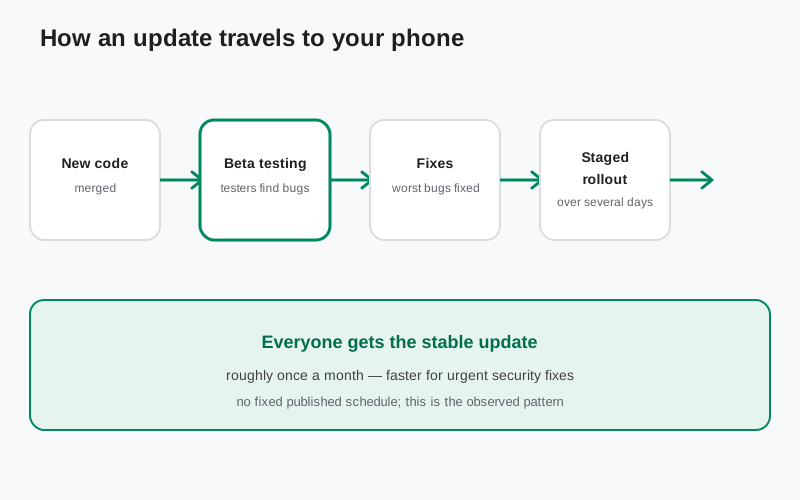
How often Signal actually updates
There is no published calendar: no “updates every Tuesday” page. But you don't need one to see the rhythm. Watch the releases over a few months and the pattern is steady: roughly one Android release a month, each one spending time in beta first. The current state tells the story: 8.29.3 is the stable website build while 8.30.x is still in beta-only testing. One track always leads, the other follows.
The little third number matters too. A jump from 8.29.0 to 8.29.3 means small fix releases: bug fixes and polish that didn't need a whole new version number. So “roughly monthly” describes the big beat; small patches can land in between without fanfare. Here is how to read a Signal version number if the digits ever confuse you.
This pace is deliberate. A messenger used by millions cannot ship fast and break things: every release touches encryption, calls, and message delivery, where a bug is not a cosmetic glitch but a lost conversation. The monthly-ish rhythm is the compromise between staying current and staying reliable. You can see it play out across this year's releases so far.
How an update travels from code to your phone
Every release makes the same journey. New code is merged, a beta build is cut, and testers run it on thousands of real phones: the device variety no lab can reproduce. Crashes and battery complaints come back, the worst problems get fixed, and only then is the build tagged stable. That is what beta testers actually do with their rough builds.
“Stable” does not mean “everyone at once.” Stable releases go out in stages over several days:
- a fraction of users first,
- then a wider group,
- then everyone.
But only if nothing breaks along the way. This is why a release can be “out” for days before it reaches you. Days, not hours.
The website APK follows the same rhythm with its own delivery: when a new website build is ready, Signal replaces the file on its download page, and the app itself shows you an in-app prompt. There is no auto-update silently swapping the file. You see the prompt, you tap, and you update from Signal's own page.
Why your friend has a newer version than you
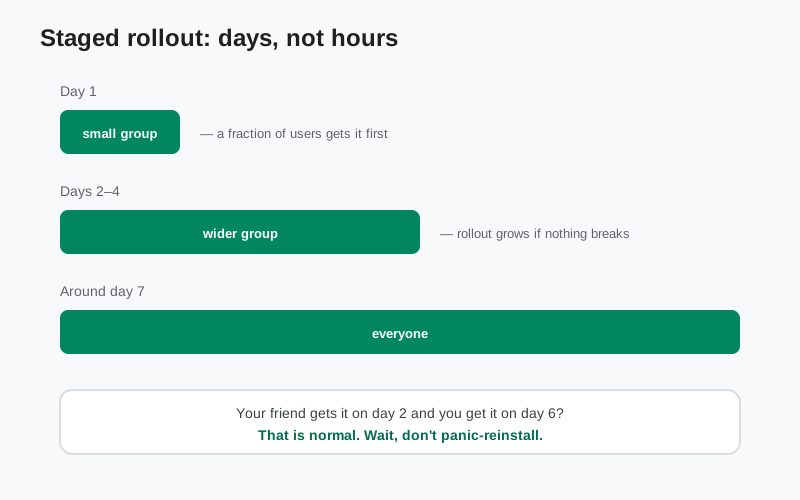
Two phones, same day, different Signal versions. Neither of you did anything wrong. Staged rollouts explain most of it: your friend was in an early wave, you are in a later one. Within a few days you will match.
Channels explain the rest. The website build and the Play build are released separately, and their version numbers can disagree even when the underlying code is the same. So “my friend on Play has 8.30 and my website APK says 8.29.3” is not a bug and not a fake file. It is two channels on two schedules. Check which build is current on each channel before worrying.
What it is not: a reason to panic-reinstall. Reinstalling mid-rollout does not pull you into an earlier wave, and every reinstall is a small chance to lose something. Wait a few days. If you are still behind after a week, then investigate: the guide to a version that won't budge covers that.
How to check for updates on the website build
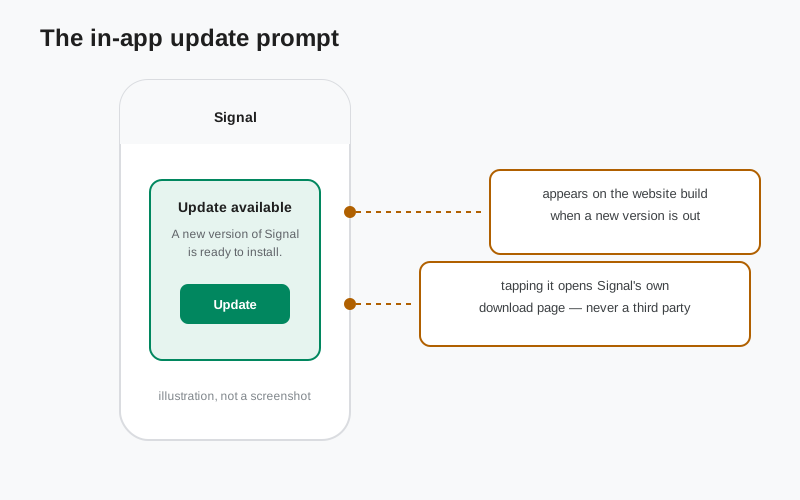
The website build does not update itself the way the Play Store does. Instead, Signal built the notification into the app: when a new website build is available, an in-app prompt appears telling you an update is ready. Tap it and it takes you to Signal's own download page to get the new file. That prompt is the update system: simple and honest.
You can also check manually. Open Signal's download page and compare the version number on the file with the version in your app's settings. If the page is newer, download and install it over your current app. Same signing key, so your data carries over like a normal update. The safe download walkthrough covers the steps.
Two things not to do. Don't install an “update checker” app from a third party. You don't need a middleman between you and Signal, and middlemen are where fake files hide. And never tap “update” on a prompt that appears outside Signal, in a browser popup or on a random site. Real update prompts come from inside the app or from signal.org, nowhere else. Here is how to spot a fake Signal file.
What triggers an urgent update
Sometimes the rhythm breaks, and that is a good sign. If a genuine security problem is found, a real vulnerability, not a rumor, Signal ships a fix fast, outside the monthly pattern. Security fixes don't wait for the next scheduled window, because attackers don't either.
Serious widespread crashes can do the same thing. If a stable release turns out to break something fundamental for a large group of users, a fix release follows quickly. These off-cycle updates are rare, which is exactly why you should take them seriously when they appear: update promptly, don't snooze them for a week.
What does not trigger an urgent update: a feature you want, a cosmetic annoyance, or a rumor on social media. If someone tells you to “update NOW or else” but Signal's own channels say nothing, treat it as noise, or worse, as bait for a fake download. Check Signal's own pages, not forwards.
Update situations, and what to do
| Situation | What to do | Why |
|---|---|---|
| The app shows the in-app update prompt | Tap it and update from Signal's page | That prompt is the official update system for the website build. |
| Your friend has a newer version and you don't | Wait a few days | Staged rollouts reach everyone in waves, not all at once. |
| No prompt for weeks and you're unsure | Check the version on Signal's download page manually | The download page is the source of truth for the website build. |
| An update fails or won't install | Work through the update-failed troubleshooting guide | Don't keep retrying blindly; find the actual error first. |
| You're on a very old version | Update soon | Old versions miss security fixes: the one update reason that truly matters. |
| A message says “urgent update” but it didn't come from the app or signal.org | Ignore it; verify on Signal's own pages | Fake urgency is a classic lure for fake files. |
from Signal's official site, file hosted by Signal, not by us
Frequently asked questions
Does the website APK update automatically?
No. The Play Store auto-updates the Play build, but the website build notifies you with an in-app prompt instead. You tap, download from Signal's page, and install. One tap, same result, no middleman.
How long after a release until I get it?
Usually a few days. Staged rollouts spread a release over several days, and the website build has its own timing. If you are more than a week behind with no prompt, check manually.
Should I update the moment a new version appears?
Generally yes. Updates carry bug fixes and security fixes, and staying current is the simplest security habit there is. The one exception is the beta: read the beta-vs-stable decision guide before opting into unfinished builds.
Can I skip versions?
Yes. Installing the latest build over an older one works fine: you don't need to install every version in between. Same signing key, data carries over.
Where can I see what changed?
The release notes guide collects what's new per version, and the version history page puts every release in order.
Related guides: which build is current right now · every release in order · what's new in each version · should you join the beta · when your version won't budge · if an update won't install · the safe download walkthrough · how Molly follows Signal's releases