
Signal says your number is already registered: reclaim it
Published: October 7, 2026 · Updated: October 8, 2026
"Number already registered" means Signal's servers already tie your phone number to an active Signal account. Most often it is your own, on an old phone you forgot about. The fix is refreshingly simple: just register the number on your current phone, and the account moves here. If you set a registration lock PIN, you'll need it. If you don't remember it, a little patience: the lock expires after 7 days of inactivity.
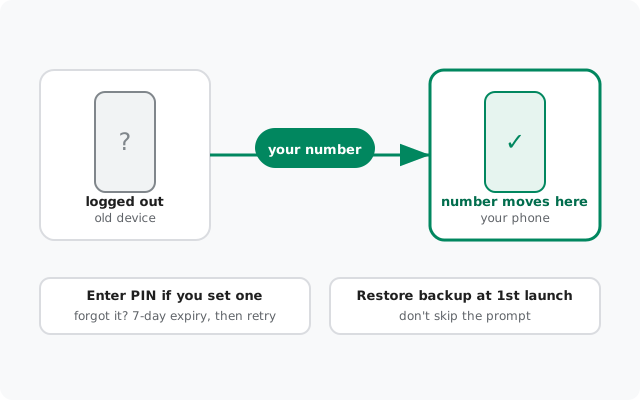
Why this happens
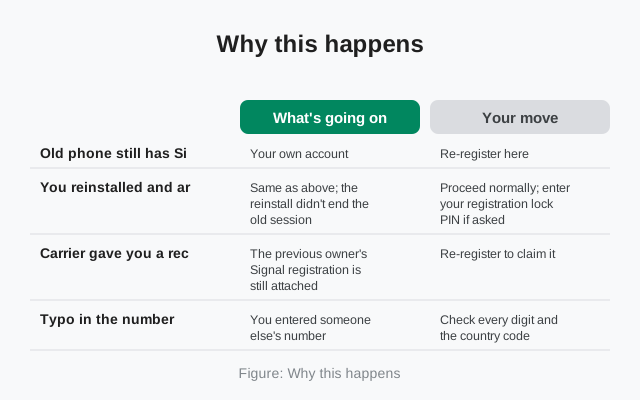
Signal identifies accounts by phone number, and one number maps to one active registration. When you try to register a number that's already live somewhere, Signal tells you. It doesn't just overwrite silently, because that would make account takeovers trivially easy. Here's what's usually behind the message:
| Situation | What's going on | Your move |
|---|---|---|
| Old phone still has Signal on it | Your own account, alive on the other device | Re-register here: the old device logs out automatically |
| You reinstalled and are registering again | Same as above; the reinstall didn't end the old session | Proceed normally; enter your registration lock PIN if asked |
| Carrier gave you a recycled number | The previous owner's Signal registration is still attached | Re-register to claim it: their history stays on their device, not yours |
| Typo in the number | You entered someone else's number | Check every digit and the country code, then retry |
| Someone registered your number maliciously | Rare, but SIM-swap attacks are real | Recover the number via your carrier first, then re-register |
Before anything else, rule out the typo. It's embarrassingly common. Read the number back digit by digit, confirm the country code, and only then treat it as a real conflict.
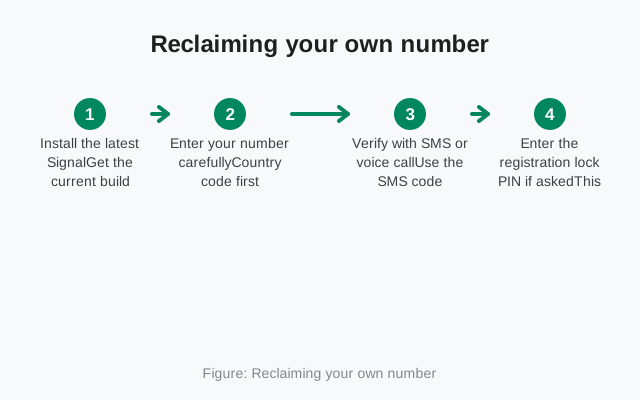
Reclaiming your own number
If the number is yours, this is a five-minute job. The old registration (on your old phone, or left over from before the reinstall) ends the moment the new one completes. That's the reclaim mechanism, not a side effect.
Install the latest Signal
Get the current build (8.29.3) from signal.org/android/apk so you're not fighting old bugs on top of everything else.
Enter your number carefully
Country code first, then the number in international format without the trunk zero. Double-check the digits.
Verify with SMS or voice call
Use the SMS code, or the voice call option if texts don't arrive. Full checklist in the missing-code guide.
Enter the registration lock PIN if asked
This appears only if you enabled it. Remember it? Enter it and continue. Don't remember it? Don't guess repeatedly. The lock lapses after 7 days of registration inactivity, and waiting is the only fix. Signal can't reset a PIN it never sees.
Restore your backup at the first-launch prompt
Don't skip it: this is the one-shot restore offer. Details in the restore walkthrough.
Once the new registration completes, the old device is logged out on its own. You don't need the old phone in hand, and you don't need to "deactivate" anything first.
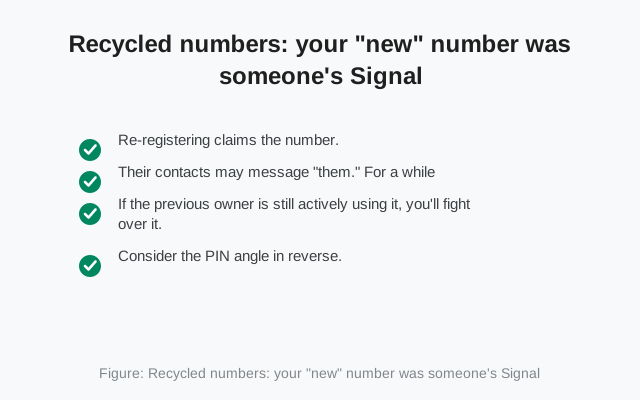
Recycled numbers: your "new" number was someone's Signal
Carriers reissue numbers all the time. If the previous owner used Signal and never unregistered, their account is still attached to what is now your number. Awkward, but fixable. And fully legitimate to fix, since the number is yours now.
- Re-registering claims the number. Go through the normal flow above. Their message history does not transfer to you. Chats live on their device, and you start fresh. You're taking over the number, not their conversations.
- Their contacts may message "them." For a while, the previous owner's contacts might text you thinking you're them. A short "hi, this number has a new owner" sorts it out. You can also ask close contacts of yours to save the number fresh.
- If the previous owner is still actively using it, you'll fight over it. Each new registration logs the other side out. If that tug-of-war starts, stop. Call your carrier and ask for a different number. Life's too short to share a phone number with a stranger.
- Consider the PIN angle in reverse. If the previous owner set a registration lock PIN, you may have to wait out its 7-day inactivity expiry before your registration goes through. Annoying, but it's the same protection that would guard your number.
If someone took your number
After you've recovered the number, re-registering logs the attacker's device out automatically. Then enable the registration lock PIN (Settings → Account) so the next attempt hits a wall. Also lock down your carrier account with whatever PIN or password they offer against SIM swaps.
Stop it happening again
- Keep the registration lock PIN on. It's the single best defense against someone else registering your number, with or without your SIM. Store it in your password manager.
- Never share verification codes. No legitimate person or company ever needs your Signal code. Anyone asking is running a takeover.
- Unregister before giving up a number. Changing numbers? Delete your Signal account under the old number first (or use the change-number feature), so the next person who gets it doesn't inherit your registration.
- Secure the carrier account. Ask your carrier about a port-out / SIM-swap PIN. Most carriers offer one; almost nobody enables it.
After reclaiming: the first ten minutes
The number is yours again. Don't just close the app. Finish the job:
Confirm the old side is out
If you still have the old phone, open Signal on it. It should show the logged-out state. That's your proof the reclaim actually completed.
Decide on the restore now
If you skipped the first-launch restore in the excitement, the automatic offer is gone. Getting it back means clearing data and re-registering once more. Decide today, not next week when you've built up new chats you'd rather not lose.
Turn on the registration lock PIN
Settings → Account. This is what stops the next surprise: whether that's a recycled-number tug-of-war or something malicious.
Re-link Desktop and tablet
They were unlinked by the re-register. Link them fresh before you actually need them.
Tell key contacts (recycled numbers only)
A quick "this number has a new owner" message to anyone who keeps texting the previous owner prevents weeks of confused replies.
One last thing: give it a day. Group memberships and contact rediscovery settle over the first few hours after a re-register. If something looks missing right after the reclaim, check again after a few hours on Wi-Fi before assuming it's broken.
from Signal's official site, file hosted by Signal, nosked questions
Will re-registering delete the other device's chats?
No. Re-registering logs the other device out of the account, but chats stored on that device stay on that device. You're moving the number, not wiping their phone.
I don't know the registration lock PIN. What can I do?
Only the person who set it knows it. Signal can't reset or reveal it. The lock lapses after 7 days of registration inactivity, so waiting is the fix. Don't burn registration attempts guessing.
Strangers are messaging me thinking I'm the previous owner. Help?
Classic recycled-number situation. Reply once that the number has a new owner, and re-registering under your name is legitimate. Their old chats don't come to you. If it becomes a tug-of-war, ask your carrier for a different number.
Can two phones share one Signal number?
No: one number, one phone. Registering the number on a second phone automatically logs the first one out. Use linked devices (Desktop, tablet) if you want Signal on more screens.
How long until a recycled number becomes free to claim?
There's no published schedule, but you usually don't have to wait at all: re-registering claims it, unless the previous owner set a registration lock PIN, in which case its 7-day inactivity expiry applies.
Someone stole my SIM and registered my number. Can Signal give it back?
No. Only your carrier controls number ownership. Recover the number through your carrier first, then re-register on Signal, which logs the other device out. Enable the registration lock PIN afterward.
Related: re-registering after a reinstall, fixing failed registrations, when the SMS code doesn't arrive, getting the code by voice call, the restore walkthrough, and the troubleshooting hub.