
Re-registering Signal after a reinstall: read this first
Published: October 7, 2026 · Updated: October 8, 2026
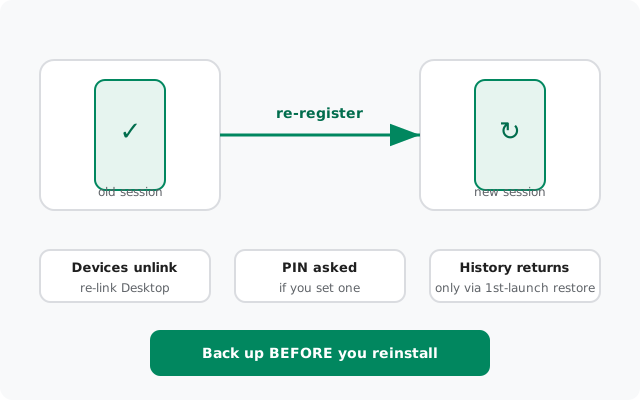
Re-registering Signal, entering your number again on the same phone after a reinstall or a data wipe, is routine, and Signal is built for it. But it is not harmless: it ends your old session, unlinks every connected device, and asks for your registration lock PIN if you ever set one. And your message history only survives if you restore a backup at the first-launch prompt. Read the backup-first warning below before you tap anything.
What re-registering actually does
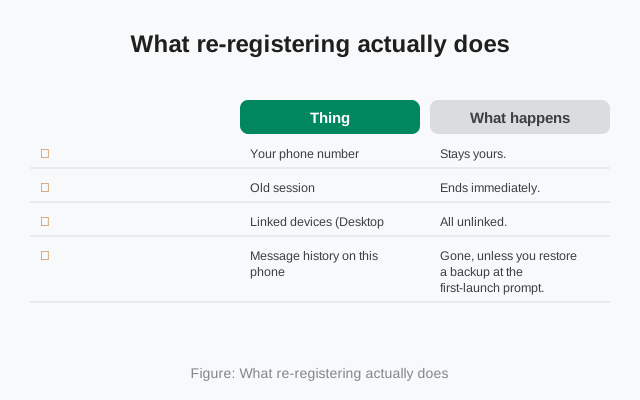
People say "reinstall" like it's a refresh. Technically, you're proving you own the number again and starting a fresh session. Here's the honest ledger:
| Thing | What happens |
|---|---|
| Your phone number | Stays yours. You re-verify it with an SMS or voice-call code, same as the first time. |
| Old session | Ends immediately. If the number was registered on another device, that device gets logged out. That is the reclaim mechanism working. |
| Linked devices (Desktop, iPad) | All unlinked. You must re-link each one after registering. |
| Message history on this phone | Gone, unless you restore a backup at the first-launch prompt. There is no "download my history from the server." Signal doesn't keep it. |
| Groups | Memberships usually reappear on their own, because group membership is kept server-side. The messages inside them do not come back without a backup. |
| Contacts | Your phone's contacts are untouched. Signal rediscovers which of them use Signal after you register. |
| Registration lock PIN | Asked at re-register if you enabled it. Forgotten it? There's a waiting path. See below. |
| Profile name and photo | Restored if your backup included them; otherwise you set them up again in a minute. |
The row that ruins people's week is message history. Everything else on that table is a minor inconvenience. History is the one that's permanent.
The backup-first rule
If you're reading this after already reinstalling without a backup: the honest answer is that the history on that phone is gone. Re-register cleanly, set up Secure Backups properly this time, and save the key in two places. The backup troubleshooting hub covers every failure mode if the backup itself misbehaves.
The registration lock PIN
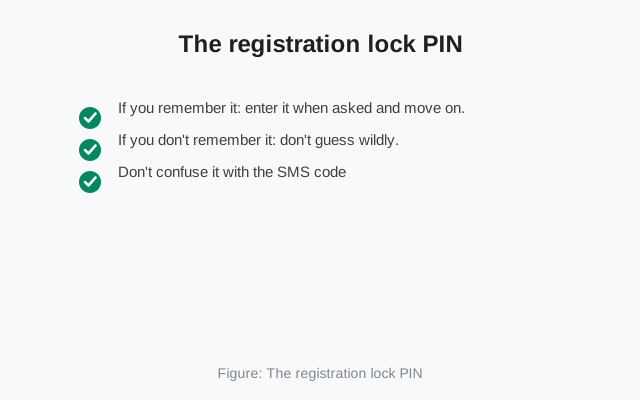
The registration lock PIN is the thing that surprises people mid-re-register. It is not your phone's screen lock, and it is not the 6-digit SMS code. It's an extra PIN you may have set inside Signal (Settings → Account) that protects your number: anyone trying to register your number, including you, on a fresh install, has to enter it.
- If you remember it: enter it when asked and move on. This is the whole flow working as designed.
- If you don't remember it: don't guess wildly. The lock has a 7-day inactivity expiry. After 7 days without registration activity on the number, the lock lapses and you can register without the PIN. Waiting is the only fix; Signal cannot reset it for you because they don't know it either.
- Don't confuse it with the SMS code: the SMS/call code proves you received something at the number; the PIN proves you're the person who locked the account. Both gates exist for a reason.
Once you're back in, keep the PIN enabled. It's the main defense against someone else registering your number. Store it in your password manager next to your backup recovery key.
Same number, same phone: the clean sequence
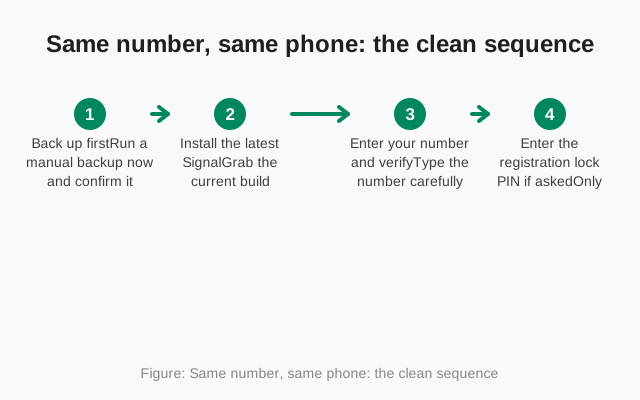
Do it in this order and re-registering is boring, which is exactly what you want:
Back up first
Run a manual backup now and confirm it completes. Save the 64-character recovery key where you'll find it again. This step is the whole game.
Install the latest Signal
Grab the current build (8.29.3) from signal.org/android/apk. Don't re-register on an outdated build and inherit old bugs.
Enter your number and verify
Type the number carefully with the right country code. Verify with the SMS code, or use the voice call option if texts don't arrive.
Enter the registration lock PIN if asked
Only appears if you enabled it. Forgotten it? See the waiting path above. Don't burn registration attempts guessing.
Restore at the first-launch prompt. Don't skip
This is the one-shot offer. Accept it, enter your recovery key, and wait for the restore to finish before touching anything.
Re-link your other devices
Desktop and tablet were unlinked by the re-register. Link them fresh from the phone.
Changed number or new SIM
Registering a different number isn't re-registering. It's a new account. Your old backup is tied to the old number and won't restore onto the new one. Practical notes:
- Your contacts see the new number as a new Signal account. Tell important people, or they'll keep messaging the old number.
- Groups: you'll need to be re-added under the new number.
- If you still have the old number active, register with it to keep everything, then use Signal's change-number feature instead of starting over.
When re-registering goes wrong
Each failure has its own fix. Don't treat them all as "registration is broken":
- "Number already registered": usually your own old session. The reclaim guide walks through taking it back.
- SMS code never arrives. Work the missing-code checklist, or switch to the voice call verification.
- "Too many attempts": you've hit a rate limit from retrying. Stop and read the rate limit guide before you extend it.
- Registration fails outright. The registration failure guide covers the remaining cases.
- App crashes on launch. That's not a registration problem at all; see the crash diagnosis guide.
Re-registering on a brand-new phone (not a reinstall)
Everything above assumes the same phone. If the phone itself is new, you have a better option than backup-and-restore: a direct device transfer. When both phones are in your hands, Signal can move your chats over a local connection. No cloud backup needed, and media comes along in full. The device transfer guide and the Android-to-Android walkthrough cover it step by step.
Use the backup-and-restore path only when the old phone is gone, broken, or already wiped. And one warning that bites people here: don't factory-reset the old phone the moment the new one lights up. Keep it untouched until you've opened Signal on the new phone and confirmed your chats are actually there. "Transfer complete" on a progress bar is not the same as your chats being readable. Verify with your own eyes first.
from Signal's official site, file hosted by Signal, not by us
Frequently asked questions
Will I lose my chats if I reinstall Signal?
Only if you skip the restore prompt or never made a backup. Reinstall with a good backup and accept the restore at first launch, and your history comes back. Without a backup, the history on that phone is gone permanently.
Why is Signal asking for a PIN I don't remember setting?
That's the registration lock PIN, set earlier under Settings → Account. If you've forgotten it, the lock lapses after 7 days of registration inactivity. Waiting is the only fix, since Signal can't reset a PIN it never sees.
Do I need to tell my contacts that I reinstalled?
No. Your phone number is your identity on Signal, so contacts see the same you. Just re-verify the number and you're back where you were.
Will my linked desktop stay connected after I re-register?
No. Re-registering ends the old session and unlinks every device. Re-link Desktop and tablet fresh from the phone once registration is done.
Can I use the same Signal number on two phones?
No. One phone number, one phone. Registering the number on a second phone logs the first one out. That's the reclaim mechanism, not a bug.
I skipped the restore prompt. Can I get it back?
Yes, with a redo: clear the app's data or reinstall, re-register your number, and this time accept the restore at the first-launch prompt. Your cloud backup is tied to your account, so it survives the redo.
Related: reclaiming an already-registered number, when the SMS code doesn't arrive, getting the code by voice call, backup failure hub, the restore walkthrough, and the troubleshooting hub.