
Signal iOS History: The Story So Far
Published: October 7, 2026 · Updated: October 8, 2026
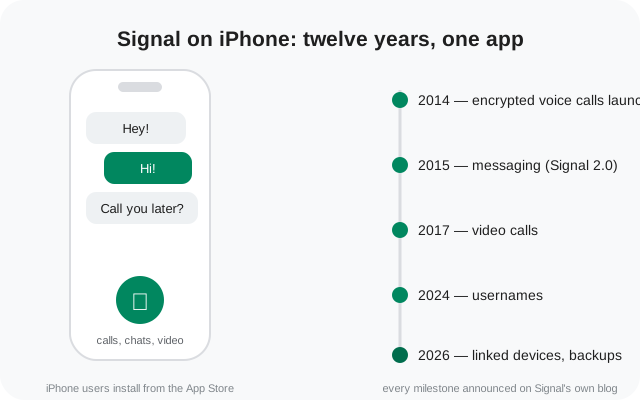
The milestone timeline
Signal does not publish a version-by-version changelog for iOS the way some apps do. What it does publish is blog announcements for the big turns in the road. Here is the complete verified trail. Nothing here is reconstructed from third-party lists:
| When | Milestone | What changed |
|---|---|---|
| Jul 2014 | iPhone launch | Signal 1.0: free, open-source encrypted voice calls on iPhone (RedPhone-compatible). No texting yet. |
| Mar 2015 | Signal 2.0 | TextSecure private messaging on iPhone: encrypted group, text, picture, and video messages, chatting with Android. |
| Sep 2016 | Desktop linking | Signal for iPhone 2.5.1 gains multi-device: link the desktop client; new iOS theme for desktop. |
| Oct 2016 | Disappearing messages | Timers from five seconds to one week on iPhone, Android, and Desktop: pitched as "data hygiene." |
| Feb 2017 | Video calls beta | End-to-end encrypted video calls in public beta (with CallKit on iOS 10); out of beta in March 2017. |
| Oct 2018 | Sealed sender | Technology preview: sender identity hidden from the service itself; beta first. |
| Nov 2019 | Signal for iPad | iPad support as a linked device, plus other iOS improvements. |
| May 2020 | Signal PINs | PIN-based recovery of profile, settings, and contacts, plus registration lock. |
| Aug 2020 | Message requests | Messages from strangers land in a requests inbox instead of your main chats. |
| Dec 2020 | Group calls | Encrypted group video calls launch on all apps, starting with 5 participants. |
| Nov 2022 | Stories | 24-hour encrypted stories on Android and iOS, with per-viewer controls. |
| Feb 2024 | Usernames | Connect without sharing your phone number (beta, app version 7.0.0). |
| 2026 | Linked devices + backups | iOS 8.22: link another iPhone or iPad. iOS 8.30: secure backup improvements on all platforms. |
The story below covers each milestone in more detail, briefly, since this is a companion page, not an iOS manual.
2014: Signal launches on iPhone
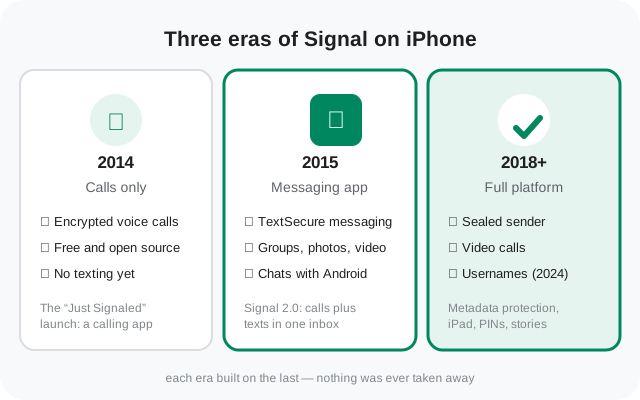
On July 29, 2014, Open Whisper Systems released Signal for iPhone. It was not a messenger at first. It was a free, open-source app for making end-to-end encrypted voice calls, compatible with the RedPhone app on Android. The announcement post, titled "Just Signaled," framed the pitch simply: secure calls, free, with no carrier involved.
Encrypted texting was explicitly a later promise, not a launch feature. At the time, the team said its next steps included bringing TextSecure-style messaging to iOS. It kept that promise within the year. If you only remember one thing about the iPhone launch, remember this: Signal started as a calling app, and everything else was built on top of it.
2015: encrypted messaging arrives
In March 2015, Signal 2.0 brought private messaging to the iPhone. The update added support for TextSecure private messaging, so users could send end-to-end encrypted group, text, picture, and video messages. Crucially, users could also message people on Android running TextSecure. Calls and texts now lived in one app with an inbox-and-archive workflow.
This was the moment the iPhone app stopped being a calling tool and became a messenger. It also ended the split era where you needed different apps for secure calls and secure texts. From here on, every major Signal feature would ship to both phone platforms together.
2016: desktop linking for iPhone
On September 26, 2016, the iPhone app gained multi-device support. Updating to Signal for iPhone 2.5.1 let you link the Signal Desktop client, so conversations continued on your computer. Once linked, the desktop worked whether your phone was online or not. The same update added a new iOS-flavored theme for the desktop app, enabled by default when you linked from an iPhone.
Android had gotten desktop linking first (the desktop client launched Android-only in December 2015). With this update, both phone platforms fed the same desktop app, and the "Android only" asterisk was gone. Our Desktop history page tells the other half of this story.
2016: disappearing messages
On October 11, 2016, disappearing messages arrived for iPhone, Android, and Desktop at once. Any conversation could be set to delete sent and received messages after a chosen interval, from five seconds to one week, with the clock starting when the recipient read the message.
The announcement was honest about the limits: the feature was pitched as "data hygiene," not protection against a determined adversary: anyone can photograph a screen. That framing has stayed with the feature ever since, and it is still the right way to think about it today.
2017: video calls
In February 2017, video calls entered public beta across Android and iOS, built on a brand-new calling system that replaced the older one. On iOS the update added CallKit support (iOS 10). Signal calls could then be answered from the lock screen like regular calls. The announcement was clear: iCloud would then sync call metadata. There was a toggle to opt out of CallKit for anyone who preferred privacy over convenience.
The beta left beta in March 2017. Video completed the feature triangle: calls, messages, and now face-to-face. All end-to-end encrypted, all in the same app that had started three years earlier as voice-only.
2018: sealed sender
On October 29, 2018, Signal previewed sealed sender in a technology-preview blog post. The idea: hide the sender's identity from the service itself, so the server only learns the destination, like mailing a package with a blank "from" field. It rolled out to beta builds first, with the plan to enable it by default in a future stable release.
For iPhone users nothing visibly changed. The app looked and behaved the same. The protection was invisible by design, which is exactly the point of metadata work: the best privacy upgrades are the ones you never notice.
2019: Signal for iPad
In November 2019, Signal announced iPad support alongside other iOS improvements. The iPad app worked as a linked device, bringing the full Signal experience, messages, calls, media, to the bigger screen. For people who wanted Signal on a tablet without picking up their phone, this closed a real gap.
iPad support has been maintained since, and the linked-device story kept growing: in 2026, Signal expanded iOS linking so you can link an iPhone to your account too, with iPad support continuing alongside.
2020: PINs and message requests
May 2020 brought Signal PINs: a PIN that encrypts your profile, settings, and contacts so they can be recovered when you switch devices. A registration lock stops someone else from registering your number without the PIN. In August 2020, message requests followed: messages from people you don't know land in a requests inbox instead of your main chats.
Together these two changed account safety more than any single feature that year: one protects your identity, the other protects your attention. Both are still core to how Signal accounts work today.
2020: encrypted group calls
In December 2020, encrypted group video calls launched across Signal's apps, iPhone included. Group calls are free, private, and end-to-end encrypted, like everything else on Signal. The launch cap was 5 participants; it was later raised to 40.
This was the pandemic-era feature: families and teams who had moved their lives onto video calls could finally do it without trading privacy for convenience. It closed the biggest remaining gap with the mainstream video apps.
2022: Stories
In November 2022, Stories launched on Signal for Android and iOS (desktop was promised "coming soon"). Stories are 24-hour posts, photos, videos, text, end-to-end encrypted like everything else, with controls for who can see them and view receipts you can toggle.
Signal was candid that Stories were simply one of its most-requested features. If you don't want them, there is a setting to turn Stories off entirely: no nagging, no dark patterns.
2024: usernames and phone-number privacy
On February 20, 2024, Signal launched usernames in beta (app version 7.0.0). A username is a unique name you can share instead of your phone number: a way to connect without handing out your number. Your phone number is still required to register, and your username is not your profile name or a public handle; it is simply a way to initiate contact.
Once rolled out, your phone number stopped being visible to people who didn't already have it saved: the biggest privacy change to Signal's identity model in years. See our usernames guide for how they work in practice.
2026: linked devices and secure backups
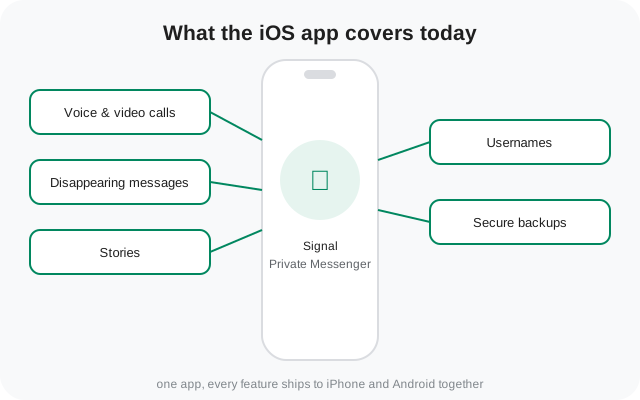
In 2026, the iOS story has been about devices and safety nets. Android v8.20 and iOS v8.22 brought comprehensive linked-device support: you can now link another Android phone or tablet to your account, and on iOS you can link an iPhone alongside the existing iPad support. Then iOS 8.30 arrived with the second wave of Signal Secure Backups improvements: automatic, encrypted backups of your messages and media, opt-in, across all platforms.
The pattern of the last decade holds: the app keeps getting more useful without getting less private. Backups were once the most-requested feature that Signal refused to build the easy (insecure) way. It built the hard (encrypted) way instead.
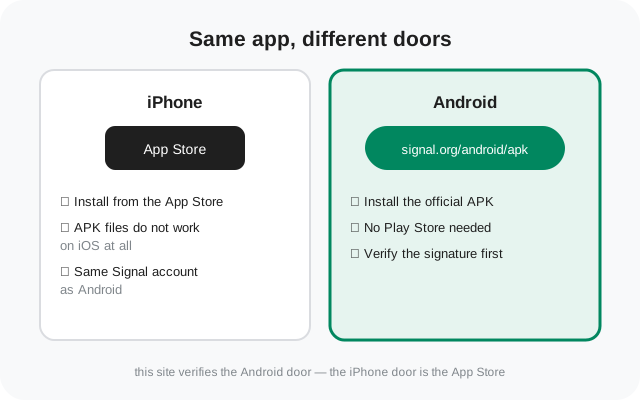
Why this page lives on an Android-APK site
A fair question: why does an Android-APK verification site keep an iOS history page? Two reasons. First, Signal is one account across platforms. People with an iPhone and an Android tablet, or families split across both, run into the same features from different doors. Second, the iOS trail explains where Android features came from: disappearing messages, video calls, sealed sender, all shipped to both platforms together, announced in the same posts.
The practical difference is installation only. iPhone users get Signal from the App Store; APK files do not install on iPhones at all. Everything this site verifies about APK files, signatures, hashes, the website build, is Android-only. If you landed here from an iPhone, the App Store is your only official source, and the download button below is for Android users.
How to follow iOS releases
Because Signal doesn't maintain a single iOS changelog, here is where release information actually lives:
- The Signal blog: announcements for launches and major features. Every milestone on this page came from here first.
- The GitHub releases page for signalapp/Signal-iOS: every public build, tagged. Beta builds wear a pre-release badge.
- The App Store: the update notes shown under each new version. Brief by design; the blog has the full story.
One quirk to know: iOS and Android version numbers don't match. In 2026, Android's stable line is 8.29.x while iOS has shipped 8.30. The platforms release on their own schedules, and the numbers drift. Don't read a version gap as a feature gap; check the blog to see what actually shipped.
Our release notes guide explains how to read these sources, and the Android version history is the companion to this page.
from Signal's official site — file hosted by Signal, not by us
Frequently asked questions
What was the first Signal app for iPhone?
Signal for iPhone launched on July 29, 2014 as a free, open-source app for end-to-end encrypted voice calls. Encrypted texting did not arrive until Signal 2.0 in March 2015.
Can I install an APK file on an iPhone?
No. APK is Android's package format; iOS cannot install it. iPhone users install Signal from the App Store. That is the only official source for iOS.
When did the iPhone app get video calls?
Video calls entered public beta in February 2017 and left beta in March 2017. On iOS the update also added CallKit integration, which you can turn off in Settings if you prefer.
Does the iOS app have the same features as Android?
Almost entirely. Major features ship to both platforms: disappearing messages, video calls, sealed sender, usernames all launched together. Version numbers drift between platforms, so don't read a number gap as a feature gap.
Where can I read the official iOS release notes?
The Signal blog for announcements, and the signalapp/Signal-iOS releases page on GitHub for every build (beta builds carry a pre-release badge). There is no single official changelog page.
Why does an Android APK site cover iOS history?
Because Signal is one account across platforms, and the iOS trail explains where shared features came from. The APK files this site verifies are Android-only; iPhone users should use the App Store.
Keep reading
- the Android release history: the version trail on the Android side, release by release
- where Signal publishes release notes: the blog, GitHub, and in-app notes, decoded
- the Desktop story: how the desktop app grew from a 2015 Chrome app to a standalone program
- download the official Signal APK: the current website build, version 8.29.3, straight from Signal's own page