
Old Signal APK versions: what you need to know first
Published: October 7, 2026 · Updated: October 8, 2026
Signal FoundationSignal only offers the current build on its official download page. There is no official "old versions" archive to download from. Older builds do still exist in Signal's public source history, but no third-party site offering old Signal APKs is safe to trust, and running an outdated build means running known, unpatched security holes in the app that carries your private conversations. Unless you have a very specific reason, the right move is always the latest version from signal.org/android/apk.
This page covers where older builds officially exist (and where they don't), the concrete risks of running outdated versions, the one legitimate situation where people go looking for old builds, phones too old for the current release, and why old-APK mirror sites are the worst of both worlds. We are an independent guide, not Signal, and we link to no third-party APK sources, old or new.
from Signal's official site — file hosted by Signal, not by us
Where older builds officially exist
Let's map the territory precisely, because most "old version" searches end in confusion.
Signal's download page: current build only. The official page serves one file: the latest website build, currently v8.29.3. There is no version picker, no archive link, no "previous releases" section. This isn't an oversight; it's the entire distribution model. When a new release ships, the old file is replaced, full stop.
Signal's public GitHub history: source code, not downloads. Signal's Android app is open source, and its repository preserves the complete history of every release as source code. That is the only official place where "old Signal" exists at all. But source code is not an APK. Turning it into an installable app requires Android build tools, the right SDK versions, and developer knowledge. For a normal user looking to tap-and-install, the GitHub history is effectively not a download source, and we won't pretend otherwise.
Everywhere else: unofficial, unverifiable, or both. Any site offering old Signal APKs as ready-to-install files is a third-party mirror. It doesn't matter how long the site has existed or how professional it looks. You cannot confirm the file is Signal's unmodified build from that version, and stale or tampered copies are common. Our mirror warning guide documents the risks in full.
So the honest summary: there is no official way to download an old Signal APK as a file. Anyone telling you otherwise is selling you a mirror.
Why there is no official old-version download page
This frustrates people, so it's worth understanding the reasoning instead of just the rule. Signal's security model depends on everyone running current code. Messaging apps are high-value targets, and every old build in circulation is a population of users exposed to vulnerabilities that are already fixed, and publicly documented in release notes, which means attackers know exactly what the holes are.
An official archive would actively undermine that model. It would give users a one-click path to downgrade past security fixes, and it would give scammers an official-looking source to point at when distributing "stable old versions" that are really just outdated. By shipping only the latest build, Signal makes the safe choice the easy choice and the risky choice genuinely difficult. You may disagree with the paternalism, but the logic is coherent: the publisher's job is to keep the installed base current, not to curate a museum.
There's a practical side too. Old builds can stop working on their own as Signal's servers evolve: protocol changes, new registration flows, updated backup formats. An archive of builds that half-work would generate endless support confusion for a small nonprofit team. One current build, one download page, one thing to support: that's the trade-off, and it's deliberate.
The risks of running an old build
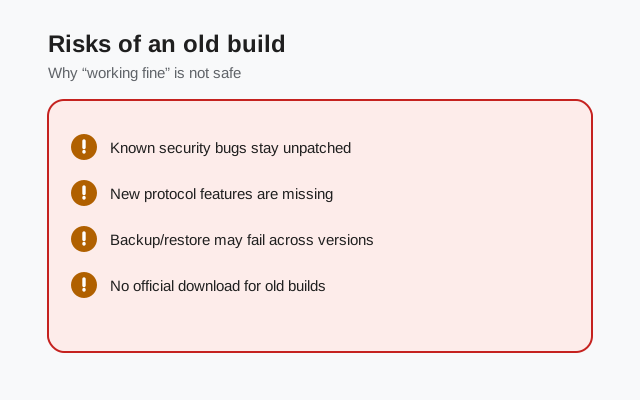
"It worked fine last year" is not a safety argument. Here's what an outdated Signal build actually exposes you to:
| Risk | Why it matters | How bad is it? |
|---|---|---|
| Unpatched security vulnerabilities | Every release fixes bugs, some of them security-relevant. Release notes and code history are public, so attackers can see exactly what old builds are missing. | Serious: the core reason to stay current |
| Protocol and server drift | Signal's servers evolve. An old client can lose features, fail to register, or stop syncing as the backend moves on. | Moderate: usually shows up as mysterious breakage |
| Backup incompatibility | Backup formats change over time. A backup made by a new version may not restore on an old one, which can strand your chat history during a phone move. | Moderate: bites hardest when you're already stressed |
| Missing safety features | Newer releases add protections (registration lock improvements, safety number tooling, screen security options). Old builds simply don't have them. | Moderate: invisible until you need them |
| No verification path | Old builds from mirrors come with no trustworthy fingerprint to check against. You can't prove what you installed. | Serious: undermines the whole trust model |
The uncomfortable truth: the older the build, the worse every row gets, and the rows compound. A two-year-old APK from a mirror isn't just missing features. It's missing two years of security fixes, may not talk to current servers properly, and can't be verified. Our old-APK security guide goes deeper on thne is too old for the latest version
This is the one sympathetic reason people hunt for old APKs, so let's address it directly. Signal raises its minimum Android version over time as old OS releases stop receiving security patches themselves. If your phone runs an Android version below Signal's current minimum, the latest APK will refuse to install. And no mirror's old APK fixes the underlying problem, which is that your phone is no longer safe to do sensitive things on.
Here's the honest decision tree. First, check whether your phone can update its OS. Many "too old" phones are just behind on updates they could install. Our old Android support guide tracks which versions Signal still supports and what happens when yours is dropped. Second, if the phone genuinely can't go further, understand what you'd be accepting with an old build: an outdated app on an outdated OS, both missing security fixes, carrying your private messages. That's a bad combination no matter how you slice it.
The real fix is unglamorous: that phone has reached the end of its life for secure messaging. A budget Android phone from the last few years runs the current Signal build fine and costs less than most people expect. We know that's not the answer anyone wants when they're trying to squeeze another year out of old hardware. But recommending an old APK as the solution would be dishonest, and this site doesn't do that.
Why old-APK mirror sites are the worst option
Sites specializing in old APK versions combine every risk factor at once. They're mirrors, so all the standard mirror dangers apply: files that may be stale, modified, or fake, with no trustworthy fingerprint. But old-version mirrors add two extra problems on top.
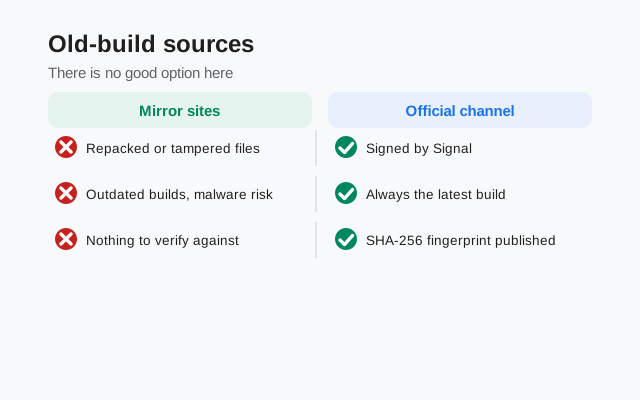
First, selection bias toward the vulnerable. These sites exist to serve people who can't or won't run current software, which means their audience is disproportionately on old, unpatched devices. That's a tempting target population for anyone distributing trojaned APKs, and the site operators have no obligation to protect them.
Second, version confusion as a weapon. Old-version sites routinely mislabel builds, mix up variants (beta vs stable, old "prod" vs "website" naming), and present whatever they have as "the version you asked for." A user who wanted a specific old build for compatibility reasons can easily end up with a different old build, or a modified one, and have no way to tell.
The pattern to recognize: a legitimate need (my phone can't run the new version) gets funneled into an illegitimate supply chain (a stranger's file archive). The need is real; the supply chain is not trustworthy. That's why this page keeps pointing you back to the real fixes: update the OS, use a supported device, or accept the current build.
If you run an old build anyway: harm reduction
We don't recommend running outdated Signal builds. But some readers will do it regardless (a work phone they can't replace, a region where only an old file circulates), and "don't do it" without further guidance helps no one. So here's the harm-reduction version, stated plainly:
-
Get the file from the most trustworthy source available
A copy you made yourself from the official page back when that version was current beats any mirror. A file from someone you personally trust, transferred directly, beats a download site. A random APK archive is the last resort, not the first stop.
-
Verify anything that can be verified
Check the package name (
org.thoughtcrime.securesms), confirm the version number in the app matches what you expected, and be suspicious of anything asking for unusual permissions during install. Old builds have no published fingerprint to check against from Signal's current page. That's a gap you can't close, so treat the install as lower-trust. -
Isolate the risk
Don't make the outdated install your primary messenger. Use it only for the specific thing that requires it, keep sensitive conversations on a current build on another device, and don't grant it permissions it doesn't need.
-
Plan your exit
An old build is a temporary bridge, not a home. Set a concrete trigger for moving on: a phone upgrade, an OS update, a ROM install. Treat every month on the old build as borrowed time. The vulnerabilities aren't theoretical; they're documented in the release notes you skipped.
Frequently asked questions
Where can I download an old Signal APK version?
There is no official download source for old versions. Signal's page serves only the current build, and its GitHub history holds source code, not installable files. Third-party old-APK sites are untrusted mirrors; we don't link to any of them.
Why did my old Signal version stop working?
Most likely server-side drift: as Signal's backend evolves, very old clients lose the ability to register, sync, or connect. This is expected behavior, not a bug. The fix is the current build, not a different old one.
Can I downgrade Signal to an older version?
Technically you can install an older APK over a backup-restored setup, but it's discouraged: you lose security fixes and risk backup incompatibility. Only consider it with a full backup first, as our downgrade guide explains.
Is an old APK from a well-known mirror site safe?
No. Reputation doesn't solve the core problems: you can't verify the file against an official fingerprint, and the build is missing security fixes by definition. "Well-known" mirrors have served tampered files before. Familiarity isn't verification.
My phone runs a very old Android version. What should I do?
First check for an OS update you haven't installed. If the phone truly can't go further, the honest answer is that it's past its safe life for messaging. Consider a newer device or a custom ROM, rather than an old APK on an old OS. Our old-Android support guide has the details.
Related guides
- Download guides hub
- Latest Signal APK version
- Why to avoid Signal APK mirrors
- Signal on old Android versions
- Old APK versions: security risks