
Downgrading Signal: The Risks, and the Only Cautious Path
Published: October 7, 2026 · Updated: October 8, 2026
The risks, first and honestly
Most "how to downgrade" guides on the internet start with the steps and bury the risks at the bottom. This one does the opposite, because the risks are the reason downgrades fail.
Database upgrades are one-way
When Signal updates, it sometimes migrates your message database to a newer format. There is no "migrate back". An older build of the app may simply refuse to open a database written by a newer one. This is the single biggest reason downgrades end in data loss, and no backup fully protects you from it, because the backup itself was written by the newer version.
Security fixes go backwards too
Every update carries fixes for bugs and vulnerabilities found in earlier builds. Installing an older build re-opens every hole that was patched since. A downgrade is not just "the old familiar app". It is the old familiar app with known, documented weaknesses.
Features and server compatibility break
Signal's servers move forward with the app. An old build can lose features, fail to register, or misbehave in ways that look like bugs but are really just age. The older the build you install, the more of this you should expect.
Downgrades often fail outright
Android itself resists installing an older version over a newer one, and as you will see below, the database problem can leave you with an app that installs fine and then cannot open your chats. In that case you end up reinstalling the current build anyway, having risked your data for nothing.
Risk table: what can actually go wrong
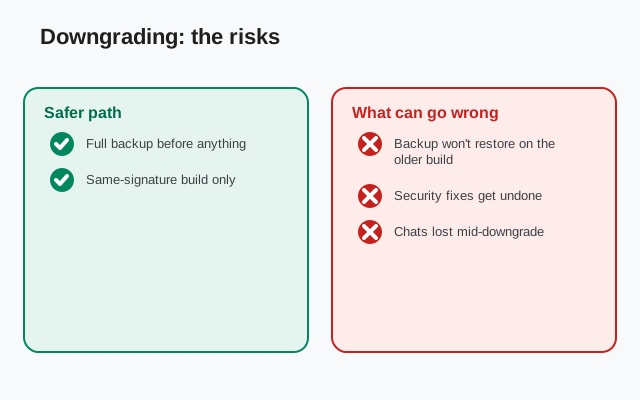
| Risk | What actually happens | How to protect yourself |
|---|---|---|
| Chat database won't open | The older build can't read the newer database format; the app may crash or show an empty chat list | Make a fresh backup before downgrading, and accept that even the backup may not restore on the old build |
| Backup won't restore | Backups written by a newer version may be rejected by an older one | Test nothing: there is no safe test. Treat every downgrade as potentially destructive |
| Lost security fixes | Known vulnerabilities from newer builds become exploitable again | Return to the current build as soon as possible; don't treat the downgrade as permanent |
| Malware from archive sites | "Old version" sites repackage APKs with added code | Take older builds only from Signal's own pages. See the section below |
| Account/registration issues | Very old builds may fail re-registration or lose server features | Keep your phone number accessible for re-verification, and don't go back further than you must |
The backup-first rule (non-negotiable)
If you ignore everything else on this page, do not ignore this: make a fresh, verified backup before you touch anything.
- In Signal, go to Settings > Chats > Chat backups and run a backup now. Don't rely on last week's.
- Write down your recovery key. The current format is a 64-character key. (The old 30-digit format is retired. If your key is 30 digits, regenerate it first.) Store it somewhere you can read during setup, like on paper.
- Confirm the backup file actually exists and is recent. Our backup-location guide shows where Signal keeps it, and the Android backup guide covers the full process.
Understand the limit of this protection: a backup lets you restore onto the same or a newer build. Restoring a new-version backup onto an old build is exactly what may fail. The backup is your escape route back to the current version. Not a guarantee the downgrade will keep your chats.
The only semi-safe path
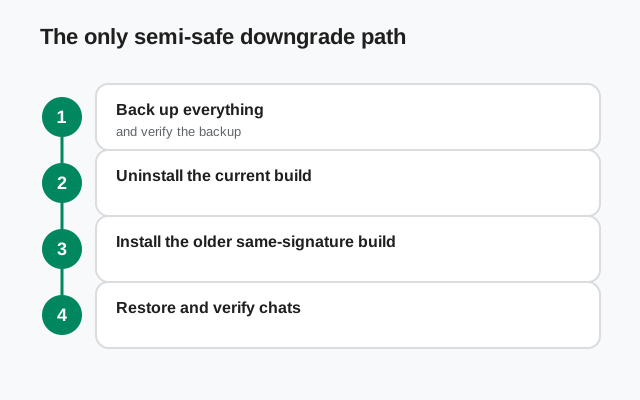
If you have read the risks, made a verified backup, and still want to proceed, this is the least dangerous way:
- Back up and record your key (see above). Do not skip this.
- Uninstall the current Signal. Android generally won't let you install an older version directly over a newer one, so the current app has to go first. This is the point of no return for your on-device data. The backup is now your only copy.
- Install the older build from a trustworthy source: meaning Signal's own pages only (next section). Install it and open it.
- Try restoring your backup during setup. If the old build rejects it, you have your answer: that combination doesn't work. Reinstall the current build from Signal's official APK page and restore there instead.
- If it works, stay cautious. Treat the old build as temporary. Watch for missing features and odd behavior, and plan your return to the current build.
Be honest with yourself about the most likely outcome: many downgrade attempts end at step 4, back on the current build, with time lost and nerves frayed. That is still better than the alternative: an old build running with half your history missing.
Where older builds may come from
This part is simple and strict: older builds should come only from Signal's own pages. Search results are full of "old version" archive sites offering every Signal release ever made, and they are exactly as dangerous as they look. A repackaged APK can carry anything, and you would be granting it the same permissions your real Signal had: access to contacts, storage, microphone. Our fake-Signal-APK guide and the mirror warning page explain this threat in detail.
We do not link to any archive, "old versions" download site, or file mirror here, deliberately. If Signal itself does not offer the build you want on its own pages, that is information: the project does not intend that build to be installed anymore. Also note our own notes on old Signal versions, which explain why chasing old builds is usually a dead end.
When downgrading is the wrong answer
Most downgrade attempts start from a frustration that has a better fix:
- "I hate the new design." Designs change; downgrading only delays the inevitable, because updates are how security fixes arrive. Give the new layout two weeks. Most people stop noticing.
- "The new version has a bug." Report it, and check the release notes for the next patch build. Patch builds exist precisely to fix regressions, and they arrive quickly. Downgrading trades one bug for a pile of old ones.
- "The app is slow / drains battery." That's a troubleshooting problem, not a version problem. Our battery-drain guide and crashing guide fix the common causes on the current build.
- "An update broke something specific." Check the update troubleshooting page first. A failed or partial update can mimic a dozen different bugs.
The rule of thumb: downgrade only when a specific, current-build problem blocks something you genuinely need today, and you have a verified backup. "I preferred the old one" is never a good enough reason to run known-vulnerable software.
from Signal's official site, file hosted by Signal, not by us
Frequently asked questions
Can I go back to an older Signal version?
Technically sometimes, but it is risky: the app's database upgrades run one way, so an older build may not open your chats or your backup. Always back up first with your 64-character recovery key, and expect that the downgrade may simply fail.
Will I lose my messages if I downgrade?
Possibly. Even with a backup. A backup written by a newer version may not restore on an older build. Treat every downgrade as potentially destructive and never start without a fresh, verified backup.
Where can I safely download an old Signal APK?
Only from Signal's own pages. We deliberately do not link to third-party "old version" archives: repackaged APKs are a classic malware vector, and you would be handing them your contacts and storage permissions.
The old version won't install over the new one. Why?
Android blocks installing an older version directly over a newer one, and the website build and Play build use different signing keys and can't be installed over each other at all. A downgrade requires uninstalling first, which is why the backup step is non-negotiable.
I hate the new design. Is downgrading the fix?
No. It's a temporary retreat that costs you security fixes, and the design will keep evolving without you. Give the new layout two weeks; if a real bug is behind your frustration, report it and watch the release notes for the patch.
Related guides: all version guides · where release notes live · back up before anything · update troubleshooting · why old versions are a security risk · spotting fake Signal APKs