
Molly vs Signal: where they differ and where they don't
Published: October 7, 2026 Updated: October 8, 2026
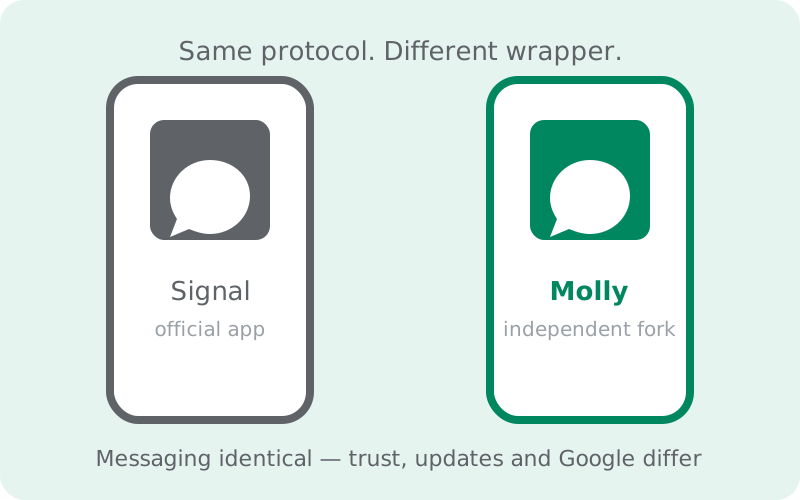
The honest answer: for messaging, almost nothing changes. Molly is an independent fork of Signal (from molly.im, not official, not affiliated with Signal Foundation) that uses the same Signal protocol, the same network, and the same end-to-end encryption. Chats, groups, calls, and disappearing messages work identically, and your contacts cannot tell which app you use. What differs is the wrapper around that protocol: Molly removes or replaces Google dependencies (push notifications no longer need Google's FCM), can run fully without Google services via UnifiedPush, adds passphrase-locked local database encryption, ships through its own F-Droid repository, and follows official releases with a short delay. This page lists the real differences, the real tradeoffs, and who should pick which.
What's identical (the important part)
Start here, because this is what most comparison posts bury: the messaging core is the same. Molly is built from Signal's open-source Android client, so the protocol, the encryption, and the network are shared. A message you send from Molly is encrypted with the Signal protocol, travels through Signal's servers, and is decrypted by the Signal protocol on your contact's device, whether they run official Signal or Molly. Sealed sender, safety numbers, registration lock, disappearing messages, group encryption: all protocol-level, all identical.
Practically, this means three things. One: full interoperability. You don't need your contacts to switch; a Molly user in a group chat with five Signal users is invisible as anything unusual. Two: the same privacy guarantees against the network. Signal's servers see the same metadata (or lack of it) regardless of which client you use, because the client doesn't change what the protocol reveals. Three: switching doesn't strand anyone. Your contacts, groups, and identity carry over because they live at the protocol layer, not in the app.
Anyone telling you Molly is "more encrypted" than Signal is selling something. The encryption is the protocol's, and the protocol is shared. Molly's advantages live elsewhere: in the notification path, in what's on your device, and in what's not phoning Google. That's the honest framing, and everything below follows from it.
The differences, in one table
| Area | Official Signal | Molly (independent fork) |
|---|---|---|
| Maker | Signal Foundation (funded nonprofit) | Independent developers at molly.im (community project) |
| Official status | The official app | Not official, not endorsed, not supported by Signal |
| Messaging protocol encryption | Signal protocol | Same Signal protocol, fully interoperable |
| Push notifications | Google FCM (or built-in connection on GMS-less phones) | Standard build: FCM like Signal. FOSS build: UnifiedPush, no Google needed |
| Google services dependency | Some (FCM, parts of contact discovery) | Reduced or removed, depending on build |
| F-Droid | Not in F-Droid's catalog | Own official F-Droid repo at molly.im/fdroid |
| Local database encryption | Not passphrase-locked | Optional passphrase lock on the local database |
| Updates | Immediate, from Signal | Follows Signal releases with a short delay |
| Support | Signal's support team | Community + molly.im docs only |
| Signing identity | Signal Foundation's key | Molly's own keys (separate app, can't install over Signal) |
| Contact discovery | Uses Google-adjacent pieces | Reworked to avoid Google dependencies (FOSS build) |
Read the table left to right and the pattern is clear: everything about messaging is the same, and everything about distribution, trust, and Google is different. That split is the whole decision in one glance.
The Google-free notification path
The single biggest functional difference is notifications. Official Signal on a normal phone uses Google's Firebase Cloud Messaging: a message arrives at Signal's server, Google's push service wakes your phone, you see the notification. It is reliable and battery-efficient, and it is also a Google server in the loop of your messaging metadata (not message content, which stays encrypted, but the fact and timing of wake-ups).
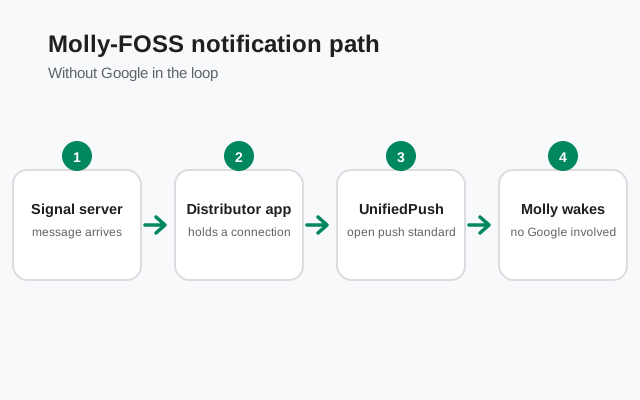
Molly-FOSS replaces FCM with UnifiedPush, an open push standard. Instead of Google's servers, a small distributor app on your phone holds a direct connection and wakes Molly when messages arrive. No Google account, no Google servers, no proprietary push library in the app. The tradeoff is real: a direct connection uses more battery than FCM's shared, system-level one, and on phones with aggressive battery savers the distributor can get killed and delay notifications. Our UnifiedPush guide covers the setup and the reliability tradeoffs in detail.
Standard (non-FOSS) Molly keeps FCM, exactly like official Signal. The Google-free path is specifically the FOSS build's territory. If notifications that never touch Google are your goal, you need Molly-FOSS, not just "Molly." The build comparison makes this choice concrete.
Extras Molly adds
Beyond de-Googling, Molly ships a few features official Signal doesn't. The headline one is database encryption at rest: you can set a passphrase that locks Molly's local message database, so the history stored on your phone isn't readable to someone who gets the device. Official Signal protects messages in transit with the protocol, but its on-device database doesn't offer a passphrase lock. For most people this is a nice-to-have; for anyone whose phone might be searched or seized, it's a genuine upgrade.
The other extras are smaller quality-of-life settings the fork's users asked for: things like finer notification controls and backup options. We won't list them exhaustively here because fork features change between releases and we don't invent version-specific claims; check molly.im's current release notes for the exact list. The pattern to understand is that Molly, as a community fork, can ship features Signal's team has declined or deprioritized. Sometimes that's great. Sometimes it's a feature you didn't need. Judge each on its merits rather than assuming "more features" means "better."
Release lag: the honest cost
Every fork pays a tax, and Molly's is release lag. Signal ships an update; Molly's developers merge it, adapt their changes, test, and publish. That takes days, sometimes a bit more. Feature updates delayed by a few days are harmless. Security fixes delayed by a few days are a real, if small, exposure window: official Signal users are patched while Molly users wait for the fork's build.
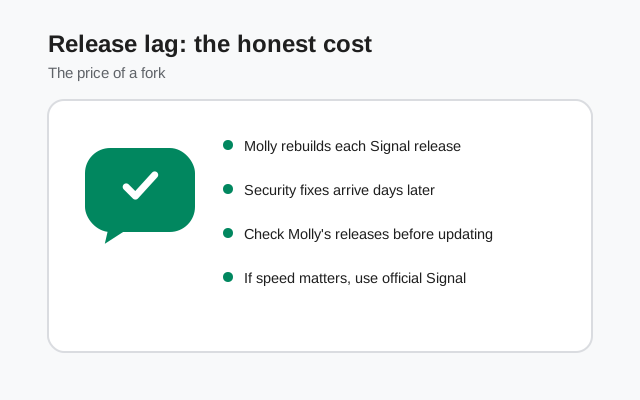
Let's keep this in proportion. The lag is short, the project is maintained, and for most threat models a few days don't change anything. But if your personal policy is "install security updates the hour they land," a fork structurally can't match the upstream app. There's no way around it. It's the price of the fork existing at all. If that bothers you, it's a legitimate reason to stay on official Signal, and no one should talk you out of it.
Security and trust considerations
Using a fork means trusting a different team, so let's talk about that plainly and respectfully. What's solid: Molly is open source, its builds are reproducible (you can verify the published APK matches the published source), and it publishes its own signing keys. That's the right foundation. It's exactly what you'd ask of any project asking for your trust, and Molly provides it.
What's different from Signal: it's a small community project, not a funded nonprofit with a dedicated security team. Fewer eyes, fewer resources, slower incident response. That's the structural reality of nearly every community fork, stated without malice. And Signal's team doesn't support the fork: if something breaks, you're relying on the community and molly.im's documentation.
How to think about it: the protocol trust is unchanged (same Signal protocol, same servers), while the client trust shifts from a large nonprofit to a small open-source team with verifiable builds. For many people (especially on Google-free phones where official Signal is awkward), that's a good trade. For people who want the simplest possible trust story ("one organization, one app, one support channel"), official Signal wins. Our Signal safety guide covers the official app's trust story if you want the other side of the comparison.
Who should pick which
Pick official Signal if: your phone has Google services and works fine; you want updates the moment they ship; you want official support; or you simply want the fewest parties in your trust chain. This is most people, and it's the right call for most people. Our official APK guide gets you set up.
Pick Molly if: your phone has no Google services (Huawei, GrapheneOS, de-Googled ROMs) and you want reliable notifications without Google; you want zero proprietary code on your device (take the FOSS build); or you specifically want the passphrase-locked local database. These are the cases the fork was built for, and here it's genuinely the better tool.
Either way, avoid the traps: download Molly only from Molly's official site or its official F-Droid repo. Never from a mirror site, and never a "Molly Pro" (it doesn't exist). And don't run both apps registered to the same number expecting them to stay in sync; they're separate apps sharing one identity, so pick one as your daily driver. The Molly install guide walks through the safe setup.
from Signal's official site (file hosted by Signal, not by us)
A final word on tone: you'll find plenty of writing that treats this as a holy war: Signal maximalists vs. de-Googling purists. Ignore it. These are two clients for the same protocol, made by different teams with different priorities. The right choice depends on your phone and your threat model, not on tribal loyalty.
Frequently asked questions
Is Molly more private than Signal?
Not in the way people usually mean. The protocol, encryption, and network are identical, so message privacy is the same. Molly's privacy edge is situational: the FOSS build keeps Google out of the notification path, and the optional passphrase lock protects the on-device database. Against the network, there is no difference.
Is Molly safer than official Signal?
It's a tradeoff, not an upgrade. You gain verifiable reproducible builds and de-Googled options; you trade away Signal Foundation's security team, instant security updates, and official support. For Google-free phones the trade is usually worth it. Otherwise, official Signal's trust story is simpler.
Will my contacts know I'm using Molly?
No. Molly speaks the same Signal protocol, so chats, groups, calls, and disappearing messages work identically. Nothing in a conversation reveals which client you use.
Can I use Molly and Signal at the same time?
They install as separate apps, but only one can hold your phone number's registration at a time. Switching between them means moving your registration and restoring a backup. They're not designed to run side by side in sync. Pick one as your daily driver.
Is Molly legal? Doesn't it violate Signal's terms?
Forking is allowed: Signal's Android client is open-source under the AGPLv3 license, which explicitly permits modified versions. Molly doesn't pretend to be Signal, which keeps it on the right side of trademark rules too.
Keep reading
- Molly hub: the full map of fork guides
- What is Molly: the fork explained from scratch
- Molly or Molly-FOSS: which build to pick
- Safe Molly install walkthrough: the install path from molly.im
- Molly notifications without Google: how UnifiedPush works
- Signal vs Molly comparison: the head-to-head view