
Locked Out of Signal: Every Way Back In, Honestly Ranked
Published: October 7, 2026 · Updated: October 8, 2026
Getting back into Signal depends on exactly three things: being signed in on any device, still controlling your phone number, and remembering your PIN. Answer those three and your recovery path is one of a short list. One combination has no way back at all, and this guide says so plainly instead of wasting your time with false hope.
The three questions that decide everything
Every lockout story is some combination of three yes/no answers. Work through them in order. The first “yes” usually hands you the fix:
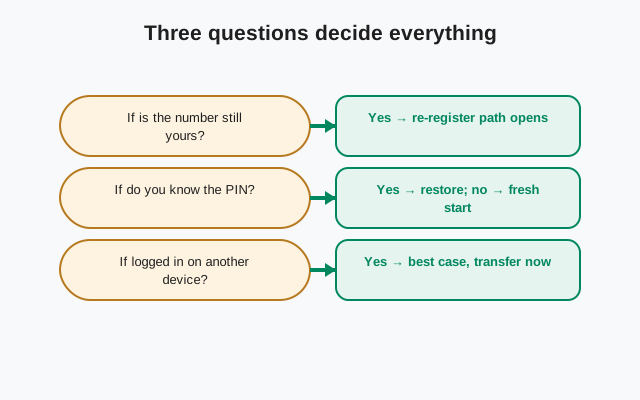
- Are you still signed in anywhere? The old phone, a linked desktop, a tablet: any device where Signal still opens and works. A signed-in device can change your PIN, view your recovery key, and transfer your chats. It is by far your most valuable asset in a lockout.
- Do you still control the phone number? Can you receive an SMS on it right now? Re-registering Signal on any device requires the verification code sent to that number. No number access, no re-registration. This one is non-negotiable.
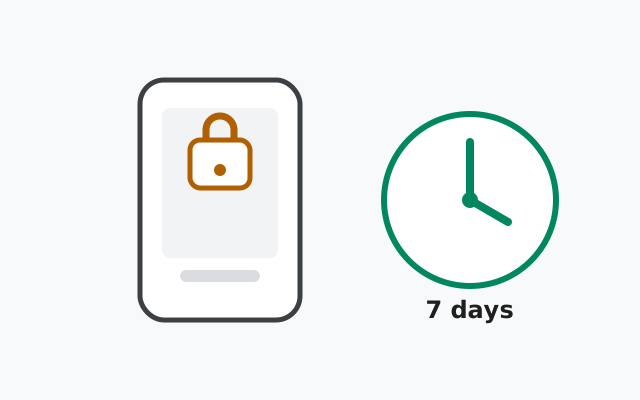
- Do you remember the PIN? Needed when registration lock is on (to re-register) and to restore your saved profile data. If registration lock was off, a forgotten PIN is a minor inconvenience; if it was on, it means the 7-day wait.
The table below maps the common combinations to outcomes. Find your row and skip straight to its section.
| Signed in? | Have the number? | Know the PIN? | Verdict |
|---|---|---|---|
| Yes | Either | Either | Not really locked out: fix it from the signed-in device |
| No | Yes | Yes | Easy re-register, everything restores |
| No | Yes | No (lock off) | Skip and create a new PIN, minor data loss |
| No | Yes | No (lock on) | 7-day inactivity wait, then fresh PIN |
| No | No | Either | Genuinely unrecoverable: start fresh |
Best case: you are signed in somewhere
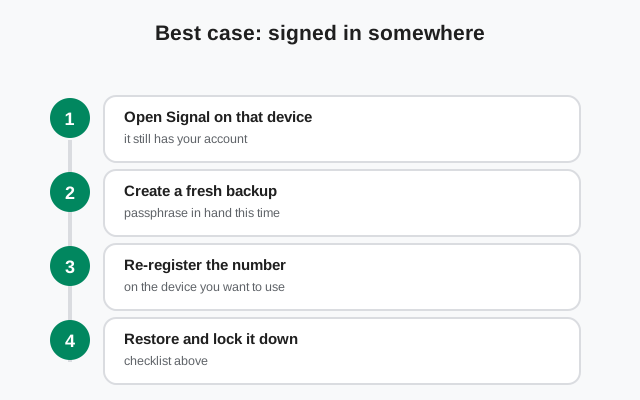
If Signal still opens and works on any device, the old phone in a drawer, Signal Desktop on your laptop, you are not locked out in any meaningful sense. Do these three things before anything else:
- Change the PIN now. On the phone: profile > Settings > Account > Change your PIN. Pick something memorable and store it in your password manager immediately.
- View and save the 64-character recovery key while you have access. It is your backup credential if the PIN ever slips again.
- Move your chats properly instead of improvising. If this is a new-phone situation, use the device transfer guide while both phones are in your hands. It moves history over a local connection with no cloud involved.
The classic mistake here is wiping or selling the old phone before doing the above. A signed-in old phone is a working recovery path; a wiped one is a paperweight. Do the three steps first, then retire the device.
One more, if a new phone number is the reason for all this: use Change phone number (profile > Settings > Account > Change phone number) while you are still signed in. It moves your account — profile, groups, and contacts — to the new number without re-registering from scratch. This only works from a signed-in phone, so do it before you wipe or lose the old device.
New phone, number still yours, PIN remembered
This is the scenario Signal’s design handles smoothly. Install the app, verify your number with the SMS code (the missing-code checklist helps if it never arrives), enter your PIN when asked, and your profile, settings, contacts, and block list restore from the encrypted backup on Signal’s servers.
One thing to expect: your message history does not come back through this path. The PIN restores profile data, not chats. If you want history on the new phone, that comes from the on-device backup restore offered at first launch, covered in the restore walkthrough. If you skipped that prompt, history from the old phone is gone; the PIN cannot bring it back. That surprises people every time, so it is worth stating twice.
Number yours, PIN forgotten
You have the number, you lost the PIN. Everything now hinges on registration lock:
- Lock was off: during re-registration, tap Skip > Create new PIN on Android (or Need Help? > Create New PIN on iPhone). You lose the saved profile data tied to the old PIN, but you are back in within minutes.
- Lock was on: you wait out the 7-day inactivity timer. After seven days of the account sitting unused, the lock expires and you can create a new PIN. The old PIN and its encrypted data are gone for good. During the wait, do not keep attempting to re-register every few hours; it does not shorten anything and burns PIN guesses. The full mechanics are in the forgotten-PIN guide.
While you wait, double-check you are not actually in the first scenario: an old phone, a work laptop with Signal Desktop, anything still signed in. People routinely forget about a linked desktop that would have solved this in two minutes.
The hopeless case: the number is gone too
New phone, forgotten PIN, and no access to the number: lost SIM, number recycled by the carrier, traveling without that SIM. We will be direct: there is no recovery path. Re-registering requires the SMS verification code to that number, full stop, and Signal has no alternate identity check: no email, no ID upload, no support override. That account is gone to you.
Here is what actually happens next, and what to do about it:
- The old account lingers, then dies. Signal deletes accounts after 120 days of inactivity, so the ghost account will eventually be cleaned up on its own. Your contacts will see you go unreachable; group chats will show you as a member who never responds.
- Start fresh with your current number. Register normally, rebuild your profile, and tell important contacts directly. Do not assume they will notice the new account on their own.
- Ignore “account recovery services.” Anyone offering to recover a Signal account without the number is selling something impossible. There is no back door for them to use.
- Learn the one lesson: a phone number you might lose is a fragile account anchor. For anything important, keep the number active or move to a number you control long-term before you need it.
Someone else took your old number
A special nasty variant of the above: your carrier recycled your old number and a stranger registered it on Signal. If your registration lock was on, they hit the same 7-day wall you would, which is exactly what the lock is for. If it was off, they are in immediately, and they may see your old profile name and photo. There is nothing to recover here either; the number is theirs now. Warn mutual contacts that the old number is no longer you, register your new number, and this time turn registration lock on with a PIN you have actually stored somewhere safe.
After you are back in: lock it down
Whatever path got you back, spend ten minutes making sure you never take it again:
- Set a memorable PIN and store it in your password manager.
- Turn registration lock on (Settings > Account). Now that the PIN is safely stored, the lock is pure protection.
- Leave PIN reminders on so the PIN stays fresh in memory.
- Save the 64-character recovery key somewhere durable.
- Make an encrypted on-device backup so your message history survives the next phone change too.
Five small habits, and the next lockout story is someone else’s.
from Signal's official site — file hosted by Signal, not by us
Frequently asked questions
I changed my number and cannot access the old one. Can I recover my Signal account?
No. Signal registration requires the SMS verification code sent to the registered number, and there is no alternate recovery method. You will need to register fresh with your current number.
How long is the 7-day registration lock wait, really?
It is seven days of account inactivity, measured by Signal's servers, not seven days from your first attempt. Leave the account alone during the wait; repeated re-register attempts do not shorten it.
Will Signal delete my account while I wait out the lock?
No. Accounts are deleted after 120 days of inactivity, so a single week of waiting is nowhere near the threshold. Your account will still be there when the lock expires.
Someone registered my old phone number on Signal. What should I do?
Nothing can be recovered. The number belongs to them now. Tell your contacts the old number is no longer you, register your new number, and enable registration lock with a securely stored PIN this time.
Can Signal support unlock my account?
No. Support cannot verify your identity another way and cannot bypass the PIN or registration lock. Any third party claiming they can is a scam.
Does uninstalling and reinstalling fix a lockout?
No. The lock is tied to your number on Signal's servers, not to the app on your phone. Reinstalling just brings you back to the same PIN prompt.
Keep reading
- Forgot your Signal PIN: the honest recovery limits and the 7-day wait
- Why Signal keeps asking for your PIN: the reminder rhythm and how to handle it
- Re-registering after a reinstall: what happens to sessions, devices, and history
- SMS code never arrived: the checklist before you assume the worst
- Troubleshooting hub: every Signal fix guide in one place