
Signal keeps crashing? Diagnose it before you delete anything
Published: October 7, 2026 · Updated: October 8, 2026
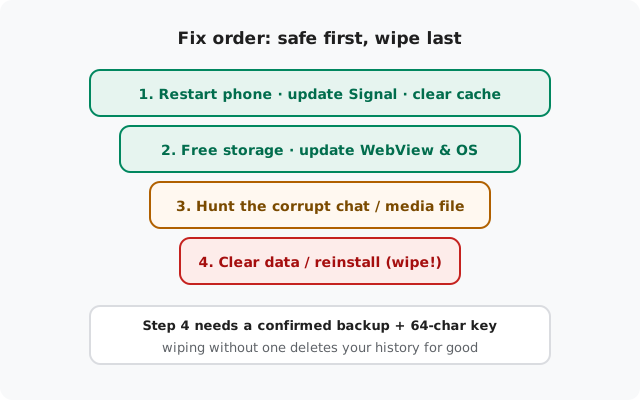
If Signal keeps crashing (on launch, mid-chat, or during a backup), resist the urge to uninstall first. Most crashes come from full storage, an outdated app, or a single corrupt media file, and the safe fixes take minutes. The dangerous fixes (clear data, reinstall) wipe your chats unless a backup is in place. So this guide orders everything from safest to riskiest, and tells you exactly when to stop.
The 60-second diagnosis table
When it crashes tells you why it crashes. Match your pattern before trying fixes at random:
| When it crashes | Most likely cause | Try first |
|---|---|---|
| On launch, every single time | Corrupt local data, or critically low storage | Free up storage, then clear cache |
| Right after an app update | Stale cache from the old build, or a buggy release | Clear cache; update to the newest build (currently 8.29.3) |
| Opening one specific chat | A corrupt media file or message in that chat | See the one-chat section below. Don't wipe the app for this |
| During backup | Corrupt media, or storage filling mid-run | Messages-only backup test; free up space |
| App "restarts" in background on old phones | The OS killing it for RAM, not a real crash | Battery optimization exemption; close heavy apps |
| Only on the beta version | Beta bugs. That's what betas are for | Leave the beta, install the stable build |
If none of these match, crashes at random times doing random things, start with the safe fixes anyway. Random crashes are usually storage or an outdated WebView wearing a disguise.
Safe fixes first
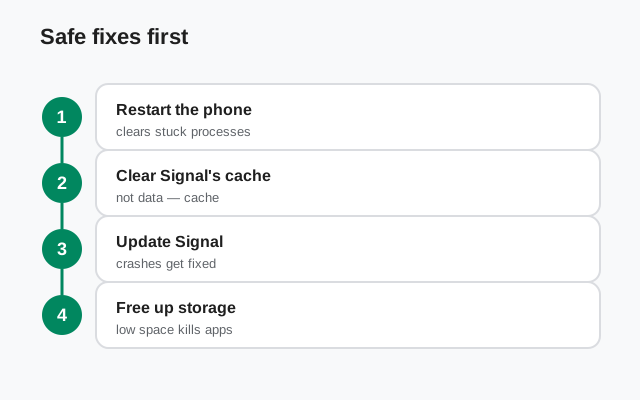
None of these touch your chats. Do them in order:
Restart the phone
Not airplane mode, not a quick lock. A full restart. It clears stuck system services and radio state that no app-level fix can reach. This alone resolves a surprising share of "suddenly crashing" reports.
Update Signal
Install the latest build (currently 8.29.3) from signal.org/android/apk. Crash bugs get fixed in releases; running a months-old build means running months-old bugs. The website build updates itself, so staying current is mostly automatic once installed.
Clear the cache (safe)
Settings → Apps → Signal → Storage → Clear cache. This deletes temporary files only. Your chats, media, and settings stay exactly where they are. Stale cache from an update is the classic post-update crash cause.
Free up storage
Android gets unstable when storage runs critically low, and apps are the first casualty. Clear other apps' caches, delete downloaded videos and old downloads, move photos to cloud storage. Give the phone real breathing room, not just 200 MB.
Update Android System WebView and the OS
Signal uses the system WebView to render link previews and some content. An outdated WebView crashes host apps in creative ways. Update it from the Play Store (or your system updater), and install any pending OS updates too.
Exempt Signal from battery optimization
Settings → Apps → Signal → Battery → Unrestricted. On aggressive phones this stops the OS from killing Signal mid-task, which users experience as a crash.
If the app is stable after any one of these, stop there. There's no prize for applying all six.
When one chat kills the app
Everything works until you open that one chat. Then Signal dies instantly, every time. That's the signature of a corrupt media file or a malformed message in that conversation. The renderer chokes on it each time the chat opens.
- Confirm the pattern. If every other chat opens fine and this one crashes the app within a second, you've found it. Don't wipe the whole app for one bad chat.
- Delete the offending message from another device. If you have Signal Desktop or a tablet linked, open the chat there, find the suspicious recent media, usually a video or image that never quite loaded, and delete it. The phone app should open the chat normally afterward.
- Last resort: delete the chat on the phone. Long-press the chat in the list and delete it. Be honest with yourself about the cost: that chat's history is gone. Only do this after confirming a backup exists, or accepting the loss.
- Ask the sender to resend. If a specific incoming file keeps arriving broken, the file itself may be corrupt at the source. Have them send it again, or as a document instead of a photo/video, which takes a different path.
The nuclear options: clear data vs reinstall
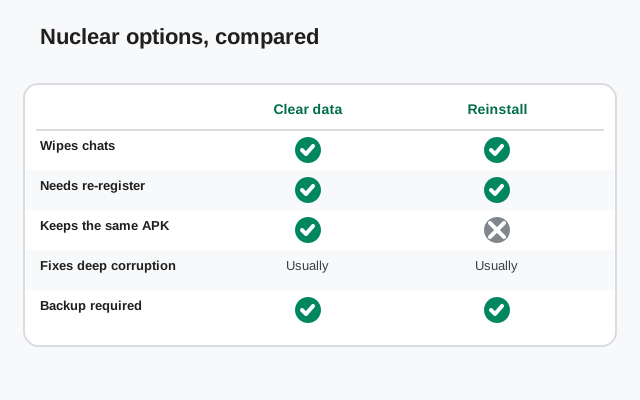
If the safe fixes failed and you've confirmed the backup:
- Clear data (Settings → Apps → Signal → Storage → Clear data) keeps the app installed but resets it to fresh-install state. Faster than reinstalling, same wipe. Then re-register and restore at the prompt.
- Reinstall (uninstall, then install 8.29.3 fresh from signal.org/android/apk) also replaces the app binary itself. Worth it if you suspect the installed files are damaged. Then re-register and restore at the prompt.
After either one, the restore walkthrough covers the first-launch flow, and the backup troubleshooting hub covers it if the restore itself misbehaves.
Beta builds and unofficial APKs
- On the beta? Crashes are the price of admission. If stability matters more than early features right now, leave the beta program and install the stable build. Most "mystery crashes" on beta are just beta bugs.
- Using a "modded", "pro", or "unlocked" Signal APK? Stop. Unofficial builds from random sites are a malware risk first and a stability risk second. Nobody maintains them, and some are outright trojans. The checks in is sideloading Signal safe and the fake Signal APK warning explain what to look for. Install the genuine build from Signal's own page and re-test.
When it's the phone, not Signal
Sometimes the diagnosis table points at Signal and the real culprit is the hardware underneath:
- Very old or low-RAM phones. With 2–3 GB of RAM and a dozen apps fighting for it, Android kills background apps aggressively, including Signal mid-call or mid-backup. The battery exemption helps, but on these phones some of it is just physics. Keep the phone lean: fewer background apps, storage comfortably free.
- Custom ROMs. Most run Signal fine, but ROMs with aggressive memory management or outdated WebView components can crash apps that are stable everywhere else. If the crashes started with the ROM, check the ROM's community for known WebView or memory-killer issues before blaming Signal.
- Overheating. A thermally throttling phone behaves erratically. Apps crash, the UI stutters, everything feels broken. If Signal only crashes when the phone is hot (long video calls, charging in the sun), let it cool down and re-test before wiping anything.
Rule of thumb: if every app is misbehaving, it's the phone. If only Signal crashes, it's Signal. Work the table at the top.
from Signal's official site, file hosted by Signal, not by us
Frequently asked questions
Will clearing the cache delete my messages?
No. Clear cache removes temporary files only. Your chats, media, and settings stay untouched. It's the safest fix on the list, which is why it comes before everything risky.
Signal crashes only when I open one specific chat. Why?
A corrupt media file or malformed message in that chat. The renderer chokes on it every time the conversation opens. Delete the offending message from a linked desktop, or delete the chat as a last resort.
Is it safe to reinstall Signal without a backup?
No. Reinstalling wipes everything on the phone, and without a Secure Backup plus your 64-character recovery key, that history is gone permanently. Confirm the backup first, always.
Does it matter whether I use the website APK or the Play Store version?
Both are genuine Signal builds. The website build updates itself without the Play Store; the Play build updates through the Play Store. For crashes, what matters is that you're on the latest version (currently 8.29.3), whichever build you chose.
Crashes started right after an Android update. What broke?
OS updates change things apps depend on. Update Android System WebView and Signal itself first. If it persists, clear Signal's cache; stale cache plus a new OS is a classic crash recipe.
Signal keeps getting killed in the background on my old phone.
That's usually the OS reclaiming RAM, not a Signal bug. Exempt Signal from battery optimization, keep storage comfortably free, and close heavy apps before long calls. Some of this is simply the phone showing its age.
Related: the backup failure hub, the Android backup guide, how Secure Backups work, is sideloading Signal safe, spotting fake Signal APKs, troubleshooting hub, and fixing download problems.