
Signal vs Molly-FOSS: The De-Googled Pick
Published: October 7, 2026 · Updated: October 8, 2026
If you run a de-Googled phone (GrapheneOS, /e/OS, a Huawei phone without GMS), you already know the official Signal app works without the Play Store. What most people do not know is that it still ships with Google's libraries inside. Molly-FOSS exists for the people who want that gone too: the same Signal network and the same chats, with no proprietary Google components in the client at all. This guide compares the two honestly, including where the fork's approach costs you something.
from Signal's official site — file hosted by Signal, not by us
The honest comparison, side by side
| Signal (official app) | Molly-FOSS (independent fork) | |
| Made by | Signal Foundation | An independent developer; published at molly.im |
| Official / endorsed | Yes | No. Independent and unofficial, clearly labeled as a fork |
| Google code in the app | Built with proprietary Google components | Removed entirely. This is the FOSS edition's whole point. |
| Notifications | Google's push service where Play Services exist | UnifiedPush, through a distributor app you choose |
| Battery behavior | Efficient, deeply integrated with Android's power management | Depends on your distributor; aggressive battery savers can delay notifications |
| Updates | Fastest, direct from Signal; the website build updates itself | Follows official releases; can lag by days or weeks; from molly.im or the F-Droid repo |
| Chat compatibility | The full Signal network | The same Signal network; contacts cannot tell which client you use |
| Account | Your Signal account; a phone number is required | The same Signal account; a phone number is required |
| Database encryption at rest | Relies on Android's device encryption | Encrypted database with its own lock, plus a duress password option |
| Support | Signal's official support channels | Community and the fork's own channels; not Signal support |
| Trust chain | Signal Foundation only | Signal Foundation plus the fork's maintainer |
Read the table the right way round: Molly-FOSS wins exactly one big thing, Google independence, and pays for it with slower updates, weaker official support, and a longer trust chain. Everything else is close to a draw, because both apps talk to the same servers.
What Molly-FOSS actually is (and is not)
Signal's Android client is open-source software, and that license lets anyone modify and redistribute it. Molly is the result: a modified build of Signal's Android app with extra features, maintained independently and published at molly.im. It is not a separate messenger, not a "Signal Pro," and not affiliated with Signal Foundation in any way.
Molly ships in two editions. The standard Molly works like the official app on normal phones and adds the fork's extras: an encrypted local database, an app lock, a duress password, encrypted backup files, and SOCKS proxy support. Molly-FOSS is the edition for de-Googled phones. It is built without proprietary Google components, so it runs on phones with no Google Play Services while keeping the fork's extras. If you want the full breakdown of the two editions, our Molly vs Molly-FOSS guide covers it in depth.
What Molly-FOSS is not matters as much. It is not a way to use Signal without a phone number; registration works exactly like the official app. It is not reviewed by Signal's security team. It cannot change how Signal's servers behave, because it is only a different client for the same network. And it has exactly one legitimate home: molly.im. Anything calling itself Molly-FOSS from another source should be treated as suspicious. Our Molly overview explains the fork's background.
Notifications: the real difference
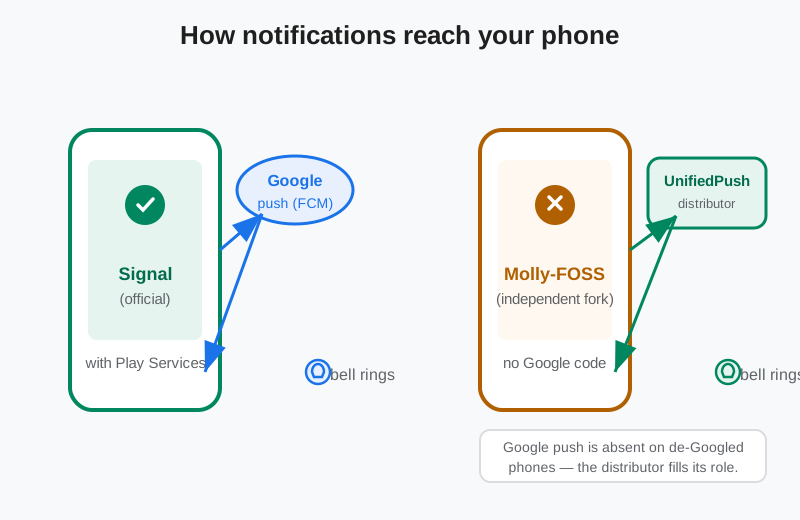
Notifications are where the two apps genuinely diverge, so this deserves the full explanation. On a normal phone with Google Play Services, the official Signal app receives push messages through Google's push service. It is battery-efficient, deeply integrated with Android's power management, and almost never gets killed by the OS. That is the gold standard for notification reliability on Android.
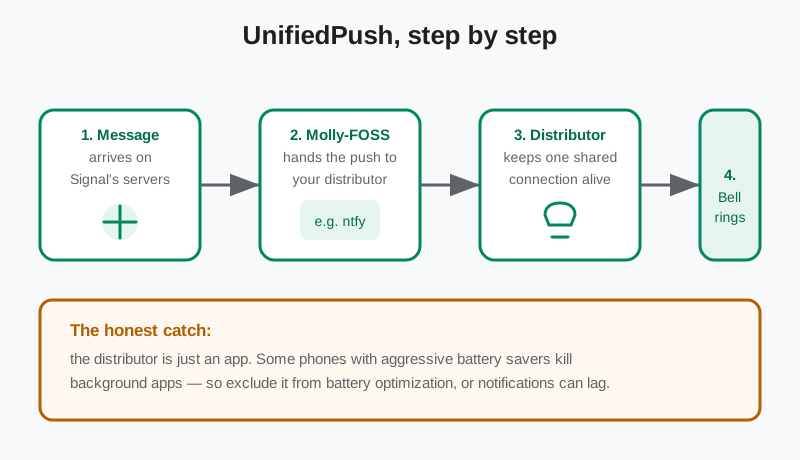
Molly-FOSS cannot use Google's push service, because the whole point of the edition is having no Google components. Instead it uses UnifiedPush, an open standard where a separate "distributor" app on your phone keeps one shared push connection alive for every app that opts in. You pick the distributor; a common choice is ntfy. When a message arrives, Molly-FOSS hands the push to the distributor, which wakes the phone and shows the notification.
Here is the honest catch, and it is the single most important thing to know before switching. The distributor is just an app, and some phones (certain OEM skins are notorious for this) aggressively kill background apps to save battery. If your phone kills the distributor, your notifications arrive late, whenever the connection re-establishes. The fix is to exclude the distributor from battery optimization in your phone's settings. Do that during setup, not after you start missing messages. Our UnifiedPush notifications guide walks through the setup.
Battery life, honestly
On a phone with Google services, the official app wins on battery without a contest. Google's push service is part of the OS itself: one shared, deeply optimized connection for every app on the phone. Nothing you install can beat that efficiency, because nothing else gets the same system-level privileges.
On a de-Googled phone the contest is different, because there is no Google push service to compare against. There, Molly-FOSS's UnifiedPush distributor replaces a job that would otherwise fall to each app keeping its own persistent connection. One shared connection is still better than many, but the distributor needs to stay alive in the background, and on phones with aggressive power management that takes deliberate configuration. Expect to spend ten minutes in battery settings getting it right. If you are the kind of person who chose a de-Googled phone, you already know this trade-off; it is the price of Google independence, not a flaw in the fork.
Updates and chat compatibility
Updates: security fixes land in the official app first. Molly-FOSS has to merge each official release, rebuild without the Google components, and publish. That work takes days, sometimes weeks. Get Molly-FOSS from molly.im or from the fork's F-Droid repository at molly.im/fdroid, which lets your F-Droid client check for updates. In the window between an official security fix and the fork's rebuild, fork users run older code. For a security-critical app, that lag is a real cost; keep the app updated and do not ignore update prompts.
Chat compatibility: this part is simple and good. Molly-FOSS uses the same Signal network and the same protocol as the official app. Your contacts cannot tell which client you use. Groups, disappearing messages, reactions, voice notes: all of it works across the two apps, because compatibility lives in the protocol, not the client. Our broader Signal vs Molly comparison covers the network side in more detail.
Registration: one thing the fork does not change. You still register with a phone number, the same as the official app. If you were hoping for number-free Signal, neither app offers it.
Moving from Signal to Molly-FOSS
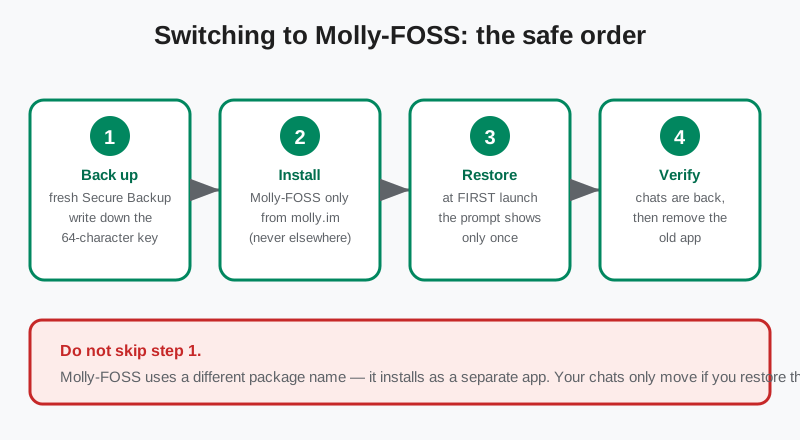
Molly-FOSS uses a different package name from the official app, so it installs as a separate app rather than replacing it. That is convenient for testing, but it means your chats do not move automatically. The safe order is:
- Back up first. In the official app, create a fresh Secure Backup and write down the 64-character recovery key on paper. Do not skip this; there is no other way to carry your history over. Our Secure Backups guide explains the key and the storage tiers.
- Install from molly.im only. Get the FOSS build from the fork's own site or its F-Droid repo at molly.im/fdroid. Nowhere else.
- Restore at first launch. The restore prompt appears only the first time you open the app. Enter your recovery key and let it restore before doing anything else.
- Verify, then remove. Check that your chats, groups, and media are all present in Molly-FOSS before you uninstall the official app.
If anything goes wrong mid-migration, our restore guide covers the recovery steps. And if you decide the fork is not for you, you can go back the same way: back up in Molly, reinstall the official app, restore.
Who should pick which
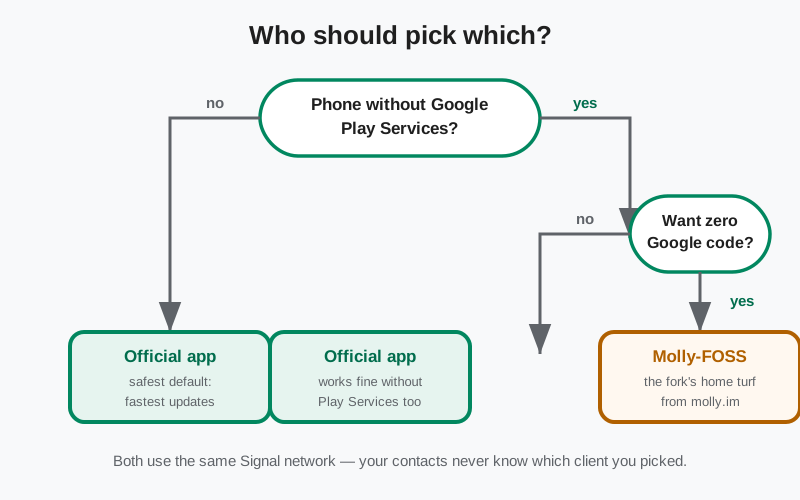
The honest decision rules, plainly stated:
- Pick the official Signal app if your phone has Google Play Services, if you want the safest default, if you want security fixes the day they ship, or if you are not technical and just want private messaging that works. This is the right answer for most people, including most people reading a comparison page.
- Pick Molly-FOSS if your phone has no Google Play Services and you specifically want zero proprietary Google code in your messenger. This is the fork's home turf. It is the reason the FOSS edition exists.
- Either way, do the account-level basics: set a Signal PIN (registration lock), turn on Secure Backups, and verify safety numbers with important contacts. Those protect you identically on both apps.
One last note on trust, because it deserves repeating: with the official app you trust Signal Foundation. With Molly-FOSS you trust Signal Foundation plus the fork's maintainer and build process. That is not a reason to reject the fork, but it is a reason to choose it consciously, download it only from molly.im, and keep it updated.
Frequently asked questions
Is Molly-FOSS official? Is it made by Signal?
No. Molly-FOSS is the Google-free edition of Molly, an independent open-source fork published at molly.im. It is not made, endorsed, or supported by Signal Foundation. It connects to Signal's network as a third-party client.
Can my Signal contacts tell I am using Molly-FOSS?
No. Molly-FOSS uses the same Signal network and protocol, so messages, groups, and calls work normally with official-app users. Your contacts cannot tell which client you use.
Do I need Google Play Services for Molly-FOSS?
No. That is the point. Molly-FOSS is built without proprietary Google components and gets notifications through UnifiedPush, so it is designed for phones without Google Play Services, like GrapheneOS, /e/OS, or Huawei phones without GMS.
Will my notifications be delayed on Molly-FOSS?
They can be, if your phone's battery saver kills the UnifiedPush distributor app. Exclude the distributor from battery optimization in your settings and notifications arrive promptly. This is the main practical trade-off of the Google-free build.
How do Molly-FOSS updates work?
Get it from molly.im or add the F-Droid repository at molly.im/fdroid so your F-Droid client can check for updates. Expect new releases to trail the official app by days or weeks while the fork merges and rebuilds each version.
Does Molly-FOSS work on Huawei phones without Google?
Yes. Phones without Google Play Services are exactly the target: Molly-FOSS runs without any Google components and handles notifications via UnifiedPush. Our Molly on Huawei guide covers the setup specifics.
Related guides
- All Signal comparisons: the full compare hub
- Signal vs Molly: the broader official-vs-fork comparison
- Molly vs Molly-FOSS: the two fork editions, head to head
- Molly hub: everything on this site about the fork
- Install Signal without the Play Store: sideloading the official APK